August 06, 2026
 37 Views


A prospect recently asked us a version of the same question we’ve now heard a dozen times: “We turned on an Agentforce agent last month. It’s confidently making things up half the time. What did we miss?”
Nothing dramatic, as it turned out. The org had three different “Customer Tier” fields across two objects, a permission model built for humans who ask before touching a record, and a support process that lived almost entirely in a shared inbox rather than Salesforce. The agent wasn’t broken. It was working exactly as configured, against a foundation that was never built to support autonomous decision-making.
This is the pattern we keep seeing, and it isn’t unique to Salesforce. Gartner predicted in 2025 that over 40% of agentic AI projects would be scrapped by 2027, pointing to unclear business value, weak governance, and data that isn’t actually fit for an agent to act on. Agentforce doesn’t fail loudly. It fails by producing plausible-sounding answers from incomplete or duplicated data, or by getting stuck because it doesn’t have permission to do the thing you asked it to do.
So before you scope your next Agentforce project, it’s worth running your org through an honest readiness check. Below is the checklist we use with clients during Agentforce Health Checks, organized around the four things that actually determine whether an agent succeeds: data quality, Data Cloud and integration setup, permissions and security, and the automation foundation underneath it all.
Key Takeaways
- Agentforce is only as reliable as the data it retrieves — duplicate records, inconsistent field usage, and unmanaged Knowledge articles are the single biggest cause of hallucinated or wrong agent responses.
- Data Cloud isn’t optional for most meaningful use cases; if your data lives in disconnected systems with no harmonization layer, plan for Data Cloud setup as part of your Agentforce roadmap, not an afterthought.
- Permission sets built for human users often grant agents too much or too little access — agent actions need their own deliberate permission model, reviewed before go-live.
- Flows and Apex actions that Agentforce will call need to be idempotent, well-tested, and scoped narrowly; reusing a sprawling legacy Flow as an agent action is a common source of unpredictable behavior.
- A structured readiness assessment is the difference between a pilot that expands and one that gets quietly shelved.
- Start with a narrow, well-bounded use case (a single Service Cloud topic, one Sales Cloud workflow) rather than a broad rollout; readiness gaps show up fast in a focused pilot and are cheaper to fix there.
What Does “Agentforce Ready” Actually Mean?
“Ready” doesn’t mean your Salesforce instance is modern or well-liked by your admins. It means four specific things are true at the same time: the data an agent will retrieve is accurate and de-duplicated, that data is accessible to the agent through Data Cloud or a supported retrieval method, the agent’s permissions are scoped deliberately rather than inherited from a human profile, and the actions an agent can take (Flows, Apex, integrations) are stable enough to be called autonomously, repeatedly, without a person double-checking each one.
Most orgs are ready on one or two of these dimensions and not the others. That’s normal — it’s also exactly why a readiness assessment matters more than a demo. A demo shows an agent working on curated data in a controlled scenario. Production shows what happens when the agent hits the record with three duplicate contacts, an out-of-date Knowledge article, and a Flow that was written for a slightly different business process than the one that exists today.
Is Your Salesforce Data Clean Enough for AI Agents?
Agentforce answers questions and takes actions by retrieving information from your org — Knowledge articles, records, related lists, and (via Data Cloud) other harmonized sources. If that retrieval layer is messy, the agent doesn’t know it’s messy. It just presents whatever it finds as confident fact.
The most common data readiness gaps we see:
- Duplicate and fragmented records. If a customer has three Contact records because of years of manual data entry, an agent asked “what’s this customer’s support history” may only see one of them — and present a partial picture as complete.
- Stale or conflicting Knowledge articles. Agentforce grounds many responses in Knowledge. If you have five articles on the same topic written at different times, with different answers, the agent will pick one — and you won’t know which.
- Inconsistent field usage. Picklist values that mean different things across business units, free-text fields standing in for what should be structured data, and custom fields that duplicate standard ones all degrade an agent’s ability to reason about a record correctly.
- Missing or incomplete data. An agent can’t reason about churn risk if the fields that would signal churn risk are only populated for 40% of accounts.
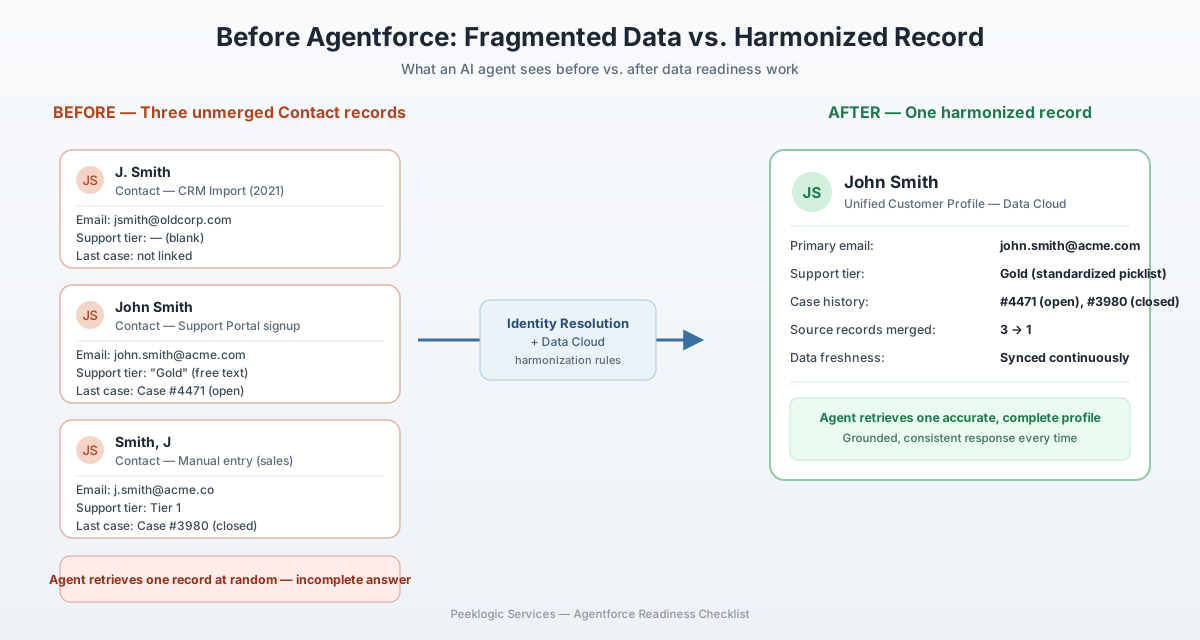
None of this requires a full data warehouse project. It requires a focused data quality pass — deduplication, Knowledge audit, field usage review — scoped to whatever object and process the agent will touch first. This is precisely the kind of gap a structured Salesforce Health Check is designed to surface before it becomes a production incident.
Do You Have the Right Data Cloud and Integration Setup?
Salesforce’s own Agentforce documentation is clear that Data Cloud is the recommended foundation for grounding agent responses in accurate, harmonized data, particularly when relevant information lives outside core Salesforce objects — in an ERP, a support ticketing system, or a data warehouse. If your organization’s data still lives in silos with no harmonization layer, this is usually the single largest piece of “hidden” implementation work in an Agentforce project.
A few prerequisite questions worth answering honestly before you scope a project:
Is Data Cloud already provisioned and configured, or does licensing and setup need to happen first? Do you have identity resolution rules in place so the agent isn’t reasoning about three unmerged versions of the same customer? Are the systems the agent needs — ERP, billing, a support platform — already connected via Data Cloud connectors, MuleSoft, or a custom integration, or does that integration work still need to be built?
| Integration approach | Best for | Readiness signal |
| Native Data Cloud connectors | Common SaaS sources (NetSuite, marketing platforms, etc.) | Fastest path if your source system has a supported connector |
| MuleSoft / middleware | Complex, multi-system orchestration with transformation logic | Good fit if you already have integration infrastructure |
| Custom API integration | Bespoke or legacy systems without a supported connector | Requires the most lead time; scope this early |
| Salesforce-native data only | Simple use cases fully contained in Salesforce objects | Fastest to pilot, but limits what the agent can meaningfully do |
If the answer to any of these is “we’re not sure,” that’s a legitimate finding, not a blocker — it just means an integration assessment belongs at the front of your project timeline, not somewhere in the middle where it turns into a delay.
Are Your Permissions and Security Model Ready for Autonomous Agents?
This is the readiness gap that gets the least attention and causes the most damage when missed. Human users generally self-limit — they ask before deleting a record, they escalate when something looks wrong. An agent does what its permission set allows, at the speed and scale it’s configured to operate.
Agentforce actions run under a defined permission set, and that permission set needs to be built specifically for the agent’s job, not inherited wholesale from an existing user profile. A support agent that can update case status should very likely not also be able to modify billing records, even if the human profile it was cloned from happens to have that access because of an unrelated legacy requirement.
Worth reviewing before go-live: what specific objects and fields does each agent action actually need to touch, and does its permission set reflect that minimum rather than a convenient existing profile; are there guardrails on high-risk actions (refunds, record deletion, external communications) requiring human approval in the loop; is there an audit trail that shows what the agent did and why, so a support or compliance review isn’t reconstructing agent behavior after the fact; and have you tested what the agent does when it’s asked to do something outside its permitted scope — does it fail gracefully, or does it hallucinate a workaround?
This is also where governance conversations about AI and data privacy tend to surface. If your organization operates under specific regulatory requirements — HIPAA, GDPR, financial services regulations — the readiness conversation about agent permissions needs to happen alongside, not after, your compliance and security review.
Do You Have the Right Automation and Flow Foundation?
Agentforce takes action largely through Flows and Apex invocable actions. If your Flow library was built assuming a human is running each Flow deliberately, one at a time, with context about the specific situation, that assumption breaks when an agent is calling those same Flows autonomously and repeatedly.
The readiness signals worth checking here: are the Flows an agent will call narrowly scoped to a single, well-defined outcome, rather than a sprawling multi-branch Flow built to handle a dozen edge cases with manual judgment calls baked into the branching logic? Are they idempotent — safe to run more than once without creating duplicate records or unintended side effects, since an agent may retry an action if it doesn’t get a clean confirmation? Do you have test coverage and error handling, so a malformed input from the agent produces a clear failure rather than a silent partial update? And have legacy automations been audited for the “it’s always worked, nobody’s touched it in four years” pattern — those are exactly the Flows most likely to behave unpredictably under new usage patterns?
A useful pressure test: pick the specific action you want your first Agentforce use case to perform, and walk through what happens if it’s called ten times in the same minute, or with a value it’s never seen before. If the answer is “we’re not sure,” that Flow needs hardening before it becomes an agent action.
How Do You Actually Run an Agentforce Readiness Assessment?
Pulling the four areas above together, here’s the practical sequence we recommend:
| Step | What happens | Typical output |
| 1. Scope the pilot use case | Pick one narrow, high-value workflow — not an org-wide rollout | A defined agent job description and success criteria |
| 2. Data quality audit | Review the specific objects, fields, and Knowledge articles the agent will use | A prioritized list of data cleanup tasks |
| 3. Data Cloud and integration review | Confirm what’s already connected and what needs to be built | An integration plan with realistic timeline |
| 4. Permission and governance design | Build agent-specific permission sets and approval gates | A security model separate from human user profiles |
| 5. Automation hardening | Test and, where needed, rebuild the Flows/Apex actions the agent will call | Idempotent, tested agent actions |
| 6. Pilot and measure | Launch to a limited audience, monitor actual agent behavior against real data | Go/no-go decision for broader rollout |
Each step surfaces gaps that are far cheaper to fix during an assessment than after a public-facing agent has already given a customer the wrong answer. This is also why we run Agentforce readiness work as a distinct engagement rather than folding it into implementation — a client needs an honest picture of gaps before committing to a build timeline, not partway through one.
If your team wants a second opinion before committing budget to an Agentforce rollout, a focused Health Check against the checklist above is usually a faster, lower-risk starting point than a full implementation kickoff.
Conclusion
Agentforce doesn’t need a perfect Salesforce org — it needs an honest one. The organizations getting real value from it aren’t the ones with the most polished instances; they’re the ones that ran a genuine readiness check first, fixed what needed fixing in a scoped, manageable way, and launched a narrow pilot instead of a broad bet.
If you’re weighing whether your org is ready, the checklist above is a reasonable place to start on your own. If you’d rather have a second set of eyes validate the data, permissions, and automation foundation before you commit to a build, that’s exactly the kind of assessment we run as part of our Salesforce Health Check and AI Automation engagements.
FAQ
Not for every use case. Simple agents that only need Salesforce-native object data can operate without it. But most valuable use cases — ones that need context from support tickets, ERP data, or historical interactions across systems — benefit significantly from Data Cloud’s harmonization and identity resolution, and Salesforce’s own guidance treats it as the recommended foundation for grounded, accurate agent responses.
For a single, well-scoped use case, two to four weeks is typical — enough time to audit data quality on the relevant objects, review integration and permission requirements, and produce a prioritized remediation plan. Org-wide readiness reviews take longer and are usually broken into phases by business process.
In our experience, it’s almost always upstream data quality — duplicate records, conflicting Knowledge articles, or incomplete fields — rather than a problem with the agent’s configuration itself. Fixing the underlying data is usually more impactful than tuning prompts or instructions.
You can, and a narrow pilot is actually a reasonable way to surface readiness gaps cheaply. The risk is piloting on a broad, high-visibility use case where those gaps become customer-facing problems. Choose a contained, lower-stakes workflow for the first pilot.
Yes, but heavy customization is exactly where readiness work matters most. Custom objects, non-standard field usage, and legacy Flows built years ago under different assumptions all need review before an agent is given autonomous access to them.
It works best as a joint effort between a Salesforce admin or architect who understands the org’s data and automation history, and a business stakeholder who can define what “success” looks like for the specific use case. Security or compliance should be involved early if the agent will touch sensitive data or take financial actions.
The agent will operate under whatever access it inherits, which is often broader or narrower than intended. Broader access risks unintended actions on sensitive records; narrower access causes the agent to fail or hallucinate a workaround when it can’t complete a requested task. Neither is a good outcome to discover after launch.