November 19, 2026
 68 Views
Workato Pricing in 2026: What You’ll Actually Pay (and Where Budgets Blow Up)


Workato pricing is hard to judge from a quote alone, especially when the alternative is building the integration yourself. Peeklogic can estimate both paths: a Workato-based implementation and a custom Salesforce integration. As a Workato Silver Partner, we can compare platform, implementation, and ongoing operating costs, then build a roadmap around the option that best fits the expected volume, complexity, and growth.
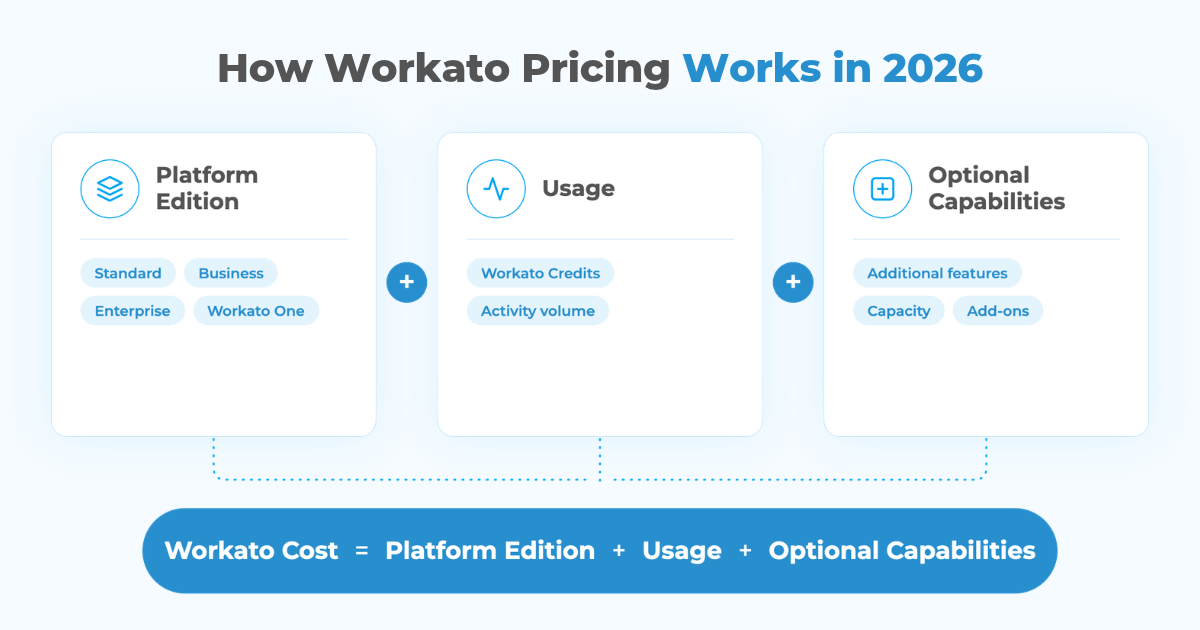
There is no single public Workato price. The current Workato pricing model combines a platform edition with usage and optional capabilities. For direct customers on the current usage-based model, activity is converted into Workato credits, so two companies using similar integrations can still end up with very different bills.
Third-party procurement data provides a rough benchmark. Vendr reports a median annual Workato contract of about $64,544 across 341 purchases, with observed contracts ranging from roughly $20,000 to $184,000. That is useful context, not a price list. Your actual Workato cost depends on what you build, how often it runs, which capabilities you need, and how the environment grows after launch.
Comparing Workato with a Custom Salesforce Integration?
Contact PeeklogicHow Workato Pricing Works in 2026
The first thing to know is that older Workato pricing articles can be misleading.
Workato historically used commercial models that were commonly described in terms of tasks, recipe packs, and other capacity limits. You will still see those terms in reviews, procurement databases, and contracts signed under older models.
For direct customers on Workato’s current usage-based pricing, the structure is different:
- Platform edition: determines which platform capabilities are available.
- Usage: measured across the workspace and converted into Workato credits.
- Optional capabilities: additional features or capacity purchased separately when required.
Workato currently documents Standard, Business MCP, Enterprise MCP, and Workato ONE editions. Higher editions add more orchestration, connectivity, security, governance, data, and agentic capabilities.
This is why asking “How much does Workato cost?” without describing the architecture is similar to asking how much AWS costs without describing the workload.
What Do Companies Actually Pay for Workato?
Workato does not publish dollar pricing for its enterprise editions, so observed contract data is useful when building an initial budget.
Vendr’s 2026 purchasing data reports:
| Pricing benchmark | Observed figure |
|---|---|
| Median annual Workato spend | ~$64,544 |
| Low end in observed purchases | ~$20,000/year |
| High end in observed purchases | ~$184,000/year |
| Average negotiated savings | ~19% |
These figures should be treated as directional.
A $25,000 deployment and a $150,000 deployment may both be completely reasonable because they can represent very different environments. One may automate a few predictable Salesforce workflows. The other may connect Salesforce, ERP, finance, support, HR, data platforms, and internal applications across several business units.
Contract databases can also contain customers on different Workato commercial models. Use them to benchmark a quote, not to calculate your exact future bill.
What Actually Drives Workato Cost?
The number of integrations is only one factor. A more useful estimate looks at how those integrations behave.
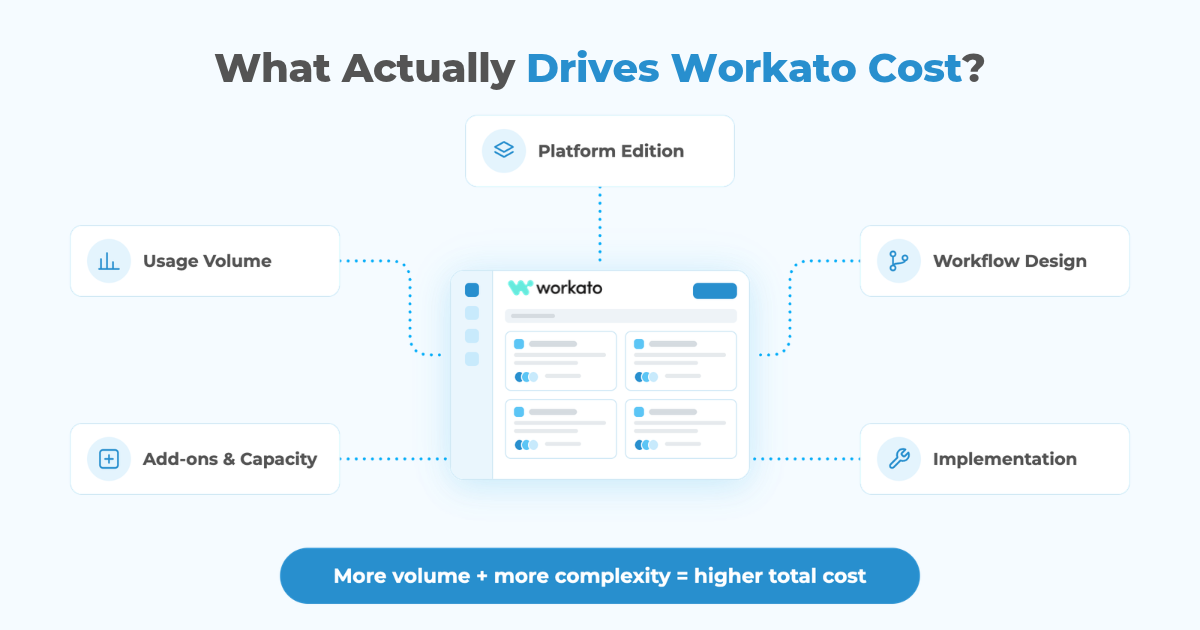
1. Platform Edition
Your edition sets the capabilities available to the organization.
A relatively straightforward Salesforce integration may not need the same governance, connectivity, data, security, or orchestration capabilities as a multinational deployment connecting dozens of systems.
Problems start when the initial budget assumes one edition and the architecture later requires features available higher in the stack.
The platform decision should therefore happen after requirements discovery, not before it.
2. Usage Volume
Usage is the variable part of current Workato pricing.
A Salesforce workflow processing 500 events per month is economically different from one processing 500,000. Frequency matters just as much as workflow count.
You need to estimate:
- records processed;
- recipe execution frequency;
- API activity;
- scheduled synchronization;
- event volume;
- data-processing requirements;
- expected growth.
Workato’s current billing documentation also notes that only successful eligible operations count toward usage. Failed or skipped operations generally do not.
3. Workflow Design
Two architectures can accomplish the same business outcome with very different usage profiles.
Consider a Salesforce-to-ERP synchronization. One design may repeatedly poll for changes and process records individually. Another may use events, filtering, batching, and more selective data movement.
The second architecture may be both cheaper and easier to operate.
This is why Workato pricing is partly an architecture problem. Poor integration design can turn ordinary business growth into unnecessary platform consumption.
4. Add-Ons and Additional Capacity
A base quote may not represent the complete environment.
Depending on the architecture and contract, organizations may need additional capabilities such as greater concurrency, more on-premise connectivity, advanced security, private connectivity, EDI, data functionality, RPA, or other platform components.
These requirements should be identified before procurement.
Otherwise, the first Workato price looks reasonable and the real budget appears later.
5. Implementation
The Workato subscription is not the same thing as the cost of implementing Workato.
Someone still has to design:
- the integration architecture;
- data mappings;
- Salesforce object relationships;
- authentication;
- transformation rules;
- recipes;
- error handling;
- monitoring;
- retries;
- deployment;
- testing and reconciliation.
Complex projects may also require custom connectors or additional code around systems that do not expose everything through standard connectors.
Implementation can therefore represent a meaningful part of first-year Workato cost even when the software quote itself is clear.
Where Workato Budgets Blow Up
Most Workato budget problems do not come from one surprise line item. They come from assumptions made before the real workflows are understood.
Underestimating Production Volume
A pilot rarely behaves like production.
The first recipe may process a small dataset and contain a few steps. Once launched, teams add more records, more branches, additional systems, retries, enrichment, and exception handling.
A usage estimate based on the pilot can therefore be materially lower than the mature workflow.
Budget against the expected production state, not the demo.
Automating Everything Because You Can
Once teams have an integration platform, every manual process can start looking like a candidate for automation.
Some should be automated. Others add platform usage and maintenance without producing enough business value.
Create a business case before adding significant workflows, particularly when their frequency is high.
Copying Too Much Data
Moving an entire ERP table into Salesforce because the connector makes it possible is rarely a good design.
Every unnecessary synchronization adds volume, failure scenarios, storage, monitoring, and maintenance.
Our guide to integration in Salesforce CRM covers why system ownership and integration patterns should be decided before implementation.
Discovering Governance Requirements Too Late
A proof of concept may only need a developer and a connector.
Production may require separate environments, access controls, auditability, higher concurrency, on-premise connectivity, security policies, or centralized monitoring.
If these requirements appear after procurement, the Workato budget can change quickly.
Ignoring Support and Maintenance
Recipes are software.
APIs change. Salesforce objects change. Authentication expires. Business processes change. New edge cases appear.
A realistic Workato budget includes ownership after go-live, not only implementation and subscription fees.
Example: Why the Same Salesforce Integration Can Have Two Very Different Bills
Imagine two companies both say:
“We need to integrate Salesforce with our ERP.”
Company A synchronizes new Accounts and closed Opportunities. The business processes a few thousand relevant records each month. The workflow is predictable and only two systems participate.
Company B synchronizes customers, products, orders, invoices, inventory, shipments, and payment status. Updates move in both directions, several regions use different rules, and large transaction volumes run throughout the day.
Both technically have “one Salesforce ERP integration.”
Their Workato cost should not be remotely similar.
The second company needs more usage capacity, more orchestration, stronger monitoring, more testing, and potentially additional platform capabilities. It will also require substantially more implementation effort.
Integration count is therefore one of the weakest metrics for estimating Workato pricing.
Workato vs Custom Integration: Which Costs Less?
This is the comparison companies should make before signing a platform contract.
A custom integration has a very different cost structure.
Instead of paying an ongoing iPaaS platform fee, you invest in engineering to build the connection directly using Salesforce APIs, Apex, middleware components, cloud infrastructure, or the external platform’s APIs.
That can be attractive when:
- only one or two systems need to connect;
- the requirements are stable;
- transaction patterns are predictable;
- the APIs are mature;
- there is little need for business-user workflow development;
- the organization already has engineering capacity.
Workato becomes more attractive when:
- many systems need to participate;
- workflows change frequently;
- reusable integration logic matters;
- IT and business teams both need visibility;
- monitoring and centralized governance matter;
- additional integrations are expected;
- the organization wants to avoid maintaining every connector from code.
Neither approach is automatically cheaper.
A $40,000 custom integration with modest annual maintenance may beat years of platform fees for a stable point-to-point requirement.
The opposite can happen when a company builds five, ten, or twenty custom integrations and then pays developers to maintain authentication, API changes, monitoring, retries, infrastructure, logging, and deployment for each one.
Our guide to evaluating the ROI of a Salesforce custom integration explains how to include implementation, maintenance, manual work, error costs, and business impact in that calculation.
Workato vs Custom Integration: Cost Structure
| Cost area | Workato | Custom integration |
|---|---|---|
| Platform/license | Recurring | Usually none beyond infrastructure/services |
| Initial development | Moderate to high | Moderate to high |
| Connectors | Many prebuilt | Built or maintained manually |
| Workflow changes | Often faster | Usually requires engineering |
| Monitoring | Platform capabilities available | Must be designed and maintained |
| Governance | Centralized platform controls | Custom implementation required |
| Infrastructure | Largely platform-managed | May require cloud/runtime costs |
| Maintenance | Recipes + platform | Code + infrastructure + APIs |
| Scaling to many integrations | Often stronger economics | Maintenance burden can accumulate |
| Stable point-to-point integration | Can be more platform than needed | Often competitive |
The useful comparison is three to five years of total cost, not the first-year implementation quote.
How to Estimate Workato Pricing Before Talking to Sales
You cannot calculate the exact Workato quote yourself, but you can prepare a much better estimate.
Start with an integration inventory.
For every workflow, document:
- Source and destination systems
- Trigger
- Expected monthly volume
- Number of business events
- Sync direction
- Real-time vs scheduled requirement
- Transformation complexity
- Error and retry requirements
- Security requirements
- Expected growth over the next 12–36 months
Then separate workflows into categories.
A daily employee sync is not the same as a real-time order-to-cash workflow. A Salesforce notification is not the same as synchronizing millions of ERP records.
This exercise gives you something much more useful than “we expect 30 integrations.”
It gives you a workload model.
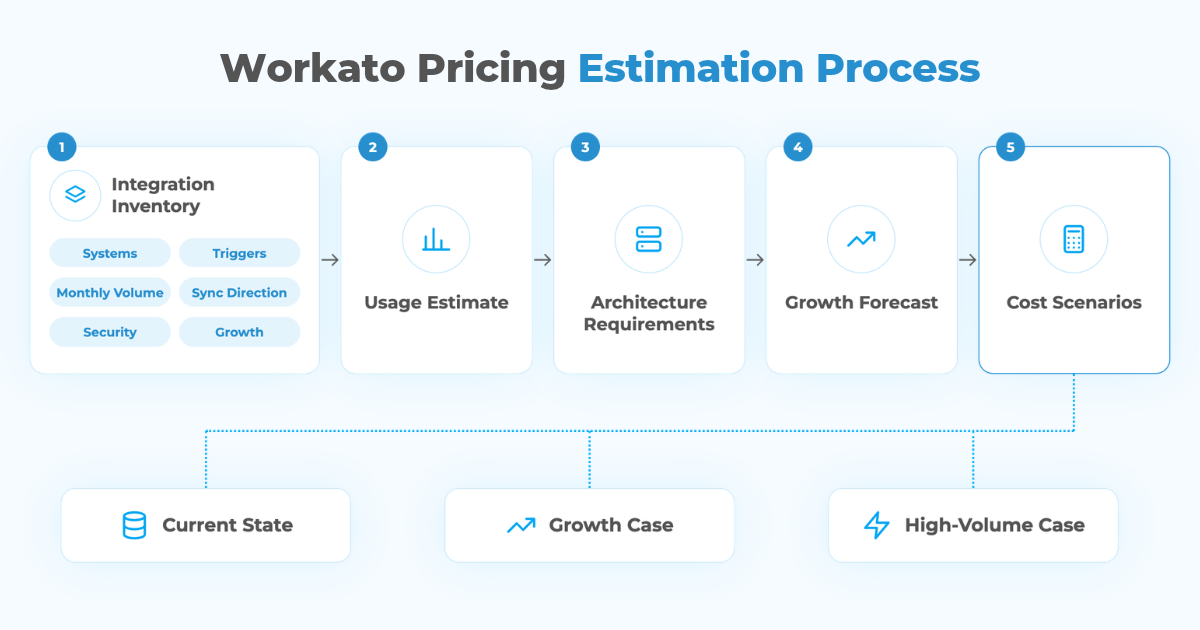
Build Three Workato Cost Scenarios
Do not budget against one number.
Create three scenarios:
Current state: expected usage immediately after launch.
Growth case: additional users, transactions, systems, and workflows over the next 12–24 months.
High-volume case: what happens if the business materially exceeds forecasts.
Then map those scenarios against the platform edition, usage capacity, add-ons, implementation, and support requirements.
The point is not to predict the future perfectly. It is to identify the variables capable of moving the budget.
How Peeklogic Compares Workato and Custom Integration Costs
Peeklogic does not start with the assumption that every Salesforce integration needs Workato.
As a Workato Silver Partner, we can design and implement Workato architectures. We also build custom Salesforce integrations using REST APIs, Apex, event-driven patterns, cloud services, and custom middleware.
That allows us to estimate both routes against the same requirements.
We look at:
- current and future transaction volume;
- number of connected systems;
- process complexity;
- available connectors;
- custom API requirements;
- security and compliance;
- monitoring;
- expected workflow changes;
- internal engineering capacity;
- ongoing maintenance;
- three-to-five-year cost.
For some clients, the answer is Workato.
For others, a custom integration has a lower total cost and fewer moving parts.
A third group benefits from a hybrid model: Workato handles shared orchestration and frequently changing processes, while high-volume or highly specialized integrations use custom services.
The goal is to choose the architecture first and the procurement roadmap second, with enough cost modeling to understand what each path looks like before committing.
Want to Compare Workato Pricing with a Custom Integration?
Book a ConsultationKey Takeaways
There is no universal Workato price in 2026.
Current direct-customer pricing combines a platform edition, usage measured in Workato credits, and optional capabilities. Public procurement data suggests annual contracts can vary significantly, with a median around $64,544 in Vendr’s dataset, but your quote depends on the architecture behind the number.
The biggest budgeting mistake is estimating Workato before modeling production volume, workflow complexity, governance, add-ons, implementation, and ongoing support.
Workato should also be compared with a custom integration rather than evaluated in isolation.
For a small, stable integration footprint, custom development may produce a lower total cost. For a growing multi-system environment, Workato can reduce the cost and complexity of building and maintaining orchestration from scratch.
The right answer comes from modeling both.
Frequently Asked Questions
Workato does not publish a universal dollar price for its enterprise editions. Current direct-customer pricing combines a platform edition, usage measured in Workato credits, and optional capabilities. Vendr’s procurement data reports a median annual contract of roughly $64,544, but individual contracts vary significantly.
Current Workato documentation describes a usage-based model measured through Workato credits for direct customers on the newer pricing model. Older contracts and many third-party pricing guides still refer to tasks, so check which commercial model applies to your organization.
High usage volume, complex workflows, higher platform editions, additional capabilities, implementation, custom connectivity, and ongoing support can all increase total cost. Poor workflow design can also create unnecessary usage.
Sometimes, but not always. Workato can make more economic sense when several systems and frequently changing workflows need centralized orchestration. A stable point-to-point integration may be cheaper to build and maintain directly.
You can estimate the major cost drivers. Map your workflows, transaction volumes, connected systems, timing requirements, growth expectations, security requirements, and required capabilities. Workato will still provide the actual commercial quote.
Yes. Peeklogic is a Workato Silver Partner and also builds custom Salesforce integrations. We can estimate both approaches against the same business and technical requirements so the decision is based on total cost, maintainability, scale, and the expected integration roadmap.

Managing enterprise-grade integrations using MuleSoft Anypoint Platform to connect Salesforce with diverse business systems. Adept at delivering secure, scalable, and high-performance integration architectures that enhance data visibility, streamline operations, and drive digital transformation. Combines deep technical knowledge with strong business acumen to ensure integration solutions align with strategic objectives.