November 17, 2026
 20 Views
Zapier vs Workato: When Your Salesforce Org Outgrows Zaps


Zaps are easy to add. They get harder to manage once Salesforce starts depending on them. Peeklogic is a Workato Silver Partner working with enterprise Salesforce environments at scale, and we often see the same pattern: a handful of useful no-code automations grows into shared infrastructure that needs monitoring, ownership, governance, and reliable recovery when something fails.
According to G2’s Zapier vs Workato comparison, both platforms are highly rated, but Workato currently scores 4.7/5 compared with Zapier’s 4.5/5. G2 also shows Workato ahead in areas such as support, ease of administration, and doing business with the vendor, while Zapier continues to score strongly for usability and automation.
That does not mean every growing Salesforce org should move to Workato. The real question is whether your automations are still independent tasks or have become part of the infrastructure your Salesforce org depends on.
Is Your Salesforce Org Outgrowing Point-to-Point Automation?
Contact PeeklogicZapier vs Workato: The Core Difference
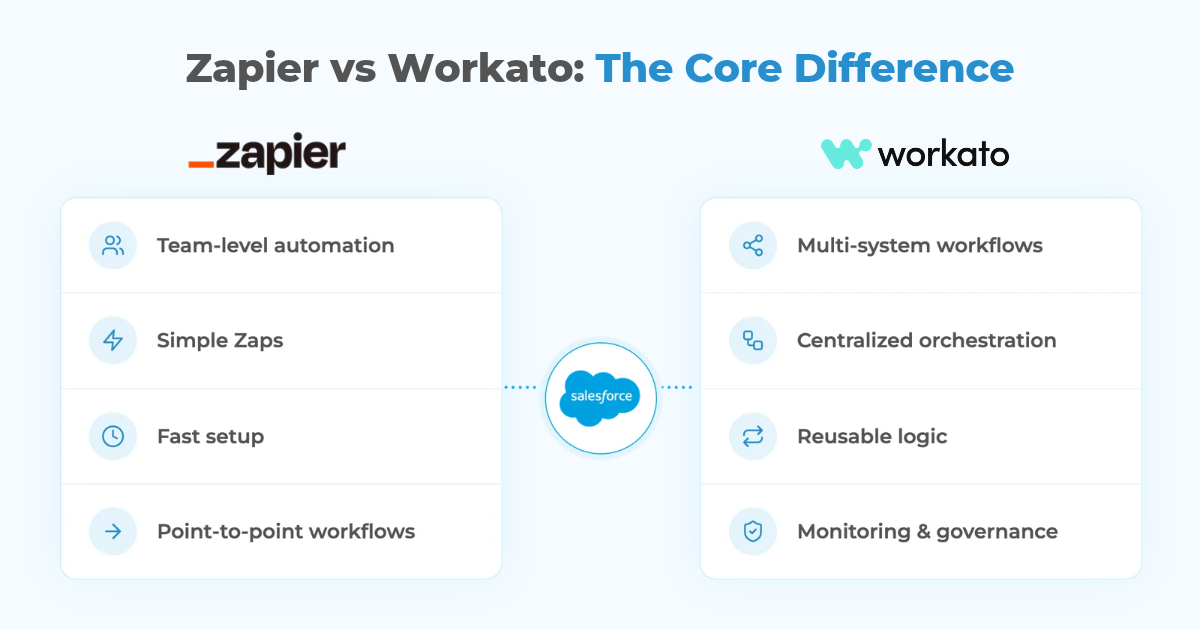
Zapier is strong at helping teams automate discrete tasks quickly. A lead arrives, create a record. A form is submitted, notify Slack. An Opportunity reaches a stage, update another application.
Workato handles the same basic idea at a different level of complexity. It becomes more useful when several systems participate in one process, teams need shared integration logic, failures have to be managed centrally, and IT needs visibility into what is running.
A Zap may connect Salesforce to one application. A larger process may connect Salesforce, ERP, finance, support, identity, data, and custom systems while applying the same validation, routing, security, and retry rules across them.
Our guide to integration in Salesforce CRM explains why integration patterns should be selected around timing, data ownership, volume, and process complexity rather than around a preferred connector.
When Zapier Works Well with Salesforce
More enterprise features are not, by themselves, a reason to replace Zapier.
Zapier remains a good option when the workflow is narrow, the data is relatively low-risk, and a failure can be corrected without affecting a critical business process. Marketing, sales, recruiting, and operations teams can automate routine handoffs without needing a dedicated integration team.
Typical Salesforce use cases include:
- creating Leads or Contacts from forms;
- sending notifications when Opportunities change stage;
- creating tasks from external events;
- moving simple data between SaaS tools;
- triggering emails or collaboration messages;
- enriching Salesforce records with external data;
- automating internal administrative tasks.
Its main advantage is speed. A business user can often build or change a workflow without redesigning anything around it.
For a small number of independent automations, that simplicity is exactly what you want.
What Does It Mean to “Outgrow Zaps”?
A Salesforce org does not outgrow Zapier because it has reached an arbitrary number of automations. The warning signs are operational.
Too Many Point-to-Point Flows
One Zap sends Accounts to finance. Another updates support. A third pushes data into an internal database. Before long, the same matching rule, transformation, or status logic exists in several places.
A simple Salesforce field change then becomes harder because the team first has to find every automation that depends on it.
Business-Critical Processes Depend on Individual Automations
A failed Slack notification is inconvenient. A failed order, onboarding, billing, or customer-data sync can leave systems inconsistent or stop a process altogether.
Once an automation becomes operational infrastructure, teams need monitoring, retries, escalation, and clear ownership.
Several Systems Participate in One Process
A closed Salesforce Opportunity may trigger ERP activity, create a finance workflow, provision a service, update a customer portal, and send data to analytics.
Breaking that process into separate point-to-point automations makes dependencies harder to understand and failures harder to trace.
Governance Becomes a Problem
Different teams may create workflows with different credentials, mappings, naming conventions, and error-handling approaches.
At some point, IT spends more time discovering what exists than managing it.
Salesforce Data Volume and Logic Increase
High transaction volume, custom objects, complex validation rules, asynchronous processing, and frequent updates put more pressure on workflows that were originally built around simple trigger-action patterns.
Workato vs Zapier for Salesforce: Side-by-Side Comparison
| Area | Zapier | Workato |
|---|---|---|
| Best fit | Fast team-level automation | Enterprise integration and orchestration |
| Typical builder | Business users and operations teams | Business teams, IT, integration specialists |
| Workflow complexity | Simple to moderately complex | Complex multi-step and multi-system processes |
| Governance | Suitable for distributed automation | Stronger centralized governance |
| Reuse | Often workflow-specific | Strong fit for reusable recipes and shared logic |
| Monitoring | Individual automation management | Broader operational monitoring |
| Error handling | Suitable for task-level workflows | Better fit for structured retry and exception patterns |
| Salesforce role | SaaS automation around Salesforce | Salesforce within a wider system architecture |
| Implementation | Fast to start | Requires more design and setup |
| Cost model | Lower entry point | Higher investment, usually tied to greater complexity |
Why Workato Fits More Complex Salesforce Architectures
Centralized Orchestration
Enterprise workflows rarely begin and end with one Salesforce record.
A closed Opportunity may need to create an ERP order, validate customer data, trigger provisioning, notify finance, update a portal, and return operational status to Salesforce.
Workato can coordinate those steps as one workflow instead of managing each connection as a separate automation.
Reusable Integration Logic
At scale, repeated logic becomes a maintenance problem.
Customer matching, normalization, authentication, validation, and error handling should not have to be rebuilt independently every time another system connects to Salesforce.
Reusable logic reduces duplication and gives teams fewer places to update when requirements change.
Monitoring and Recovery
APIs become unavailable. Credentials expire. Records fail validation. Downstream systems respond slowly.
The important question is what happens next.
Teams running critical integrations need to see failures, identify affected records, retry safely, and reconcile systems afterward. That becomes much more important once integrations support revenue, customer onboarding, billing, or service delivery.
Governance Across Teams
Large organizations need control over connections, credentials, environments, deployment, access, and workflow ownership.
They also need to know who can change an automation that affects production Salesforce data.
Workato becomes more relevant when automation is shared infrastructure rather than a collection of team-level workflows.
Salesforce Integration Patterns Matter More Than the Tool
Choosing Workato does not automatically produce a good integration design, and using Zapier does not automatically produce a bad one.
A user waiting for an immediate result may need synchronous communication. High-volume background updates are usually better handled asynchronously. Historical or reconciliation data may move in scheduled batches. Some data should stay in the source system rather than being copied into Salesforce.
Data ownership matters just as much.
If Salesforce and an ERP can both independently change the same customer status, replacing Zapier with Workato will not fix the underlying problem.
Platform selection should follow those architecture decisions, not substitute for them.
Governance and Security: Where the Difference Becomes More Visible
Security and governance become harder when dozens of automations use different connections, owners, and access rules.
Enterprise teams need consistent authentication, role-based access, connection ownership, auditability, and separation between development and production changes.
They also need visibility into what information moves between Salesforce and external applications. Financial, healthcare, employee, or other sensitive data should not pass through an automation simply because an API exposes it.
Workato is generally the stronger fit when the same security and governance model needs to apply across many workflows and teams.
Zapier can still support governed enterprise automation. The question is whether the company still wants a distributed model where teams own individual automations or now needs centrally managed integration infrastructure.
Cost: Zapier Is Cheaper Until Complexity Becomes Expensive
License price alone is a poor way to compare Zapier vs Workato.
For a small number of straightforward workflows, Zapier is usually easier to justify. There is little value in introducing a heavier platform when a simple automation reliably solves the problem.
The calculation changes when teams spend time maintaining duplicate logic, investigating failed transactions, fixing inconsistent data, locating workflow owners, or rebuilding the same integrations in several places.
Workato can still cost less overall if it replaces hours of troubleshooting, duplicated development, and manual recovery across critical integrations.
When You Should Stay with Zapier
Moving to Workato is not automatically an upgrade.
Stay with Zapier when:
- Automations are mostly independent.
- Business teams can understand and maintain their own workflows.
- Failures are easy to identify and recover from.
- The flows do not move large volumes of critical data.
- You do not need a shared integration layer across the organization.
- Maintenance remains straightforward.
Migration should solve a real operating problem, not create architectural consistency for its own sake.
When Workato Becomes the Better Fit
Workato becomes more relevant when Salesforce depends on several other systems to complete core business processes.
Typical triggers include:
- Several systems participate in core processes. Salesforce, ERP, support, finance, HR, data, and custom applications need to work as one flow.
- Automation is business-critical. Failures need structured retries, alerts, monitoring, and reconciliation.
- Integration logic is being duplicated. The same mappings, validations, and transformations appear across several workflows.
- IT needs stronger governance. Connections, permissions, deployment, ownership, and standards need centralized control.
- Transaction volume is growing. More records are moving through the integration layer, and operating those flows is becoming harder.
- The company operates across teams or business units. Shared logic and reusable components become more useful than individual automations.
- Salesforce is becoming a platform rather than one application. Core CRM processes increasingly depend on actions and data outside Salesforce.
That is usually the point where the Workato vs Zapier decision becomes an architecture decision rather than a feature comparison.
How to Move from Zapier to Workato Without Rebuilding Everything at Once
Start with an inventory.
List the existing automations, their owners, connected systems, credentials, transaction volume, failure history, and business impact. This often reveals Zaps that are no longer used or workflows that duplicate one another.
Then classify them.
Low-risk team automations can stay in Zapier. Critical flows that cross several systems, repeat the same logic, or require stronger monitoring are better Workato candidates.
Before rebuilding anything, document the actual business process and data ownership. A new Workato recipe should not simply reproduce an old Zap if the old workflow already contains unclear ownership or unnecessary steps.
Then migrate in stages. Validate records between systems, monitor failures, define rollback, and only retire the old automation once the replacement is stable.
For a real example of integration-platform modernization with minimal disruption to existing users, see our Informatica to Workato migration case study. Peeklogic replaced a legacy middleware layer with Workato while preserving existing enterprise-client integration behavior wherever possible.
There is also nothing wrong with a hybrid model. Zapier can continue handling lightweight departmental automation while Workato runs shared or business-critical processes.
How Peeklogic Approaches Workato and Salesforce Integration
Peeklogic starts with the integration architecture, not with a predetermined platform choice.
As a Workato Silver Partner, we work with Salesforce environments where integrations need to operate at enterprise scale across multiple systems, teams, and business processes.
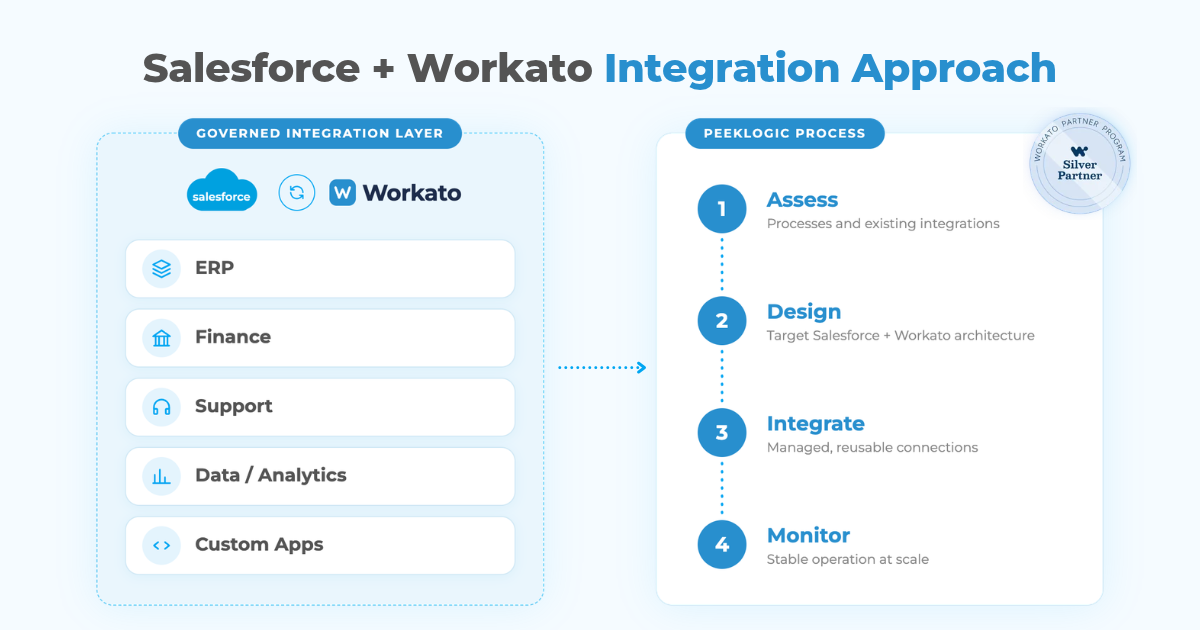
We first review the existing automation landscape: Zaps, Salesforce Flow, Apex integrations, middleware, custom APIs, batch jobs, and manual handoffs. Then we identify data ownership, timing requirements, transaction volume, security needs, failure scenarios, and the processes that genuinely require centralized orchestration.
The final design may keep some workflows in Zapier, move critical processes to Workato, use native Salesforce capabilities where they fit, or combine middleware with custom APIs.
The objective is not to replace every Zap. It is to build an integration model that remains understandable, reliable, and supportable as the Salesforce environment grows.
Need Help Moving from Zaps to Enterprise Salesforce Integration?
Book a ConsultationKey Takeaways
Zapier and Workato solve overlapping problems, but they are strongest at different levels of integration complexity.
Zapier is often the better choice for fast, independent, team-owned automation. Workato becomes more useful when Salesforce workflows span several systems, depend on shared logic, or require centralized monitoring and control.
A Salesforce org does not “outgrow Zaps” at a specific task count. It happens when independent automations start behaving like shared business infrastructure.
At that point, the decision should be based on architecture, risk, maintenance, and scale rather than on which tool can build the first workflow faster.
Frequently Asked Questions
Not in every situation. Zapier is often better for simple, fast, team-level automation. Workato is usually a stronger fit for Salesforce environments that need multi-system orchestration, centralized monitoring, reusable logic, and tighter governance.
Yes, depending on the use case and operating model. The real question is whether individual automations remain manageable as the number of systems, workflows, owners, and critical dependencies grows.
Consider Workato when important workflows span several systems, integration logic is duplicated, failures need structured recovery, IT needs centralized control, or separate point-to-point flows have become difficult to maintain.
No. A hybrid model can make sense. Lightweight departmental workflows can remain in Zapier while Workato handles shared, high-volume, or business-critical processes.
Workato generally requires a larger platform investment and more architecture work. The comparison should also include maintenance, troubleshooting, duplicated development, governance, and the business cost of failed integrations rather than license price alone.
Yes. Peeklogic is a Workato Silver Partner and can assess existing Salesforce automations, identify which workflows should remain in Zapier, design Workato architecture, migrate priority integrations, and implement monitoring and governance for enterprise environments.

Managing enterprise-grade integrations using MuleSoft Anypoint Platform to connect Salesforce with diverse business systems. Adept at delivering secure, scalable, and high-performance integration architectures that enhance data visibility, streamline operations, and drive digital transformation. Combines deep technical knowledge with strong business acumen to ensure integration solutions align with strategic objectives.