November 13, 2026
 20 Views
10 EHR & Practice Management Systems to Integrate with Salesforce Health Cloud


A patient journey can touch scheduling, clinical care, billing, follow-up, and support before anyone gets a complete view of what happened. EHR and practice management systems usually hold the clinical and operational records, while Salesforce Health Cloud can organize the relationship and care experience. When those platforms are disconnected, staff re-enter information and work from different versions of the same patient record.
According to Salesforce Healthcare & Life Sciences, healthcare and life sciences organizations using Salesforce report 27% greater patient adherence, 91% positive ROI, and 29% faster case resolution.
Peeklogic works with enterprise Salesforce environments that operate at scale across multiple teams, systems, and sensitive data flows. For healthcare organizations, that means defining what belongs in Health Cloud, what stays in the EHR, and which data needs to move without turning Salesforce into a second clinical system.
Planning a Salesforce Health Cloud Integration?
Contact PeeklogicWhy Healthcare Teams Connect EHR and Practice Management Systems with Health Cloud
Healthcare organizations rarely run on one platform. The EHR may hold the clinical record, while a practice management system handles scheduling, billing, or front-office workflows. Salesforce Health Cloud can sit alongside those systems to support patient engagement, service, care coordination, referral workflows, outreach, and a broader relationship view.
Integration matters when information from one system changes what another team needs to do. A new appointment may trigger outreach, a discharge may create a follow-up task, and a referral update may need to appear in Salesforce without making staff open the EHR.
The goal is not to mirror the full medical record. It is to give Salesforce users the patient and workflow context they need while clinical systems remain authoritative for clinical documentation.
Our guide to Salesforce healthcare integration explains how Health Cloud can connect with EHR, billing, telehealth, and analytics systems while keeping clinical and operational responsibilities separate.
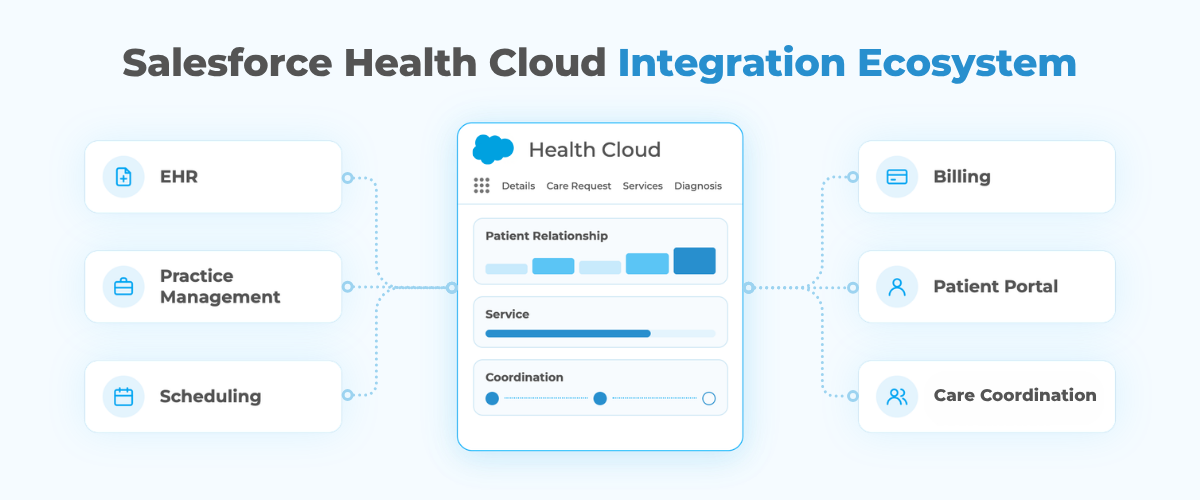
What Should Salesforce Health Cloud and EHR Systems Exchange?
The integration scope should follow the workflow rather than the number of fields available through an API.
Common data flows can include:
- Patient and contact identifiers
- Demographics and communication preferences
- Appointments and scheduling status
- Provider and care-team information
- Referral status
- Care-plan milestones
- Selected clinical summaries
- Discharge or follow-up events
- Service requests
- Billing or insurance context when required
- Consent and communication preferences
Health Cloud may own engagement, service, outreach, relationship history, and care-coordination workflows. The EHR should remain authoritative for diagnoses, clinical notes, medications, orders, results, and other clinical documentation unless the architecture clearly defines otherwise.
The safest design starts by documenting who owns each object and field. That prevents two systems from independently editing the same information and makes reconciliation much easier.
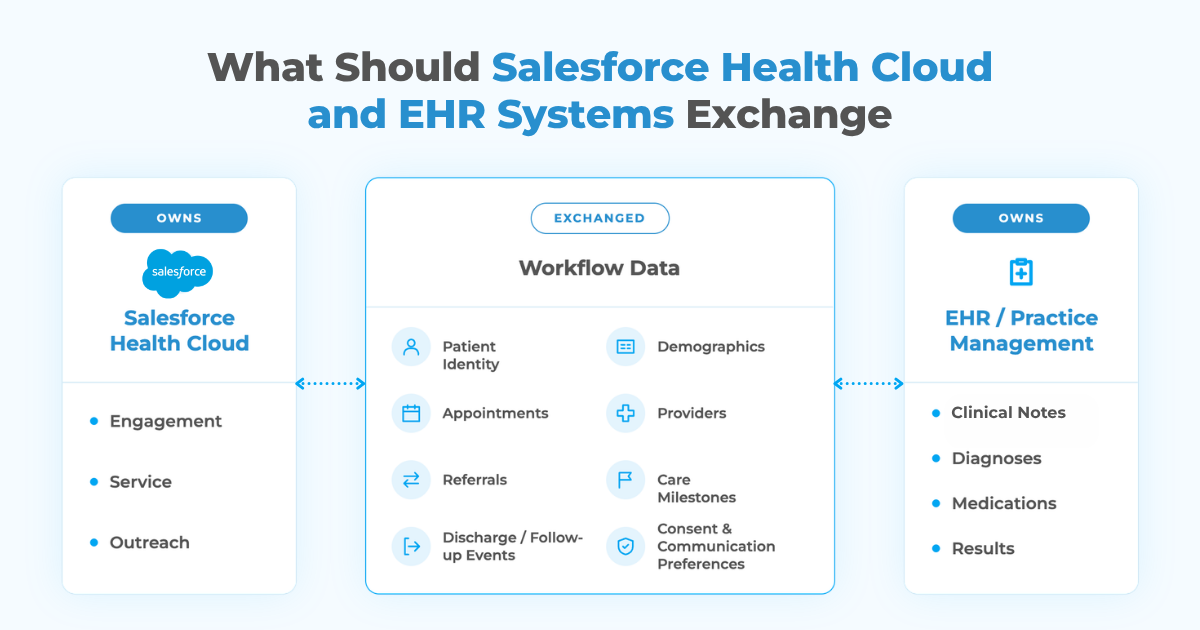
10 EHR & Practice Management Systems to Integrate with Salesforce Health Cloud
| Platform | Primary Role | Typical Salesforce Integration Focus |
|---|---|---|
| Elation Health | Primary care EHR | Patients, providers, appointments, care status |
| Healthie | API-first EHR | Patients, programs, appointments, engagement |
| Canvas Medical | Developer-friendly EHR | Clinical events, patient identity, workflows |
| DrChrono | EHR and practice management | Patients, scheduling, billing status, follow-up |
| CharmHealth | Cloud EHR | Patients, appointments, care milestones |
| Tebra | Practice management and billing | Scheduling, practice activity, billing context |
| AdvancedMD | Practice management | Patients, appointments, billing, workflow status |
| OpenEMR | Open-source EHR | Patient identity, clinical status, custom workflows |
| NexHealth | Patient scheduling API | Availability, bookings, cancellations, communication |
| WebPT | Physical therapy EMR | Referrals, episodes, appointments, treatment status |
1. Elation Health
Elation Health is centered on primary care and longitudinal clinical relationships. A Health Cloud integration can make selected patient, provider, appointment, and care-status information available to service or engagement teams while the EHR remains responsible for the clinical chart. Health Cloud can then support outreach, referrals, and follow-up without duplicating detailed clinical documentation.
2. Healthie
Healthie combines EHR capabilities with scheduling, telehealth, and client engagement. Its API-oriented approach can fit organizations that use Salesforce to coordinate patient communication or care programs across several applications. Integration should focus on patient identity, appointments, program status, and relevant events rather than copying the complete clinical record.
3. Canvas Medical
Canvas Medical is designed with extensibility and developer workflows in mind. It can fit organizations building custom healthcare experiences around Salesforce where clinical and CRM workflows need to exchange structured information. Salesforce may manage the patient relationship and non-clinical coordination while Canvas remains responsible for clinical documentation and provider workflows.
4. DrChrono
DrChrono combines EHR, scheduling, medical billing, and practice management. A Salesforce integration can connect patient-engagement activity with appointment, provider, or selected billing status information, giving Salesforce teams useful visit context without giving every user access to the clinical system.
5. CharmHealth
CharmHealth is a cloud EHR with practice management, patient engagement, and telehealth capabilities. Health Cloud can support broader patient journeys, service, and outreach while exchanging patient identity, scheduling, and care milestones. CharmHealth remains responsible for clinical documentation and practice operations.
6. Tebra
Tebra focuses on practice operations, patient acquisition, scheduling, billing, and provider workflows. It can sit closer to practice operations while Health Cloud supports patient relationship management and service. Integration may connect patient records, appointment status, billing context, or follow-up events when those details affect the patient experience.
7. AdvancedMD
AdvancedMD combines practice management, scheduling, billing, and EHR functionality. Health Cloud can use selected operational data to coordinate communications, referrals, service, and follow-up while leaving billing and clinical logic in AdvancedMD.
8. OpenEMR
OpenEMR is an open-source EHR and practice management platform suited to organizations that need more control over their EHR environment or custom workflows. Integration may require API, middleware, or custom development, while OpenEMR remains the clinical source and Health Cloud receives the information required for engagement and coordination.
9. NexHealth
NexHealth focuses on patient scheduling, forms, communication, and API-based connectivity rather than serving as a full EHR. It can give Salesforce access to availability, booking status, cancellations, or communication events without reproducing the underlying scheduling workflow.
10. WebPT
WebPT is built for physical therapy and rehabilitation practices, with EMR, scheduling, billing, and practice workflows tailored to that market. Salesforce Health Cloud can add a broader patient relationship and service layer around those workflows. Integration can surface appointment, episode, referral, or selected progress information when it affects outreach, case management, or post-treatment engagement.
Which Systems Should You Connect to Salesforce Health Cloud?
The right platform depends on the care model and on which workflows Salesforce is expected to support.
- Primary care organizations: Elation Health, CharmHealth, or another EHR can remain the clinical system of record while Health Cloud manages engagement and coordination.
- Digital-health businesses: Healthie or Canvas Medical can fit API-driven environments where product workflows span several applications and custom patient experiences.
- Independent practices: DrChrono, Tebra, or AdvancedMD may be more relevant when scheduling, billing, and practice operations are as important as the clinical chart.
- Patient-access teams: NexHealth can support scheduling and communication workflows without requiring Salesforce to reproduce the underlying appointment infrastructure.
- Specialty providers: WebPT fits physical therapy and rehabilitation workflows where referrals, episodes of care, scheduling, and treatment status need to connect with a broader patient relationship.
The decision should start with workflow ownership, not with which connector looks easiest to configure.
How Should Salesforce Health Cloud Integrate with EHR and Practice Management Systems?
Healthcare integrations still need clear timing decisions, but the consequences of bad data are higher.
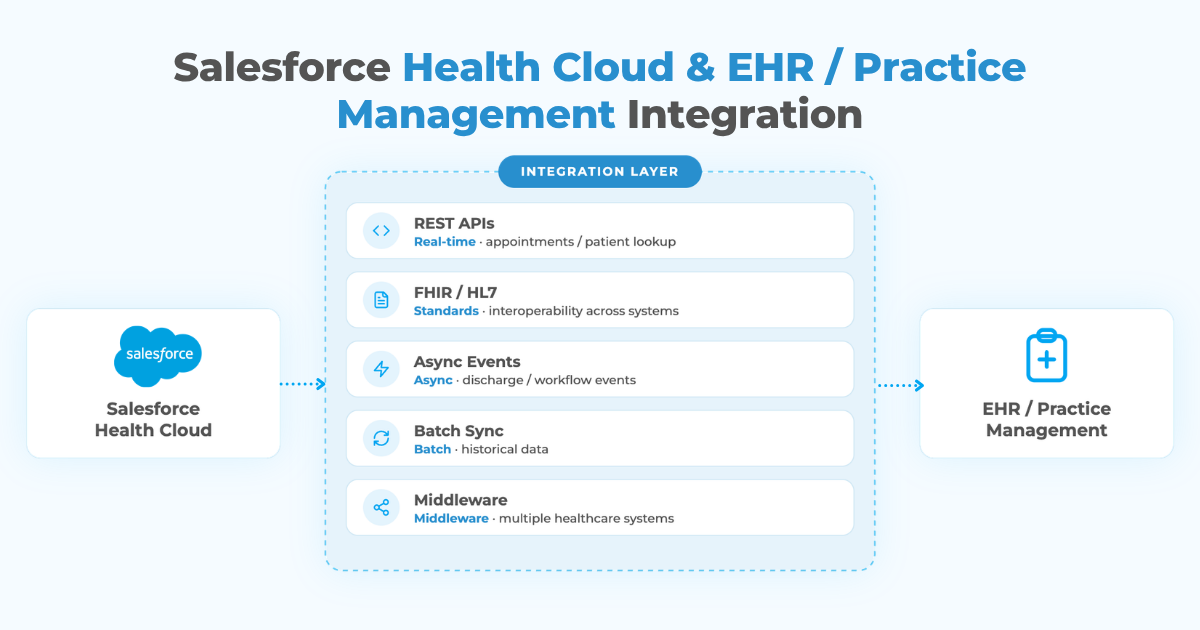
A patient search or appointment action may need a near-real-time response. A discharge event can be sent asynchronously. Historical encounters may be synchronized in batches. Some clinical information may be better viewed through an external-data pattern instead of stored again in Salesforce.
FHIR and HL7 are common interoperability standards in healthcare environments, but using a standard does not remove the need for mapping, identity resolution, permissions, monitoring, and exception handling. Two systems can support the same standard and still represent a patient, encounter, or workflow differently.
Middleware can help when Health Cloud coordinates several EHRs, labs, billing systems, or portals. Direct APIs may be simpler when the scope is narrow and stable.
Failures should also be visible. Teams need to know when a patient update was rejected, an appointment did not synchronize, or a downstream system was unavailable.
A Practical Salesforce Health Cloud Architecture
A practical design separates clinical truth from patient relationship and workflow data.
Salesforce Health Cloud can own patient engagement, service cases, outreach, care-coordination tasks, referral workflows, communication history, and selected patient summaries.
The EHR or practice management platform can own clinical notes, diagnoses, medications, orders, results, detailed appointment records, billing transactions, and other operational or clinical data.
An integration layer connects the two. A new patient can create or match a Health Cloud record. An appointment can trigger reminders or follow-up. A discharge can create a care-coordination task. A referral update can change a Salesforce workflow. A service request from Salesforce can be routed to the appropriate clinical or administrative team.
This keeps Health Cloud useful without asking it to become another source of detailed clinical truth.
Common Salesforce Health Cloud Integration Risks
Patient Matching
Names, addresses, phone numbers, and emails change. A weak matching strategy can create duplicate patients or attach information to the wrong record. Use stable identifiers, documented matching rules, and controlled merge processes.
Too Much PHI in Salesforce
More data is not automatically better. Clinical notes, documents, images, and detailed histories should only move into Salesforce when a real workflow requires them. Reducing unnecessary copies also simplifies permissions, retention, and auditing.
Unclear Data Ownership
If the EHR and Salesforce can both update the same patient status, care-plan field, or demographic value, the integration needs an explicit conflict rule. Otherwise, a valid update in one system can be overwritten by older information from another.
Weak Monitoring and Reconciliation
Failed updates can leave teams with different versions of the patient journey. Logs, alerts, retries, reconciliation, and ownership for failed records are essential, especially when integrations support scheduling, care coordination, or patient service.
Security and Auditability
Access to patient information should follow least-privilege principles, and organizations should be able to audit who accessed or changed sensitive data. Our Salesforce Shield guide explains how encryption, Event Monitoring, Field Audit Trail, and sensitive-data discovery can support a broader healthcare security and compliance program.
How to Plan an EHR Integration with Salesforce Health Cloud
Start with one patient journey rather than a list of interfaces.
For a primary care group, that may be referral-to-appointment-to-visit-to-follow-up. For a digital-health company, it may be enrollment-to-care-plan-to-remote-engagement. For a therapy practice, it may be referral-to-evaluation-to-treatment-to-discharge.
Map every system involved and identify which one owns the patient identity, appointment, clinical encounter, care plan, billing record, referral, and service workflow. Then define which events need to cross system boundaries, which fields are required, how quickly each update must arrive, and how the receiving system identifies the correct patient.
Security belongs in the same planning process. Define who can see each data category, how integrations authenticate, how consent is handled, and what must be logged.
Testing should cover duplicate patients, canceled appointments, rescheduled visits, provider changes, failed API calls, incomplete records, consent changes, and events arriving in the wrong order. Healthcare integrations should be tested for operational exceptions, not just successful data transfer.
How Peeklogic Approaches Salesforce Health Cloud Integration
Peeklogic starts with the patient journey, data ownership, and security model before choosing the integration technology.
We map which clinical and non-clinical systems participate in the workflow, what data Health Cloud actually needs, where sensitive information is stored, how records are matched, and which events should trigger Salesforce automation.
Depending on the environment, implementation can use REST APIs, FHIR or HL7 interfaces, middleware, Platform Events, Salesforce Flow, Apex, batch processing, external IDs, monitoring, and reconciliation.
Peeklogic works with enterprise environments at scale, where a healthcare integration may span multiple business units, provider groups, EHR instances, portals, and downstream systems. The architecture therefore has to remain supportable as data volumes, workflows, security requirements, and connected platforms change.
The objective is not to copy the EHR into Salesforce. It is to give care, service, and engagement teams the context they need while clinical systems continue managing the records and workflows they were built for.
Need Help Connecting Salesforce Health Cloud with Your Healthcare Systems?
Book a ConsultationKey Takeaways
Salesforce Health Cloud is most useful when it sits alongside the EHR rather than trying to replace it.
EHR, practice management, scheduling, billing, and specialty systems each own different parts of the patient journey. Integration should make those boundaries explicit, move only the information required by Salesforce workflows, and include identity matching, monitoring, security, and reconciliation from the beginning.
The best healthcare architecture is not the one with the most data in CRM. It is the one that gives teams reliable patient context without creating another clinical system to maintain.
Frequently Asked Questions
Yes. Health Cloud can exchange selected patient, appointment, care, referral, and workflow information with EHR systems through APIs, middleware, healthcare interoperability standards, or custom integration.
Usually no. Health Cloud can support patient engagement, care coordination, service, outreach, and relationship workflows, while the EHR remains the primary system for detailed clinical documentation.
Only information required by Salesforce users or workflows should move. This may include patient identifiers, appointments, care milestones, referrals, selected summaries, and service-related events rather than the full medical chart.
Yes. FHIR and HL7 are commonly used for healthcare interoperability, but teams still need to design mappings, identity matching, permissions, error handling, and monitoring around the standard.
Use least-privilege access, secure authentication, appropriate encryption and audit controls, clear data ownership, minimal data movement, monitoring, and policies aligned with the organization’s regulatory obligations.
Yes. Peeklogic works with enterprise Salesforce environments at scale and can design integrations across EHRs, practice management systems, portals, billing platforms, middleware, custom APIs, and other healthcare systems.


Salesforce Architect, CEO & Founder of Peeklogic. AppExchange Applications development, CRM Implementation, Integration with enterprise level software, Salesforce Data Migration. Salesforce AppExchange Applications development, CRM Implementation, Integration with enterprise level software, Salesforce Data Migration