August 14, 2026
 32 Views
How Much Does Salesforce Support Cost in 2026? Pricing, Support Models, and Cost Calculator


Salesforce support cost in 2026 depends on much more than the license itself. For example, current Sales Cloud list pricing ranges from $25 per user/month for Starter Suite and $100 for Pro Suite to $175 for Enterprise, $350 for Unlimited, and $550 for Agentforce 1 Sales.
Those prices cover the Salesforce product, but they do not tell you what it will cost to maintain, customize, troubleshoot, integrate, and support your Salesforce org month after month.
If you want to compare current editions, products, add-ons, and official list prices, check the Salesforce pricing page. For the rest of this guide, we will focus on the other side of the equation: how much ongoing Salesforce support can actually cost and what determines that cost.
Need Help Planning Your Salesforce Support?
Contact Our TeamUnderstanding Salesforce Pricing in 2026
Before estimating support costs, it helps to separate the different expenses that make up a Salesforce budget.
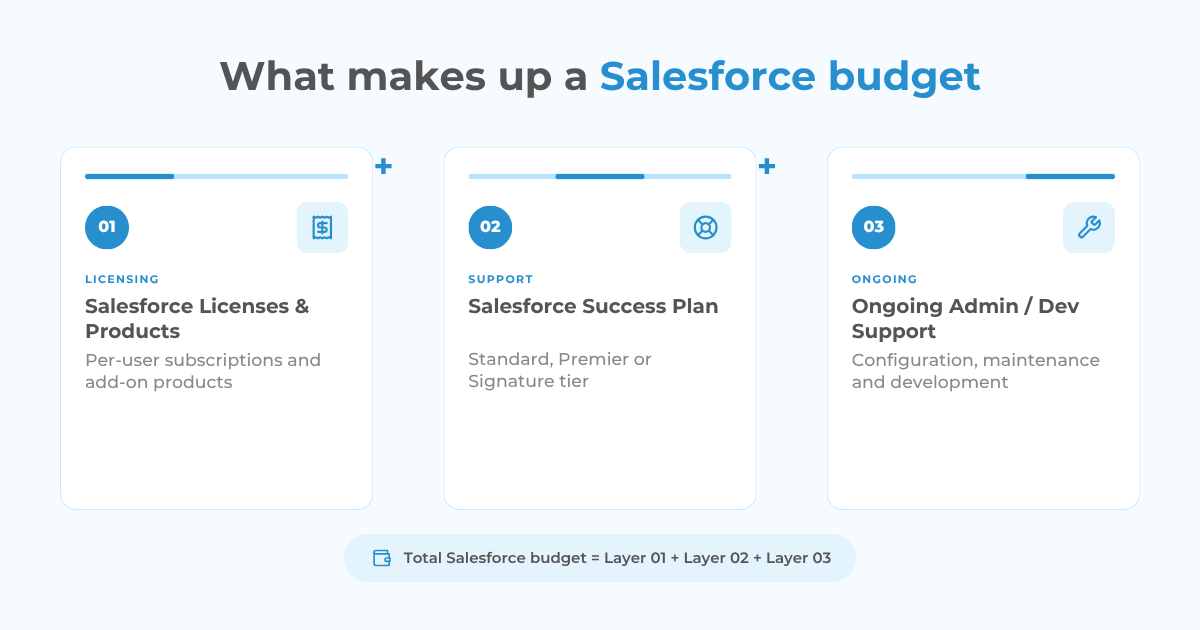
A typical organization may be paying for three different layers:
- Salesforce licenses and products
- Salesforce’s own Success Plan
- Ongoing administration, development, and technical support
These costs solve different problems.
Your licenses determine which Salesforce products and capabilities users can access. A Success Plan provides Salesforce-provided technical guidance and support. Ongoing Salesforce support handles the day-to-day work required to keep your specific org operating as the business changes.
Salesforce License Costs
Salesforce pricing varies considerably by product, edition, user count, add-ons, and contract structure.
For Sales Cloud, Salesforce currently lists:
- Starter Suite: $25/user/month
- Pro Suite: $100/user/month
- Enterprise: $175/user/month
- Unlimited: $350/user/month
- Agentforce 1 Sales: $550/user/month
Salesforce Service pricing currently follows the same headline pricing for Starter, Pro, Enterprise, Unlimited, and Agentforce 1 Service, although included functionality differs between products and editions.
How Much Does Salesforce’s Own Support Cost?
Salesforce provides three primary Success Plan levels: Standard, Premier, and Signature.
According to Salesforce, Standard is included in all licenses. Premier is priced at 30% of net license fees, while Signature pricing requires contacting a Salesforce account executive. Premier is also bundled with certain higher-tier editions, including Unlimited and Agentforce 1 Editions.
| Salesforce Support Plan | Pricing | Main Support Level |
|---|---|---|
| Standard Success Plan | Included in licenses | Self-service resources, documentation, Trailhead, community |
| Premier Success Plan | 30% of net license fees | Expert guidance, health checks, expedited technical support |
| Signature Success Plan | Custom pricing | Dedicated success management, proactive monitoring, fastest support response |
The differences are not only about response time.
Salesforce lists a two-day response for customer support inquiries under Standard, a one-hour response for business-stopping issues under Premier, and a 15-minute response for business-stopping issues under Signature. Premier also includes custom-code troubleshooting for up to 200 lines, while Signature expands that coverage and adds deployment guidance.
These plans can be valuable when you need product-level guidance or Salesforce technical support.
They still do not replace ongoing administration and development for your individual org.
Salesforce Support Plan vs. Ongoing Salesforce Support
This distinction is where Salesforce budgeting often becomes confusing.
Imagine that your sales manager asks for a new approval workflow, the operations team needs a dashboard, duplicate records are appearing, a third-party integration stopped synchronizing correctly, and new employees need different permission sets.
These are Salesforce support tasks, but they are not simply questions about how Salesforce works.
Someone has to:
✓ Review the requirement
✓ Understand the existing configuration
✓ Make the change
✓ Test it
✓ Deploy it safely
✓ Troubleshoot if something conflicts with existing automation
The same applies when your organization needs new custom objects, Apex development, CPQ maintenance, data cleanup, API integrations, release testing, user training, or performance troubleshooting.
This is why two companies with exactly the same Salesforce licenses can have completely different support costs.
One may operate an almost out-of-the-box Sales Cloud org for 10 people. Another may have 150 users, multiple Clouds, custom Apex, dozens of Flows, CPQ, ERP integration, complex sharing rules, and years of inherited technical debt.
Their license pricing may be easy to compare. Their support requirements are not.
What Determines Salesforce Support Cost?
There is no useful flat answer such as “Salesforce support costs X dollars per month” because the workload depends on the org.
The major cost drivers usually include the following.
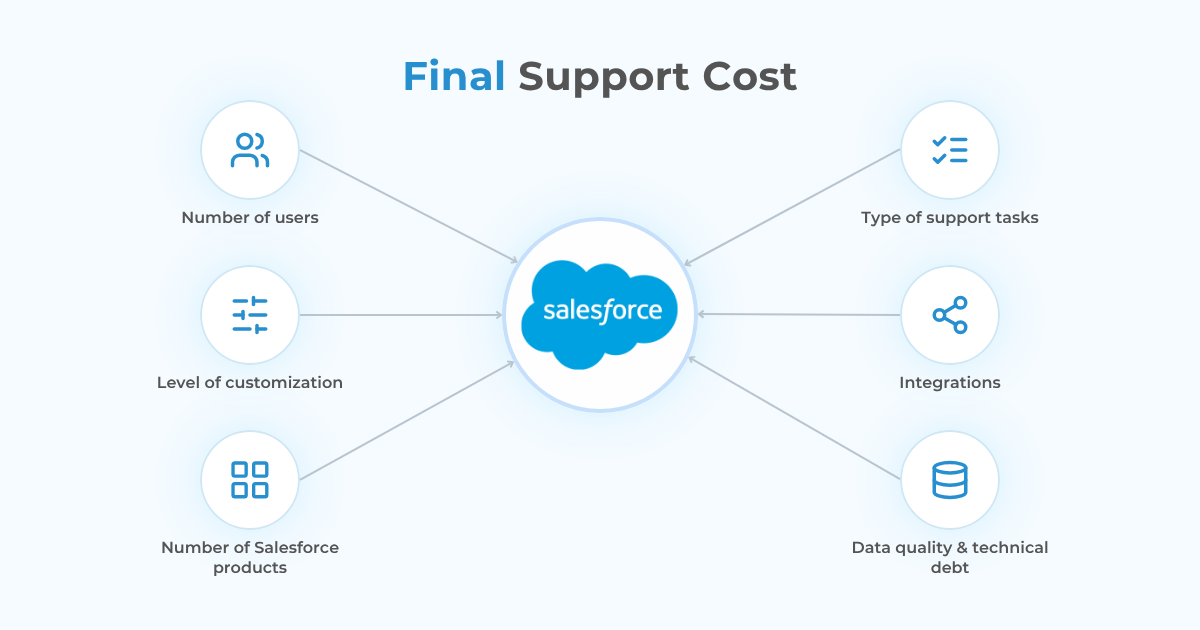
1. Number of Salesforce Users
More users generally create more administrative work.
That can include:
- User creation and deactivation
- Permission management
- Role and profile changes
- MFA and SSO maintenance
- Onboarding
- Internal Salesforce questions
- Sharing and access troubleshooting
A 10-user org and a 200-user org rarely create the same support workload.
2. Level of Salesforce Customization
An organization using mostly standard Salesforce functionality is normally easier to maintain than one built around extensive custom development.
Complexity increases when the org contains:
✓ Custom objects
✓ Large numbers of Flows
✓ Apex and triggers
✓ Lightning Web Components
✓ Custom applications
✓ CPQ or Revenue Cloud logic
✓ Legacy automation inherited from previous teams
Before changing one automation, a developer may need to understand several existing dependencies to avoid creating a regression elsewhere.
3. Number of Salesforce Products
Supporting Sales Cloud alone is very different from maintaining an environment that combines Sales Cloud, Service Cloud, Experience Cloud, CPQ or Revenue Cloud, Marketing Cloud, and third-party applications.
Each additional product introduces its own data model, configuration, permissions, automation, and possible integration dependencies.
4. Type of Support Tasks
Not every task requires the same skill set or effort.
Updating a picklist value is not comparable to creating a custom API integration.
Creating a report may require Salesforce administrator time. Troubleshooting an Apex issue may require a developer. Reworking an integration may require both.
The mix between admin hours and development hours is therefore one of the biggest factors affecting the final support cost.
5. Integrations
Connected systems can significantly increase the technical scope of Salesforce support.
Common examples include:
- ERP platforms
- Finance and billing systems
- Marketing automation
- E-signature platforms
- External databases
- Custom APIs
- Middleware
- Internal applications
Support then involves more than Salesforce itself. Teams may need to investigate authentication, data mappings, API changes, synchronization failures, limits, and error handling across several systems.
6. Data Quality and Technical Debt
An older Salesforce org may require more support even if it does not receive many new features.
Duplicate records, outdated automation, unused fields, inconsistent validation, old integrations, unclear object structures, and undocumented customizations all increase maintenance effort.
In these environments, the first support task may be understanding what already exists.
So, How Much Salesforce Support Does Your Org Actually Need?
This is the question that generic pricing pages cannot answer.
You could estimate support based on an hourly rate, but an hourly rate alone tells you very little. The real question is: How many Salesforce admin and development hours will your organization realistically need each month?
That is why we developed the Peeklogic Salesforce Support Cost Calculator.
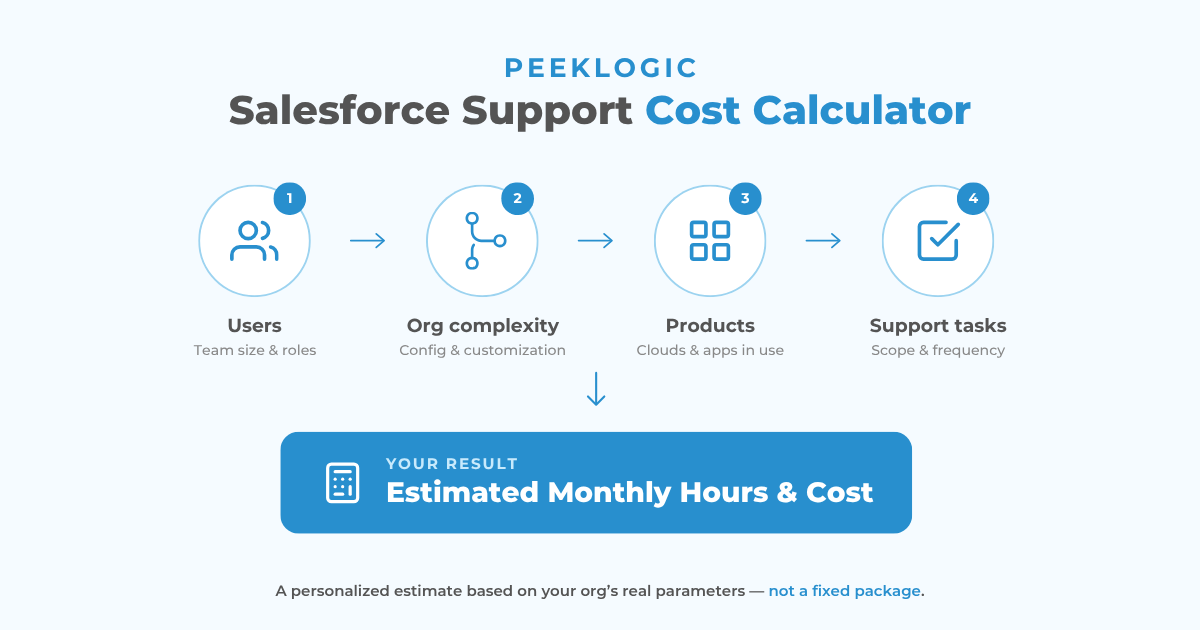
Instead of asking you to select an arbitrary support package, the calculator builds the estimate from the actual characteristics of your Salesforce environment and the work your team expects to need.
How the Salesforce Support Cost Calculator Works
The calculator takes you through a structured 13-step assessment.
It starts with three basic questions:
Step 1: How Many Active Salesforce Users Do You Have?
You select:
- 1–10 users
- 11–30 users
- 31–100 users
- 100+ users
This provides an initial indication of the administrative scale of the org.
Step 2: What Is the Current State of Your Salesforce Org?
You then describe the technical complexity:
- Clean / mostly out-of-the-box
- Some custom fields, flows, and objects
- Heavily customized or inherited from someone else
A heavily customized environment typically requires more investigation, testing, and technical support than a clean standard implementation.
Step 3: How Many Salesforce Products Are in Use?
The calculator distinguishes between:
- Sales Cloud only
- Two Salesforce products
- Three or more products, or CPQ / Revenue Cloud
From there, instead of forcing you into a predefined support package, the calculator lets you select the actual work you expect the support team to cover.
What Salesforce Support Tasks Can You Include?
The next steps are divided into support categories.
Users & Access Management
For example:
✓ Adding or removing users
✓ Managing roles, profiles, and permission sets
✓ Maintaining MFA and SSO policies
✓ Onboarding employees
✓ Managing sharing rules and org-wide defaults
Reports & Dashboards
You can include ongoing work such as building dashboards, automated reports, pipeline reporting, sales forecasts, performance reporting, and executive reporting.
Data Management & Quality
This covers tasks such as:
- Data imports and exports
- Duplicate management
- Mass record updates
- Validation rules
- Data-quality maintenance
- Archiving old records
Automation & Business Processes
If your Salesforce org relies heavily on automation, you can select work related to Flows, approvals, routing rules, notifications, SLAs, escalations, and automation of repetitive manual processes.
Customization & Configuration
This includes common enhancement work such as fields, picklists, page layouts, record types, custom objects, custom apps and screens, email templates, and CPQ support.
Integrations & Connected Systems
The calculator also accounts for tasks that typically require more technical involvement:
✓ Connecting new third-party tools
✓ Maintaining existing integrations
✓ ERP, finance, or billing connections
✓ Custom APIs and back-end development
✓ Marketing automation synchronization
Support, Troubleshooting & Health
Not all Salesforce work is planned development.
Ongoing support may involve fixing broken automation, investigating data problems, answering internal questions, preparing for Salesforce seasonal releases, conducting org health checks, or troubleshooting performance issues.
Sales & Revenue Operations
Salesforce support can also extend into the processes used by sales and RevOps teams, including pipeline stages, quote templates, forecasting, account-management rules, territories, and commission logic.
Training & Adoption
Finally, technical configuration creates little value if users do not understand how to use it.
The calculator can include adoption monitoring, team training, and creation of internal Salesforce documentation or how-to guides.
What Do You Get from the Calculator?
Once the relevant tasks are selected, you provide basic contact information and request the estimate. The Cost Calculator turns the selected scope into a tailored monthly hours and cost estimate for your organization. Peeklogic then sends the estimate to the email address provided.
The estimate is designed to answer the budgeting questions that a generic hourly rate cannot:
✓ Approximately how much Salesforce work does this org require?
✓ How much of that workload is administrative?
✓ Where is developer involvement likely to be needed?
✓ Which support categories are driving the workload?
✓ What could the resulting monthly support cost look like?
The estimate is still approximate. Salesforce environments change, and the actual workload can be adjusted after priorities and technical requirements are reviewed.
That flexibility is intentional. The purpose is to give teams a realistic starting point without requiring a full discovery project just to understand the possible support budget.
Want to Discuss Your Salesforce Support Needs?
Schedule a MeetingConclusion
Salesforce support cost in 2026 has several layers.
There is the cost of Salesforce licenses. There may also be a Salesforce Success Plan. Then there is the ongoing admin and development work required to maintain the Salesforce environment your company has actually built.
That last part cannot be calculated accurately from license count alone.
User volume, customization, Salesforce products, integrations, data quality, automation, troubleshooting, RevOps requirements, and training all influence the amount of work required.
If you want a practical starting point for your own environment, use the Peeklogic Salesforce Support Cost Calculator. Select your org profile and the tasks you need, and the calculator will translate that scope into an estimated monthly support workload and cost.
Frequently Asked Questions
Salesforce’s Standard Success Plan is included with licenses. Premier is currently priced at 30% of net license fees, while Signature uses custom pricing. Ongoing administration, customization, development, and maintenance are separate and depend on the complexity and workload of your Salesforce org.
The Standard Success Plan is included with Salesforce licenses and provides resources such as documentation, Trailhead, and community access. More advanced Salesforce-provided support is available through Premier and Signature plans. Ongoing hands-on administration or custom development should be budgeted separately.
Start with the actual workload rather than choosing an arbitrary number of hours. Consider user administration, reporting, data management, automation, customization, integrations, troubleshooting, RevOps, and training. The Peeklogic Salesforce Support Cost Calculator lets you select these requirements and receive a tailored monthly hours and cost estimate.
The largest factors are usually the number of users, level of customization, number of Salesforce products, amount of automation, integrations, technical debt, and the mix of administrator and developer tasks required.
Usually, yes. Custom Apex, Lightning Web Components, complex Flows, CPQ, APIs, integrations, and inherited technical debt can require more investigation, development, testing, and release management than an out-of-the-box Salesforce configuration.
Not for every task. Many activities, including user management, reports, dashboards, fields, permissions, and standard configuration, can be handled by an experienced Salesforce administrator. Development support becomes more important for Apex, LWC, APIs, complex automation, advanced integrations, and custom applications.
Support usually includes troubleshooting, user assistance, and resolving issues. Maintenance is broader and can include release testing, data quality work, configuration updates, integration monitoring, technical-debt cleanup, and continuous improvements. In practice, ongoing Salesforce engagements often combine both.


Salesforce Architect, CEO & Founder of Peeklogic. AppExchange Applications development, CRM Implementation, Integration with enterprise level software, Salesforce Data Migration. Salesforce AppExchange Applications development, CRM Implementation, Integration with enterprise level software, Salesforce Data Migration