August 12, 2026
 88 Views
Salesforce CPQ Implementation in 2026: Lessons from FinTech and Solar Energy Projects


According to Research and Markets, the global Configure, Price, Quote software market is projected to reach US$7.3 billion by 2030, growing at a CAGR of 16.2% from 2024 to 2030.
For Salesforce teams, however, CPQ is much more than quote generation. A production implementation may need to control product combinations, calculate customer-specific pricing, automate approvals, generate documents, support renewals, and connect Salesforce with ERP, billing, storage, mobile, and field systems. Two recent Peeklogic projects show how differently that architecture can evolve depending on the business.
What a Salesforce CPQ Implementation Actually Includes
A basic CPQ demo often looks straightforward: select products, apply pricing, generate a quote, and send it to the customer. Real implementations become more technical because each step depends on business rules, user roles, and system ownership.
A production Salesforce CPQ implementation may need to manage:
✓ Product bundles, dependencies, and exclusions
✓ Customer-specific pricing and discount logic
✓ Approval thresholds and exception handling
✓ Quote and proposal generation
✓ Amendments and renewals
✓ Integrations with ERP, billing, inventory, document storage, or field systems
The quote itself is only one object in a larger process. A production architecture can involve Opportunities, Products, Price Books, Quote Lines, Contracts, Orders, Assets, custom objects, approval records, external documents, and integration events.
A successful implementation therefore begins with architecture and business rules, not with the Quote Line Editor.
Planning a Salesforce CPQ Implementation?
Talk to PeeklogicCase 1: Salesforce CPQ Customization for FinTech and Insurance
In Peeklogic’s Salesforce CPQ customization project for a FinTech and insurance company, the main challenge was control.
The client had a specialized insurance product model with product combinations, pricing conditions, visibility rules, and quote requirements that could not be managed efficiently through a basic configuration.
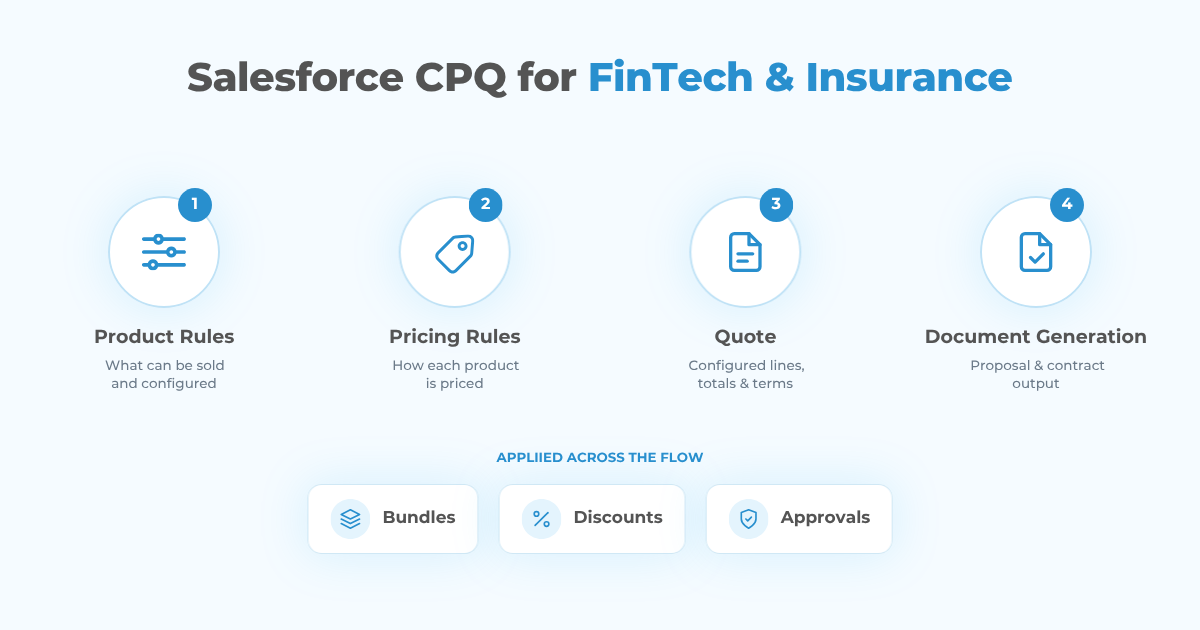
Instead of treating the project as a collection of individual CPQ settings, Peeklogic first created a structured requirements framework. A detailed questionnaire captured information about bundles, discounts, pricing behavior, document requirements, and related business rules. This made it easier to translate business logic into a maintainable Salesforce configuration.
Product configuration and visibility
Product Rules were used to prevent invalid combinations and support dependent product behavior. The implementation also covered complex bundles, Twin Field behavior, and restrictions that controlled what could be selected under specific conditions.
This matters because configuration accuracy is not only a usability issue. In financial services and insurance, an incorrect product combination can create downstream problems in pricing, documentation, approvals, or policy administration.
The project also introduced dynamic product search and visibility. Custom filters could return products according to predefined conditions, while visibility could vary depending on the user or quote context.
Pricing and quote automation
Pricing followed the same rules-based approach. Salesforce CPQ Discount Schedules and additional business logic supported:
✓ Customer-segment pricing
✓ Group policies and promotions
✓ Conditional discounts
✓ Product-specific pricing adjustments
The goal was to reduce dependence on manual pricing decisions. When commercial rules are defined in the system, sales users do not need to remember every exception or calculate every adjustment themselves.
Quote generation was also streamlined. Quick Actions made it easier to create Quotes from Opportunities and populate required data. CPQ layouts were reviewed to remove unnecessary actions and reorganize fields for business users.
Document Templates then transformed configured and priced quote data into structured customer-facing documentation. Product, price, terms, and other information could flow into generated documents instead of being copied manually.
Amendments, renewals, and permissions
The implementation also covered amendments, renewals, and user permissions. This is important because the CPQ process does not stop when the first quote is accepted. Product and pricing logic often needs to survive changes throughout the customer lifecycle.
What made this implementation successful was not one individual CPQ feature. The value came from connecting product governance, pricing, quote creation, documentation, and lifecycle processes into one controlled model.
Case 2: Salesforce CPQ Automation for a Solar Energy Provider
The second project started from a very different business problem.
In Peeklogic’s Salesforce CPQ & Automation Implementation for a Solar Energy Provider, CPQ became one component of a broader Salesforce operational architecture.
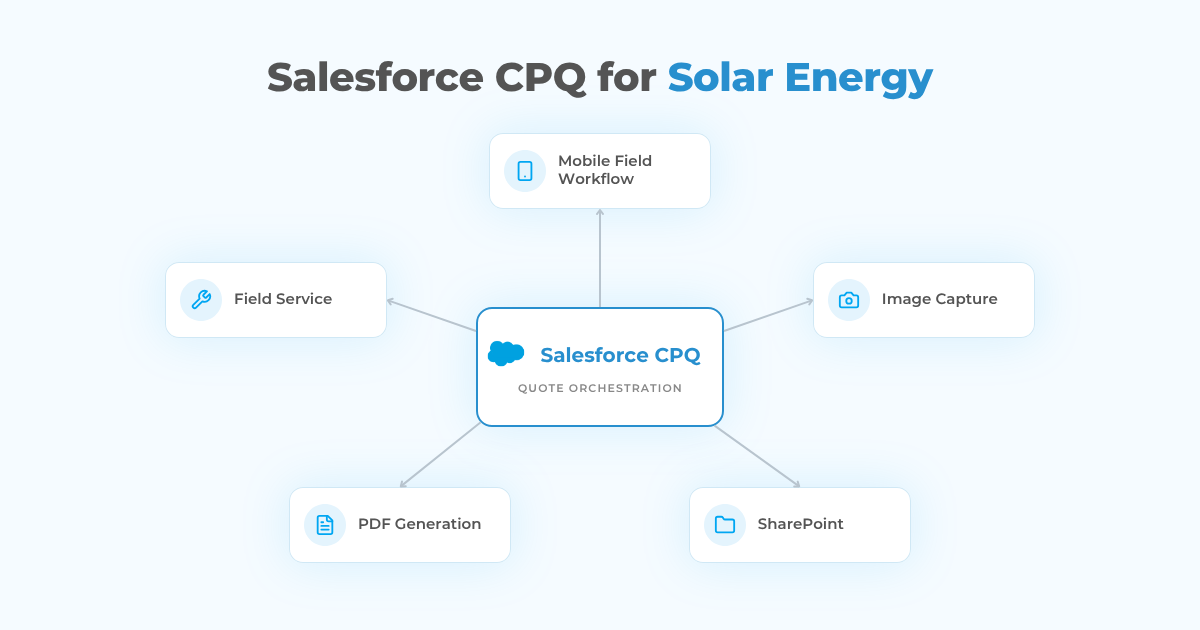
For this client, the sales process extended beyond pricing and quoting. Representatives also needed to collect site information, capture images, work from mobile devices, generate documents, store files, and coordinate activity between office and field teams.
CPQ configuration and validation
Products and bundles were configured around the company’s solar offerings. Price Rules, Product Rules, discount validation, approval workflows, and Quote Templates provided the commercial layer.
The implementation also used the CPQ Config Validation API where configuration needed to be validated outside the standard Quote Line Editor.
Mobile field workflows
The larger challenge was what happened around the quote.
Peeklogic developed a custom Lightning Web Component for field representatives to collect structured site information. Instead of using disconnected forms and later transferring the information into Salesforce, users could work through a Salesforce-based workflow.
The component also supported image capture. A Zoom viewer allowed captured images to be reviewed directly as part of the process. This was useful because site conditions are not always easy to represent through text fields alone.
Mobile support was another architectural requirement. The component was made available through the Salesforce Mobile App, and custom offline functionality was introduced for situations where connectivity was limited.
Document storage and generation
Salesforce was integrated with SharePoint through a one-way synchronization process so relevant files could move into a centralized external repository.
That reflects an important design principle: Salesforce does not have to own every piece of information simply because it orchestrates the workflow. Specialized systems can remain systems of record where appropriate.
PDF.co was integrated for automated PDF generation, replacing manual document preparation with a repeatable process. A custom e-signature solution supported document execution, while a custom object hierarchy and inventory functionality extended the Salesforce data model.
Light Salesforce Field Service configuration also created a foundation for future scheduling and task assignment.
In this project, CPQ delivered value because it was connected to field activity, files, documents, mobile workflows, and operational data. Quoting was important, but it was not isolated from the rest of the business process.
FinTech CPQ vs. Solar CPQ
The two projects used the same Salesforce ecosystem, but the source of complexity was different.
| Area | FinTech & Insurance | Solar Energy |
|---|---|---|
| Main complexity | Product and pricing rules | Operational workflow |
| Product configuration | Complex bundles, dependencies, visibility | Solar products and bundles |
| Pricing | Conditional pricing, discounts, policies | Price rules, discount validation |
| User experience | Search filters, Quick Actions, cleaner layouts | Mobile LWC, image capture, offline access |
| Documents | CPQ Document Templates | PDF.co, SharePoint, e-signature |
| Lifecycle focus | Amendments and renewals | Field execution and operational follow-up |
| External systems | Primarily CPQ-centered | SharePoint, mobile, Field Service, PDF.co |
For the FinTech client, the architecture was mainly rules-centric. Teams needed to model eligibility, product combinations, negotiated pricing, approvals, and controlled documents.
For the solar provider, the architecture was more process-centric. CPQ had to work with physical site data, images, document generation, external storage, mobile users, and field operations.
The platform was the same, but the implementation should not be. CPQ architecture should follow the revenue and operational model of the company rather than force different businesses into the same technical template.
What These Two Salesforce CPQ Projects Have in Common
Despite the differences, several principles were consistent across both implementations.
1. Business rules come before configuration
Product and pricing logic are difficult to maintain when they exist only in spreadsheets, user knowledge, or informal approval processes.
Before building Product Rules or Price Rules, teams should document how the commercial process actually works.
2. The Salesforce data model must reflect the business
Standard Salesforce and CPQ objects are useful, but they are not always enough.
Depending on the project, the architecture may also require custom objects, Apex, Lightning Web Components, external APIs, or specialized document systems.
The objective is not to customize Salesforce as much as possible. It is to customize only where the business process requires it.
3. User experience matters
A technically correct CPQ implementation can still fail if users have to work through unnecessary fields, products, actions, or screens.
In the FinTech project, filtered product selection, Quick Actions, and cleaner layouts reduced friction. In the solar project, a custom mobile component extended the workflow to field representatives.
4. Documents are part of CPQ architecture
In the FinTech case, CPQ templates automated quote generation. In the solar project, PDF generation, SharePoint storage, and e-signature extended the document lifecycle beyond the quote itself.
5. System ownership must be clear
Salesforce can manage the commercial workflow while ERP, billing, SharePoint, inventory, or another platform remains responsible for specialized records.
Good architecture defines those boundaries instead of trying to move every process into Salesforce.
How to Plan a Salesforce CPQ Customization Project
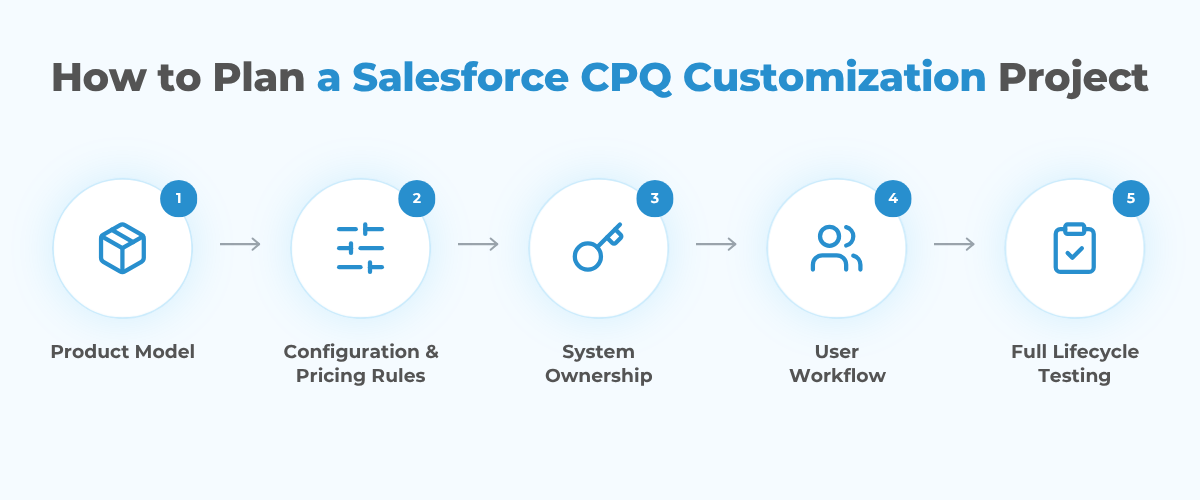
A practical CPQ project can be structured around five decisions.
1. Define the product model
Document products, bundles, required options, exclusions, dependencies, and lifecycle changes before automation begins.
If product relationships are unclear before implementation, configuration rules quickly become difficult to understand and maintain.
2. Separate configuration rules from pricing rules
A product being eligible for a quote is different from the price the customer should pay.
Product Rules can control availability and compatibility, while Price Rules, Discount Schedules, and approval logic can handle commercial calculations and exceptions.
3. Decide which system owns each record
Determine whether Salesforce, ERP, billing, inventory, SharePoint, or another platform owns products, pricing, documents, orders, and operational data.
Integration flows should follow those ownership decisions. For example:
- Salesforce: Opportunities, Quotes, approvals
- ERP: Inventory or fulfillment
- Billing platform: Invoices and payments
- SharePoint: Documents
- Product system: Master product data, where applicable
There is no universal ownership model. What matters is defining it before synchronization logic is developed.
4. Design for the real user workflow
Sales representatives, finance teams, operations users, and field employees interact with CPQ differently.
Layouts, actions, mobile components, approvals, and product selection should reflect their responsibilities. The goal is not to expose every available CPQ capability to every user.
5. Test the lifecycle, not only quote creation
Testing should include:
✓ Amendments and renewals
✓ Approval exceptions
✓ Pricing changes
✓ Document generation
✓ Integration failures
✓ Permission scenarios
✓ Downstream order processes
A quote that works only in the happy path is not a production-ready CPQ implementation.
Testing should also cover how changes propagate across the architecture. What happens if pricing changes after approval? What happens when an external document service is unavailable? How should existing quotes behave when product configuration changes?
What About Salesforce CPQ in 2026?
Salesforce CPQ is now at the end of sale for new customers, while existing customers can continue using and renewing the product.
For companies already running mature Salesforce CPQ implementations, this creates three practical paths:
✓ Continue operating and optimizing the existing Salesforce CPQ environment.
✓ Extend it with custom automation and integrations where there is a clear business need.
✓ Evaluate Agentforce Revenue Management when a broader redesign of the revenue architecture is already required.
The right decision depends on the existing implementation, licensing, technical debt, product model, integrations, and long-term revenue strategy.
For a company with a stable CPQ environment that accurately supports its sales process, a major migration may introduce more disruption than immediate value. For an organization already redesigning products, pricing, billing, contracts, or order management, the calculation can be very different.
Conclusion
Salesforce CPQ implementation is rarely only about configuring a quoting tool.
The FinTech and insurance project shows how CPQ can become a controlled rules engine for complex product combinations, pricing, visibility, documentation, and lifecycle management.
The solar energy project shows a different model, where CPQ becomes part of a wider operational workflow that includes mobile data collection, images, SharePoint, PDF generation, e-signature, offline functionality, and field operations.
Both projects point to the same conclusion: CPQ creates the most value when its architecture is built around the real business process.
Product rules need to reflect what can actually be sold. Pricing needs to reflect how the company actually charges customers. Documents need to follow the real approval and storage lifecycle. Integrations need clear ownership boundaries. Users need an interface that matches the work they perform.
That is the difference between simply installing CPQ and building a Salesforce revenue process that can scale.
Need Help with Salesforce CPQ Customization or Automation?
Talk to PeeklogicFrequently Asked Questions
What is Salesforce CPQ customization?
Salesforce CPQ customization is the process of adapting product configuration, pricing, approvals, quote generation, renewals, integrations, and user workflows to the specific commercial requirements of a business.
When does Salesforce CPQ require custom development?
Custom development may be necessary when standard configuration cannot support complex product dependencies, proprietary pricing logic, specialized user interfaces, mobile workflows, external integrations, or custom document processes.
Can Salesforce CPQ integrate with external systems?
Yes. Salesforce CPQ can be connected with ERP, billing, inventory, document storage, e-signature, payment, and other operational platforms through APIs, middleware, Apex, or other integration patterns.
Should existing Salesforce CPQ customers migrate in 2026?
Not automatically. Existing customers should evaluate the stability of their current implementation, technical debt, licensing, integrations, and future revenue requirements before deciding whether to continue optimizing Salesforce CPQ or evaluate Agentforce Revenue Management.
What should be tested in a Salesforce CPQ implementation?
Testing should cover product configuration, pricing, discounts, approvals, quote documents, amendments, renewals, permissions, integrations, failure scenarios, and downstream processes, not only initial quote creation.

Accomplished Salesforce professional with a decade of hands-on expertise in designing, implementing, and optimizing Salesforce Service Cloud solutions for organizations across diverse industries. Adept at translating complex business needs into scalable, high-performance configurations and customizations that enhance customer service, streamline case management, and improve operational efficiency.