August 03, 2026
 51 Views
Salesforce Sales Cloud for FinTech in 2026: Architecture, Use Cases, and Implementation


Salesforce Sales Cloud for FinTech can connect customer acquisition, financial applications, sales activity, automation, and reporting within one CRM architecture.
According to Salesforce, Financial Services Cloud powers 3.2 billion financial accounts worldwide. Aggregated results from customers across nine countries show that 97% of surveyed financial institutions achieved a positive return on investment, while organizations using generative or agentic AI reported a 30% increase in productivity.
These numbers show how quickly financial services are moving toward connected data, automation, and AI. For FinTech companies, however, adopting Salesforce is not simply a matter of installing a customer relationship management platform.
Lenders, payment providers, insurers, investment platforms, and digital banks may need to manage prospects, applications, compliance checks, documents, product terms, approvals, and integrations with external financial systems. A well-designed Salesforce CRM for FinTech can centralize customer information and automate repetitive work. The key architectural decision is which processes belong in Sales Cloud, which require Financial Services Cloud, and which should remain in specialized platforms.
What You Need to Know
✓ Sales Cloud manages customer acquisition, relationships, opportunities, activities, products, quotes, forecasts, and sales reporting.
✓ FinTech workflows often require additional records for applications, applicants, identity checks, credit decisions, documents, and disbursement.
✓ Financial Services Cloud provides industry-specific data models and workflows beyond standard Sales Cloud functionality.
✓ Salesforce Flow should be the primary low-code automation tool for new implementations.
✓ Security and compliance depend on the complete architecture, not only on purchasing a CRM license.
Build a FinTech Salesforce Architecture That Scales
Talk to PeeklogicWhat Is Salesforce Sales Cloud?
Salesforce Sales Cloud is a CRM platform for managing prospective customers, existing relationships, sales activity, and revenue opportunities. Its standard capabilities include Leads, Accounts, Contacts, Opportunities, Campaigns, Products, Price Books, Quotes, forecasting, and reporting.
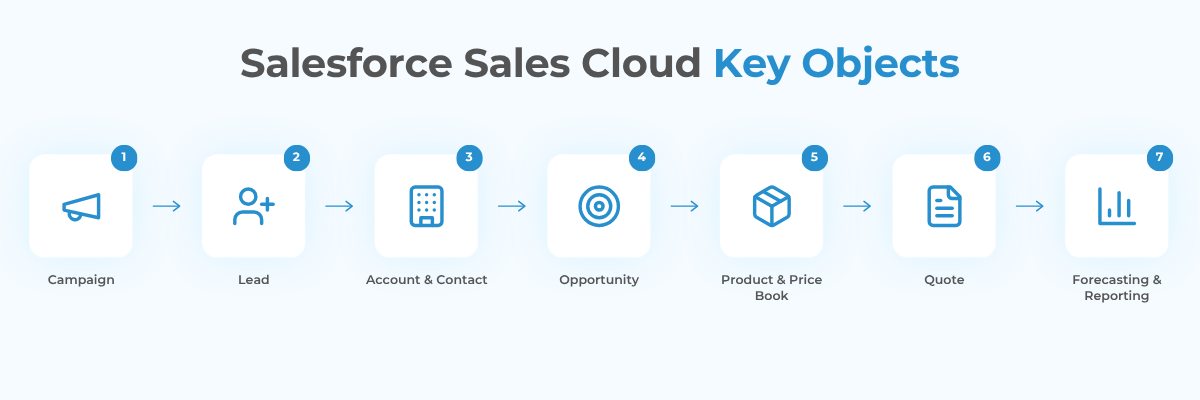
For a FinTech company, Sales Cloud can form the commercial layer around a financial product. It can show which campaign generated a prospect, who owns the relationship, which product the customer is considering, what action is required next, and which channels convert most effectively.
Sales Cloud is especially useful when digital applications, call-center sales, partner referrals, relationship management, and marketing campaigns must share the same customer context.
It should not automatically be treated as a complete loan origination, underwriting, payment processing, or servicing platform. Its role depends on the business model and on the boundaries established between Salesforce and specialized financial systems.
Sales Cloud vs. Financial Services Cloud
Sales Cloud is a general-purpose sales platform. Financial Services Cloud extends Salesforce with financial-services-specific data models, relationship structures, workflows, and AI capabilities for banking, lending, insurance, and wealth management.
| Platform | Best suited for |
|---|---|
| Sales Cloud | Lead management, pipeline, customer acquisition, forecasting, and straightforward custom workflows |
| Financial Services Cloud | Financial relationships, households, financial accounts, policies, and complex customer structures |
| Digital Origination | Application intake, lending workflows, decisioning, and document collection |
| External origination or servicing platform | Specialized underwriting, disbursement, servicing, and regulated processing |
Sales Cloud may be enough when Salesforce mainly manages acquisition and commercial follow-up. Financial Services Cloud becomes more relevant when the platform must understand households, portfolios, financial accounts, policies, life events, or related parties.
How Should a FinTech Data Model Be Structured?
A common implementation mistake is placing the entire financial-product lifecycle inside a Lead or Opportunity. A more maintainable architecture separates commercial activity from operational processing.
| Business information | Possible Salesforce record |
|---|---|
| Marketing source | Campaign and Campaign Member |
| Initial prospect | Lead |
| Customer | Person Account or Account and Contact |
| Commercial pipeline | Opportunity |
| Financial product | Product and Opportunity Product |
| Application | Custom Application object or industry-specific object |
| Applicant and co-applicant | Related Applicant records |
| Identity verification | KYC Verification record |
| Risk assessment | Underwriting or Decision record |
| Proposed terms | Quote, Offer, or Proposal record |
| Supporting files | Salesforce Files or external repository |
| Agreement information | Contract record |
| Approved financial account | Financial Account or servicing reference |
An Opportunity answers the commercial question: What potential business is the company pursuing?
An Application answers the operational question: What information, verification, and decisions are required to process the request?
Keeping these responsibilities separate improves reporting, permissions, automation, and integration design.
Campaigns, Leads, and Customer Acquisition
Campaigns can represent digital advertising, referral programs, events, partner activity, or limited-time offers. Campaign Members connect Leads and Contacts to those initiatives.
A lender may receive prospects through a landing page, API, call center, broker portal, or imported list. Campaign Member statuses could follow this sequence:
Invited → Responded → Application Started → Qualified → Funded
Salesforce can then connect marketing activity to application starts, approval rates, accepted offers, and funded value.
The company should distinguish between advertised and approved terms. A Campaign may store the promotional message, while the final rate, amount, and repayment conditions should come from the pricing, decisioning, or origination process.
A Lead can represent a person or company that has shown interest but has not yet entered the formal customer and application model. When a qualified Lead is converted, Salesforce can create an Account, Contact or Person Account, and Opportunity.
Duplicate and matching rules should be designed before automated conversion is enabled. Creating another record for an existing customer can fragment communication history, consent, active applications, and compliance data.
How Should Opportunities and Applications Work Together?
The Opportunity should track the potential commercial outcome, including the product, estimated value, stage, expected closing date, acquisition channel, representative, and lost reason.
The Application should contain or relate to:
- Applicant and co-applicant details
- Requested amount and term
- Income and employment information
- Consent, KYC, and AML records
- Supporting documents
- Credit assessment and approval conditions
- Final offer
- Disbursement or activation status
Sales representatives can manage the Opportunity while underwriting, compliance, and operations teams work with the Application and its related records.
This separation also improves access control. A sales representative may need the commercial status without receiving access to every risk score, identification document, or compliance decision.
Products, Price Books, and Quotes
Products represent the financial services offered by the company, such as personal loans, business credit lines, payment accounts, insurance products, or premium service packages.
Price Books organize products and standard commercial values for different regions, currencies, partners, or customer segments. Quotes present the proposed product configuration and conditions.
For simple products, these standard objects may be sufficient. Complex financial pricing often depends on credit risk, term, collateral, currency, jurisdiction, partner agreements, and market data. Salesforce can call an external pricing or decision engine and store the approved result.
Field terminology should also be precise. ROI means return on investment, not interest rate. Use explicit labels such as Interest Rate, Annual Percentage Rate, Effective Rate, or Expected Return.
How Should Automation Be Designed in 2026?
Salesforce Flow should be the default low-code automation technology for new implementations. Salesforce ended support for Workflow Rules and Process Builder on December 31, 2025 and recommends Flow Builder for new automation and migration work.
Existing Workflow Rules and Process Builder processes may continue to run, but Salesforce no longer provides product support or bug fixes for them.
A FinTech implementation can use Flow to:
- Assign prospects by product, region, partner, or value.
- Search for an existing customer or active application.
- Create verification and document-request tasks.
- Route an application to compliance or underwriting.
- Escalate records that exceed service-level targets.
- Update the Opportunity after a decision is returned.
- Generate follow-up activities after an offer is issued.
- Record abandonment and rejection reasons consistently.
More complex processing may require Apex, Platform Events, MuleSoft, Workato, or direct APIs.
Salesforce can initiate a credit check and store the response, but it should not recreate a mature external credit engine without a clear business reason.
Connecting Salesforce to the Wider FinTech Stack
Salesforce often sits between customer-facing teams and specialized financial platforms, including origination systems, core banking platforms, credit bureaus, identity providers, payment processors, document repositories, signature tools, support systems, and analytics platforms.
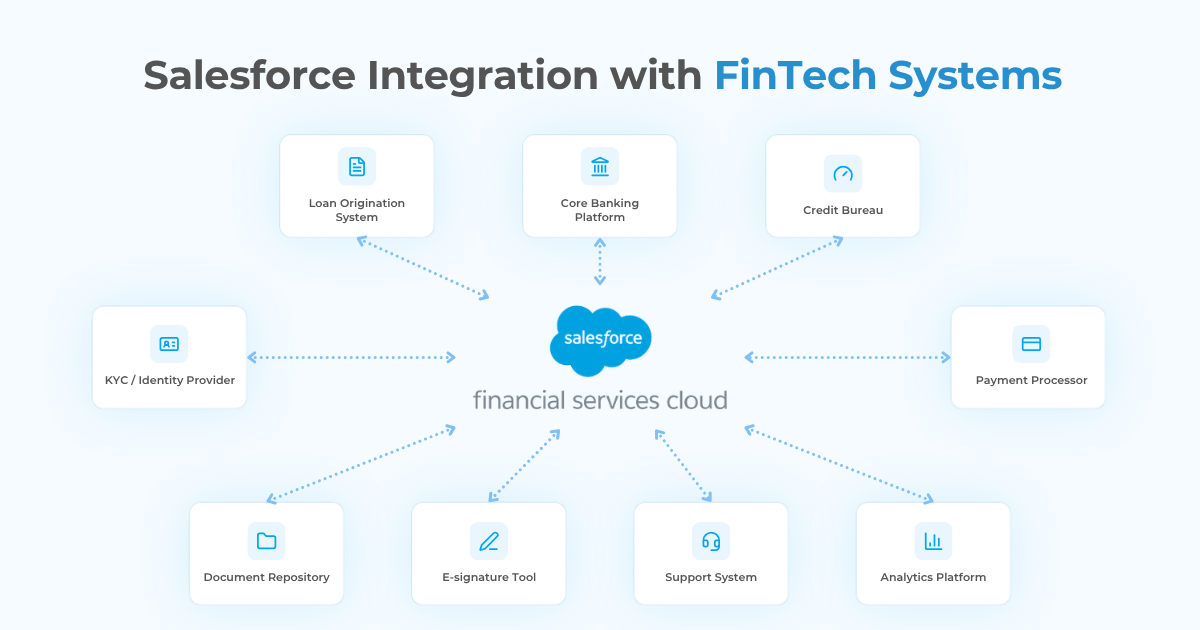
A connected lending workflow may operate as follows:
- Salesforce creates the customer and Application records.
- An API sends the required details to a KYC provider.
- The result returns to Salesforce.
- Eligible applications go to a decision engine.
- Approved terms populate an Offer record.
- Salesforce Flow creates document and approval tasks.
- The signed agreement is linked to the Application.
- The completed record moves to the servicing platform.
Similar architecture decisions appear in other industries. Our article on Salesforce for ecommerce in 2026 explains how CRM, commerce, inventory, payments, and service data can be connected without turning Salesforce into the owner of every external process.
A reliable integration should include:
✓ A clearly defined system of record for every data domain
✓ Secure authentication and least-privilege access
✓ Duplicate-event handling and idempotency
✓ Retry queues, monitoring, and failure alerts
✓ Audit logs showing which system changed each record
Security, Privacy, and Regulatory Controls
FinTech applications may process identification information, financial details, documents, credit results, and regulatory decisions. Salesforce therefore uses multiple access-control layers, including organization-wide defaults, permission sets, roles, sharing rules, restriction rules, and field-level security.
Application records can be private by default and shared only with the responsible sales team, underwriters, compliance specialists, and approved managers.
✓ Restrict sensitive fields through permission sets and field-level security
✓ Apply record access based on region, product, role, or legal entity
✓ Encrypt appropriate data and credentials
✓ Track changes to critical fields and decisions
✓ Define retention and deletion rules across connected systems
Salesforce Shield can add Platform Encryption, Event Monitoring, Field Audit Trail, and data-classification capabilities. These tools can support a governance model, but purchasing Salesforce or Shield does not automatically make an organization compliant.
Compliance depends on the complete environment, including configuration, contracts, integrations, user behavior, hosting, retention, and applicable legal requirements.
Which FinTech KPIs Can Salesforce Track?
Useful metrics include:
- Lead-to-application conversion
- Application completion rate
- Approval and offer-acceptance rates
- Time to first contact
- Time to decision and funding
- Abandonment rate
- Service-level breaches
- Funded value by product or partner
- Campaign cost per funded customer
The implementation team must define every KPI precisely. “Conversion” could mean a Lead converted to an Account, an Application submitted, an approval issued, an agreement signed, or a financial account funded.
Dashboards become trustworthy only when every team uses the same milestone definitions.
What Does a Technical Implementation Roadmap Look Like?
1. Discovery and Scope
Document customer journeys, products, user groups, systems, security requirements, reporting goals, and regulatory constraints.
2. Data and Process Design
Decide what belongs on standard objects, custom objects, Financial Services Cloud objects, or external platforms. Define stages, ownership, approvals, and exception paths.
3. Integration Architecture
Identify systems of record, API patterns, middleware, authentication, transformations, retries, and monitoring.
4. Automation and Security
Build Flow-based routing, validation, task creation, notifications, and approvals. Configure permissions, sharing, encryption, auditing, and retention.
5. Migration and Testing
Clean and deduplicate data. Test standard scenarios, duplicate customers, incomplete applications, failed integrations, access restrictions, bulk volumes, and reporting accuracy.
6. Training and Optimization
Train each role around its responsibilities, then measure adoption, data completeness, processing time, automation failures, and work that still occurs outside Salesforce.
When Is Custom Development Necessary?
Configuration may be sufficient for standard objects, simple pipelines, basic approvals, and a limited number of integrations.
Custom development becomes more appropriate when:
✓ Several applicants, guarantors, or related parties belong to one application
✓ Eligibility and pricing depend on external data or decisioning
✓ Different business units follow different workflows
✓ Employees require a guided application or underwriting interface
✓ High-volume portals or partner integrations are required
✓ Data must synchronize across several Salesforce environments or financial platforms
Customization should address a documented limitation. Rebuilding standard Salesforce functionality with custom code increases testing and maintenance without necessarily improving the customer journey.
Need a Custom Salesforce Solution for FinTech?
Discuss Your ProjectConclusion
Salesforce Sales Cloud for FinTech can provide a strong commercial foundation, but its value comes from the surrounding architecture rather than from CRM installation alone.
A successful implementation separates customer acquisition, pipeline management, application processing, risk decisions, documents, and financial servicing into clearly defined records and systems.
For straightforward sales processes, standard Sales Cloud configuration may be enough. Complex lending, banking, payments, insurance, or regulated workflows may require Financial Services Cloud, Digital Origination, custom objects, Salesforce Flow, external decisioning, and governed integrations.
The objective is not to move every financial process into Salesforce. It is to give teams reliable customer context, automate the right work, and connect Salesforce with the platforms that already own critical financial data.
Frequently Asked Questions
It is a Salesforce implementation designed to manage customer relationships, product acquisition, financial applications, communication, automation, reporting, and integrations within a FinTech business.
Not by default. Sales Cloud manages customer acquisition and commercial pipeline activity. Loan origination usually requires custom objects, Financial Services Cloud, Digital Origination, or integration with a specialized platform.
Sales Cloud is a general CRM for Leads, Opportunities, forecasting, and sales activity. Financial Services Cloud extends it with financial-services-specific data models, relationship structures, workflows, and AI capabilities.
Yes. Salesforce can connect with external providers through direct APIs, middleware, Platform Events, custom integrations, and AppExchange solutions.
New low-code automation should generally use Salesforce Flow. Complex scenarios may additionally require Apex, Platform Events, or external orchestration.
No platform makes an organization compliant automatically. Salesforce provides security and governance capabilities, but compliance depends on the complete solution and how the business operates it.

Accomplished Salesforce professional with a decade of hands-on expertise in designing, implementing, and optimizing Salesforce Service Cloud solutions for organizations across diverse industries. Adept at translating complex business needs into scalable, high-performance configurations and customizations that enhance customer service, streamline case management, and improve operational efficiency.