July 29, 2026
 178 Views
Enterprise Salesforce Outlook Integration: Beyond Native Limitations


According to McKinsey & Company, interaction workers spend approximately 28% of the workweek managing email. Salesforce’s 2026 State of Sales research adds another productivity warning: sales reps spend 60% of their time on non-selling work, including manual data entry, prospecting, quote creation, planning, and training.
A well-designed Salesforce Outlook integration can connect emails, calendar events, contacts, and CRM workflows without forcing sales reps to update two systems. Native tools cover many standard use cases. Enterprise requirements become harder when custom objects, historical activity, advanced filtering, multiple systems, or strict governance enter the picture.
This guide explains the current native stack, the December 2027 retirement deadline for Salesforce for Outlook, and the custom architecture options available when standard functionality no longer fits.
What You Need to Know
- Salesforce for Outlook will be fully retired in December 2027.
- Outlook Integration and Einstein Activity Capture work well for standard Salesforce data models and straightforward email and calendar workflows.
- Custom integration may be needed for complex objects, advanced filtering, multiple Salesforce orgs, or Microsoft tenants.
- Microsoft Graph, Salesforce APIs, and middleware support different levels of integration complexity.
- Companies still using Salesforce for Outlook should begin migration planning before the retirement deadline.
Connect Outlook and Salesforce
Talk to PeeklogicFirst, Clarify the Product Names
Three products are often grouped together even though they are not the same:
- Salesforce for Outlook is the legacy Windows application that synchronizes contacts, events, and tasks and lets users add Outlook activity to Salesforce.
- Outlook Integration is the current add-in that brings Salesforce records and actions into Microsoft Outlook.
- Einstein Activity Capture, or EAC, connects Microsoft accounts with Salesforce and captures or synchronizes supported email, contact, and calendar activity.
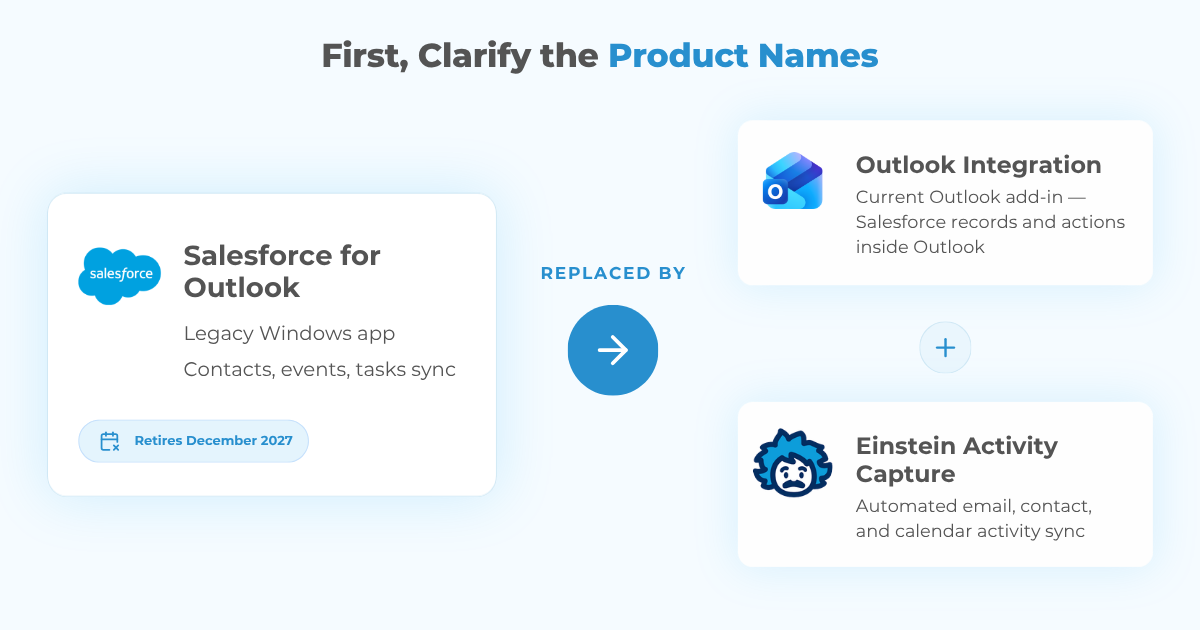
Salesforce for Outlook is already in maintenance mode, and full product retirement is scheduled for December 2027. After retirement, it will no longer synchronize contacts, events, or tasks, and users will lose its remaining Outlook functionality. Salesforce recommends moving to Outlook Integration and Einstein Activity Capture.
Companies that still use Salesforce for Outlook need a replacement path that preserves the functions their users depend on, including synchronization direction, custom field mappings, filters, user assignments, matching rules, and conflict handling. Standard teams may move directly to Salesforce’s current products. Organizations with custom workflows may need an AppExchange solution or an integration partner such as Peeklogic.
How Does the Native Salesforce Outlook Stack Work in 2026?
Outlook Integration brings Salesforce records and actions into Microsoft Outlook, while Einstein Activity Capture automates supported email, contact, and calendar activity.
Outlook Integration places Salesforce inside the inbox. A rep can view related CRM records, create or update information, and connect an email with a supported Salesforce record without switching applications.
Einstein Activity Capture automates supported email, event, and contact activity. Salesforce is also enabling eligible organizations to use Sync Email as Salesforce Activity. With this setting enabled, captured email is stored as Salesforce EmailMessage and Task records, making it available to reports, APIs, workflows, triggers, and automation.
Native integration is usually effective when:
✓ The company uses mostly standard Leads, Contacts, Accounts, and Opportunities
✓ One Microsoft 365 environment connects to one Salesforce org
✓ Email and calendar rules are straightforward
✓ The standard Outlook side panel supports the sales process
In these conditions, native tools can reduce manual data entry and improve CRM adoption without adding unnecessary custom code.
What Should Salesforce for Outlook Users Do Before December 2027?
Organizations should audit their current synchronization rules, identify missing native functionality, test replacement options, and complete migration before the product is retired.
Salesforce lists December 2027 as the full retirement date for Salesforce for Outlook. Administrators should treat the remaining time as a migration window, not as permission to keep the legacy client indefinitely.
A practical migration starts with five steps:
- Identify every active and occasional Salesforce for Outlook user.
- Record current sync directions, filters, folders, custom fields, and conflict rules.
- Match each function to Outlook Integration, EAC, an AppExchange tool, or custom development.
- Test the replacement with representative mailboxes and Salesforce data.
- Roll it out before retirement, with monitoring and user guidance.
A direct move to native products may work well for standard teams. Organizations with managed packages, custom record associations, or advanced governance should not assume the replacement will behave exactly like the retiring client.
What Affects the Migration Timeline?
The timeline depends on the number of users, the existing Salesforce for Outlook configuration, historical activity requirements, custom object mappings, Microsoft tenant structure, security rules, and the amount of testing required.
For example, a company using standard Contacts and Opportunities may only need native configuration and user rollout. An enterprise using custom objects, several Microsoft tenants, historical email migration, and regional privacy rules may require custom matching logic, APIs, middleware, and staged testing.
When Does Native Salesforce Outlook Integration Reach Its Limits?
Native tools become less effective when the business relies on complex Salesforce objects, advanced matching rules, multiple systems, strict privacy controls, or custom automation.
Historical Activity and Migration
Sync Email as Salesforce Activity improves access to captured email, but each org still needs a migration plan. Previously captured activity, user coverage, privacy settings, storage use, and historical reporting can vary according to the existing EAC configuration.
Before migration, teams should know where current activity is stored, how much history must remain accessible, which reports depend on it, and what happens to records that cannot move automatically. A customer timeline can look complete while still missing older conversations or associations.
Custom Objects and Managed Packages
Standard matching works best when an email address maps cleanly to a standard record. Enterprise data models are rarely that simple.
A financial services company may need one message connected to a Contact, Household, Financial Account, Opportunity, and relationship record. A healthcare organization may need communication associated with a Patient, Provider, Program, Case, and Care Plan.
Native matching has improved, but deeply nested objects, custom child records, proprietary identifiers, and managed-package relationships can still require organization-specific logic. The main risk is not always a failed sync. It is an incorrect record association that damages CRM data quality.
Filtering and Privacy
Not every Outlook message belongs in Salesforce. A mailbox also contains internal discussions, personal appointments, newsletters, automated alerts, and confidential communication.
Enterprise rules may need to:
- Capture an email only when an active Opportunity exists
- Exclude internal-only threads and automated notifications
- Apply different policies by region, team, or legal entity
- Route activity to different Salesforce objects based on context
Standard privacy and capture settings cover common scenarios. Custom logic becomes useful when the decision depends on domains, consent flags, folders, CRM status, user roles, message headers, or proprietary fields.
Reporting and Automation
An email visible on a timeline helps a rep. A structured email record with the correct classification and relationships can help the whole business.
Companies may need messages to create Cases, update Opportunities, calculate response times, trigger approvals, identify unanswered emails, or feed engagement signals into analytics and Agentforce. These workflows require reliable matching and accessible data.
Outlook may also be only one part of a larger revenue stack. When Salesforce, Outlook, HubSpot, ERP, service platforms, and analytics tools share customer data, the organization must define ownership and conflict rules across the entire system.
Our guide to HubSpot Salesforce integration explores the same source-of-truth, custom object, and routing questions for enterprise RevOps.
How Do Native Sync Tools Compare with Custom API Frameworks?
Native tools are efficient for standard workflows, while custom API frameworks provide more control over data models, filtering, automation, retention, and error handling.
The most useful comparison is structural, not a feature-by-feature marketing checklist.
| Capability | Native Outlook Integration + EAC | Peeklogic Custom Architecture |
|---|---|---|
| Data storage | With Sync Email as Salesforce Activity, captured email is stored as Salesforce EmailMessage and Task records. Legacy configurations still require migration review. | Data is written to the Salesforce objects and storage model selected during design. |
| Retention | Native records follow Salesforce storage, sharing, retention, and deletion policies. Legacy EAC data may follow separate rules until migration. | Retention and archival follow the organization’s policy and connected systems. |
| Custom object mapping | Native matching supports common scenarios, but complex hierarchies may require additional logic. | Supports deeply nested objects, child records, managed packages, and polymorphic relationships, where one field can reference different object types. |
| Sync directionality | Uses supported native capture and synchronization rules. | Event-driven, meaning updates are pushed when changes occur, with conditional and bidirectional logic where required. |
| Filtering | Standard privacy, sharing, and capture controls. | Custom rule-based inclusion and exclusion logic. |
| Compliance posture | Depends on Salesforce, Microsoft, permissions, storage, and migration configuration. | Designed to support organization-specific controls, auditability, and data minimization. |
| Error handling | Standard product monitoring and admin tools. | Custom queues, retries, alerts, dashboards, and audit logs. |
With Sync Email as Salesforce Activity enabled, captured email is stored directly as Salesforce records, while legacy EAC environments may still need a separate review of storage and retention before migration.
The native option is efficient when the business fits its assumptions. Custom engineering earns its place when users already rely on spreadsheets, manual logging, repeated corrections, or disconnected tools to work around the standard model.
Which Custom Salesforce Outlook Architecture Options Are Available?
The main options are direct API integration, middleware-based orchestration, and event-driven synchronization.
1. Direct Microsoft Graph and Salesforce APIs
A focused server-to-server framework can use Microsoft Graph for Outlook messages, contacts, and calendar events, together with Salesforce REST, Composite, Bulk, SOAP, or Pub/Sub APIs.
This architecture can validate data, prevent duplicates, apply conditional filters, associate activity with custom records, and trigger CRM automation. It often fits one Microsoft 365 tenant and one primary Salesforce org where middleware would add cost without enough value.
2. MuleSoft or Workato Orchestration
Middleware becomes useful when Outlook activity participates in a wider process.
A customer message may need to update Salesforce, create an ERP record, notify a service platform, send data to a warehouse, and write an event to a compliance archive.
MuleSoft or Workato can centralize credentials, transformation, monitoring, and retries. Middleware should solve genuine multi-system complexity, not become a default tax for connecting two applications that can communicate directly.
3. Event-Driven Synchronization
Polling checks systems at regular intervals to see whether data has changed. Event-driven integration pushes updates when a change occurs.
Microsoft Graph supports change notifications for messages, contacts, and calendar events. Salesforce Change Data Capture can publish notifications when supported CRM records are created, updated, deleted, or restored.
This can reduce unnecessary API traffic and support near real-time updates. It also requires disciplined engineering. Subscriptions must be renewed, webhook endpoints protected, and duplicates, missed events, retries, and ordering handled correctly.
Real-time synchronization is not just a feature. It is an operational responsibility.
How Can Custom Integration Support Business Workflows?
Custom integration can improve email matching, calendar synchronization, record creation, automation, and the user experience inside Outlook.
Contextual Email Association
A custom matching service can evaluate sender details, Account domains, Opportunity participants, record IDs, Case numbers, project codes, email headers, and proprietary identifiers.
Instead of attaching a message to the nearest Contact, it identifies the record that represents the real business context. When several matches are possible, it can suggest a record or ask the user to choose rather than silently creating an incorrect association.
Smarter Calendar Synchronization
Calendar integration does not need to copy every appointment into Salesforce. Custom rules can distinguish customer meetings, internal sessions, demonstrations, contract reviews, support calls, cancellations, and personal events.
A completed customer meeting might update an Opportunity and create a follow-up Task. An internal meeting may remain entirely in Outlook.
The goal is not to maximize CRM volume. It is to capture activity that improves decisions.
Custom Outlook Interface
A custom Outlook panel can surface Account health, open Opportunities, Cases, contracts, Project records, recent activity, next actions, and compliance warnings.
Users can create a Case, relate an email to a custom Project, update a deal stage, or start an approval without leaving Outlook. When the interface reflects the real workflow, CRM adoption improves because users no longer need to translate a generic tool into a custom process.
When Should You Choose a Custom Salesforce Outlook Integration?
A custom framework is most useful when the organization needs advanced mappings, different rules across teams, cross-system automation, multiple environments, or stricter governance.
A custom integration is not automatically secure or compliant. Security must be part of the architecture from the beginning.
Core controls typically include:
✓ Least-privilege Microsoft and Salesforce permissions
✓ Secure OAuth, encryption, credential rotation, and field-level access
✓ Retention rules, exclusion logic, audit logs, and failed-event monitoring
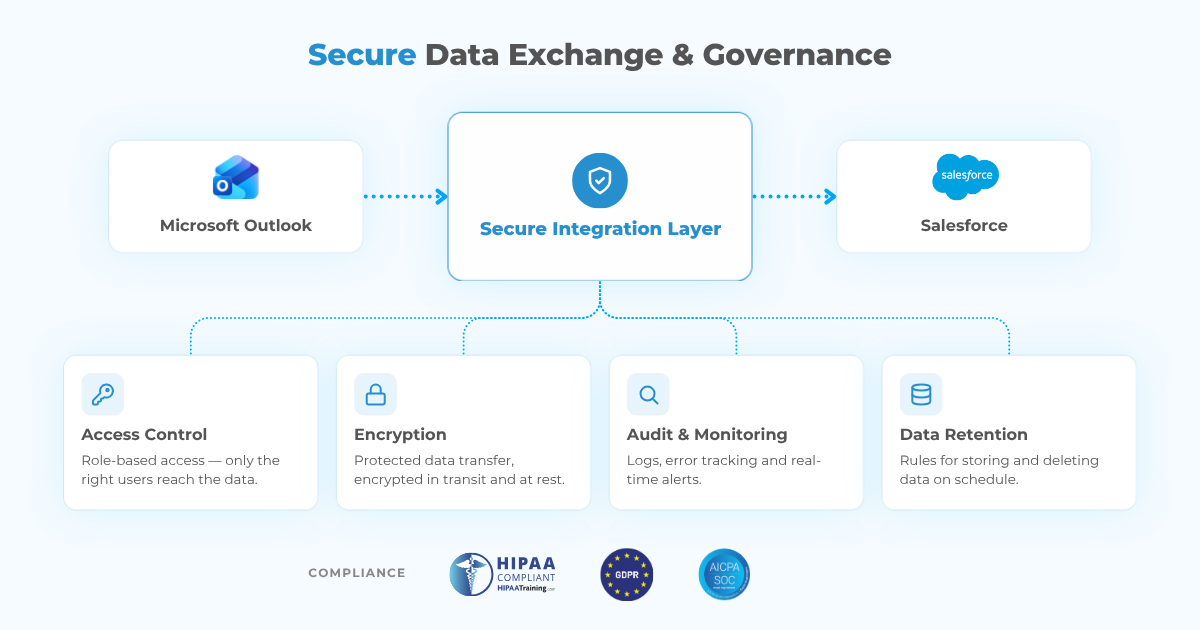
For regulated organizations, the solution can be designed to support HIPAA, GDPR, SOC 2, regional processing rules, and internal governance requirements. Compliance still depends on the full environment, including contracts, permissions, hosting, retention, and user practices.
Native integration is usually enough when the data model is largely standard, one Microsoft environment connects to one org, and native matching, reporting, and privacy controls meet the business need.
Consider a custom framework when:
- Emails must relate to custom, nested, or managed-package records
- Different teams need different capture and exclusion rules
- Activity must trigger proprietary automation or cross-system workflows
- Multiple Salesforce orgs or Microsoft tenants are involved
- Users repeatedly correct associations or re-enter the same information
The strongest signal is rarely one missing feature. It is a growing collection of exceptions.
How Does Peeklogic Approach Salesforce Outlook Integration?
The process covers discovery, architecture selection, development, validation, deployment, monitoring, and post-launch support.
- Discovery and audit: Review the Salesforce model, Microsoft environment, Salesforce for Outlook usage, EAC configuration, historical activity, user workflows, and governance requirements.
- Architecture selection: Choose native optimization, Microsoft Graph, Salesforce APIs, event-driven synchronization, middleware, migration, or a custom Outlook panel.
- Development and validation: Test successful flows, duplicates, ambiguous matches, permissions, API limits, retries, transformations, and governance controls.
- Deployment and post-launch support: Launch with monitoring, alerts, documentation, administrator guidance, and ongoing support.
Plan Your Outlook Migration
Book a Technical CallFinal Thoughts
Salesforce for Outlook will retire in December 2027. Teams still using it need a replacement plan, not just a new add-in.
For standard workflows, Outlook Integration and Einstein Activity Capture may be the right path. For custom objects, advanced filtering, multiple systems, specialized interfaces, or stricter governance, a purpose-built architecture can provide the control the native stack does not.
Peeklogic helps companies assess the gap, migrate away from retiring technology, and build Salesforce and Microsoft 365 integrations that turn inbox activity into reliable CRM context.
Frequently Asked Questions
No. Salesforce for Outlook is the legacy Windows client scheduled for retirement in December 2027. Outlook Integration is the current Microsoft add-in recommended by Salesforce and is often used with Einstein Activity Capture.
The product will stop synchronizing contacts, events, and tasks, and users will lose its remaining Outlook functionality. Organizations should migrate to the current native products, an AppExchange solution, or a custom integration before retirement.
With Sync Email as Salesforce Activity enabled, captured email is stored as Salesforce EmailMessage and Task records. Organizations using legacy configurations should review migration, storage, visibility, and historical activity before rollout.
A custom integration can relate email to custom objects, managed-package records, child records, and proprietary hierarchies using sender details, record IDs, project codes, headers, and business rules.
No. A direct Microsoft Graph and Salesforce API connection may be enough for one focused org. MuleSoft or Workato is more appropriate when the flow spans multiple systems, tenants, or Salesforce organizations.
Yes. Microsoft Graph change notifications, Salesforce Change Data Capture, Platform Events, and related APIs can support event-driven synchronization instead of continuous polling.


Salesforce Architect, CEO & Founder of Peeklogic. AppExchange Applications development, CRM Implementation, Integration with enterprise level software, Salesforce Data Migration. Salesforce AppExchange Applications development, CRM Implementation, Integration with enterprise level software, Salesforce Data Migration