August 25, 2026
 13 Views
Salesforce Multi-Cloud Implementation in 2026: Architecture, Rollout Strategy, and Common Risks


Could your Salesforce clouds be creating more silos instead of removing them?
That can happen surprisingly fast. Sales, service, marketing, partner teams, and external systems may all work inside the Salesforce ecosystem while still relying on different customer records, disconnected processes, and inconsistent data.
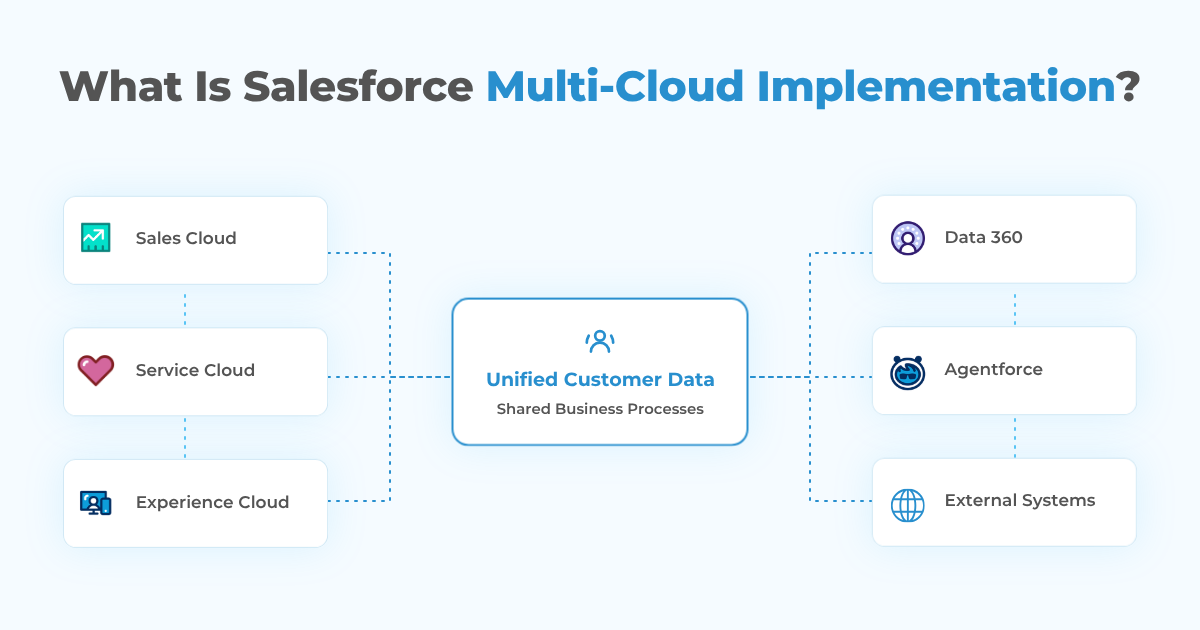
A Salesforce multi-cloud implementation connects Sales Cloud, Service Cloud, Experience Cloud, Data 360, and Agentforce around shared customer data and business processes instead of creating separate silos. According to Gartner, poor data quality costs organizations at least $12.9 million per year on average, and inconsistency across data sources is one of the hardest data quality problems to solve.
A multi-cloud program should therefore be treated as an architecture and data initiative, not simply as a sequence of Salesforce licenses.
Planning a Salesforce Multi-Cloud Implementation?
Talk to PeeklogicWhat Is Salesforce Multi-Cloud Implementation?
Salesforce multi-cloud implementation is the process of deploying and connecting several Salesforce products so they support shared workflows, data, and customer journeys.
A typical architecture may include Sales Cloud for pipeline, Service Cloud for support, Experience Cloud for portals, Data 360 for data unification, Agentforce for AI-driven actions, and MuleSoft or custom APIs for external integrations.
Simply having several Salesforce products does not create a multi-cloud architecture. If every cloud has its own customer definition, automation, reporting logic, and integration pattern, the organization has several connected applications at best and several new silos at worst.
A successful implementation answers four questions early: which system owns each important type of data, which clouds need access to it, which processes cross cloud boundaries, and what happens when data is missing, duplicated, delayed, or inconsistent.
How Salesforce Clouds Work Together in 2026
Multi-cloud value comes from the relationships between products. Each cloud solves a different part of the customer lifecycle, but the implementation must define how information moves between them.
Sales Cloud and Service Cloud: Connecting Revenue and Support
Sales Cloud and Service Cloud are a common starting point because sales and support teams often work with the same Accounts and Contacts but need different context.
Sales teams need pipeline and account context. Service teams need cases, SLAs, entitlements, and support history. When the two are connected properly, a rep can see an unresolved critical case before discussing a renewal, while service can understand whether the customer is in an active expansion.
This connection can also support automation. A high-priority case may notify an account owner, repeated product issues may influence account health, and a resolved case may trigger customer-success follow-up. Because both products share the Salesforce platform and core CRM model, the main challenge is usually governance rather than basic connectivity.
Experience Cloud: Extending CRM Data Outside the Company
Salesforce Experience Cloud extends Salesforce data and workflows to customers, partners, distributors, suppliers, and other external users through branded digital experiences. Salesforce positions it for use cases such as customer self-service, partner collaboration, and sharing CRM information securely with external audiences.
In a multi-cloud environment, Experience Cloud can expose selected CRM and service data while access remains controlled by roles, sharing, permissions, and business rules. Customer portals may surface cases, documents, or account information, while partner portals can support lead distribution, deal registration, and quoting.
That makes external-user security and identity part of the architecture from the start.
Data 360: Unifying Customer Data Across Clouds and Systems
Salesforce renamed Data Cloud to Data 360 in October 2025, although many organizations and search queries still refer to it as Data Cloud. Salesforce’s Data 360 documentation explains that the platform can ingest or connect structured and unstructured data, harmonize it, apply identity resolution, and make unified data available across Customer 360 applications and other use cases.
Data 360 becomes useful when the customer picture no longer fits inside one CRM org. An enterprise might need to combine Salesforce records with ecommerce activity, product usage, support interactions, ERP transactions, warehouse data, or web behavior.
The purpose is not to copy everything into another repository. It is to create usable customer context through harmonization, identity resolution, and activation. Data 360 is not mandatory for every rollout, but it becomes more relevant when identity resolution, high-volume behavioral data, cross-org unification, or AI use cases require a broader data foundation.
Agentforce: AI Depends on the Architecture Underneath It
Agentforce raises the stakes for data quality and integration because agents need trusted business context before they can take useful action.
According to Salesforce’s Agentforce platform overview, Agentforce can use customer and enterprise data unified through Data 360 and act across Salesforce applications and business workflows.
That means a multi-cloud implementation should define what an agent is allowed to see, which actions it can perform, which system remains authoritative, and where human approval is required.
For example, a service agent may need support history, account value, product usage, and policy data at once. If those inputs conflict, the AI layer cannot reliably decide which one is correct. AI readiness is therefore one more reason to get identity, permissions, integration, and data ownership right early.
External Integrations: Where MuleSoft and APIs Fit
Enterprise Salesforce rarely operates alone. ERP, billing, product, logistics, identity, document, and analytics platforms often remain outside Salesforce.
MuleSoft Anypoint Platform can provide a managed integration layer for APIs and reusable services when many systems need to exchange data, while direct Salesforce APIs may be more appropriate for narrower integrations where middleware would add unnecessary complexity. Salesforce describes MuleSoft as a platform for developing, deploying, managing, and governing integrations and APIs at scale.
A direct API can be efficient for one focused connection. An API-led integration layer becomes more valuable when multiple clouds and external systems repeatedly need the same customer, order, product, billing, or entitlement data.
Why Implement Multiple Salesforce Clouds?
The strongest reason is the ability to make cross-functional processes work without employees rebuilding context manually. A multi-cloud architecture can create outcomes such as:
✓ Sales seeing service risk before renewal conversations
✓ Service seeing commercial context before handling strategic accounts
✓ Partners accessing only the CRM data relevant to them
✓ Marketing and AI using unified customer attributes instead of isolated lists
✓ Customer activity triggering workflows across several departments
✓ Reporting connecting acquisition, revenue, service, and retention
These benefits depend on trustworthy data. Connecting poor-quality records faster simply distributes the problem faster.
How to Plan a Salesforce Multi-Cloud Implementation
A complex rollout is easier to control when architecture decisions happen before configuration.
1. Map Business Processes Before Choosing the Sequence
Start with journeys such as lead-to-opportunity, opportunity-to-order, order-to-service, case-to-renewal, partner-to-deal, or customer onboarding.
For each journey, document which teams participate, which systems they use, where data changes ownership, and what still requires manual work. This reveals which clouds should be connected first.
2. Define Systems of Record
Every major data domain needs a clear owner.
| Data Domain | Possible System of Record |
|---|---|
| Accounts and Contacts | Salesforce CRM |
| Opportunities | Sales Cloud |
| Cases | Service Cloud |
| Orders | ERP or Commerce platform |
| Partner activity | Salesforce + Experience Cloud |
| Customer identity | Data 360 |
| Invoices | Finance or ERP |
| Product usage | External product platform |
The exact answer varies. What matters is that the answer exists.
Bidirectional synchronization without ownership rules creates circular updates, conflicts, duplicate records, and difficult troubleshooting.
3. Clean and Govern Data Before Connecting More Clouds
Multi-cloud implementation amplifies whatever data quality already exists.
Before migrating or synchronizing data, review duplicate Accounts and Contacts, required-field completeness, naming standards, consent, inactive records, historical-data requirements, and identity rules.
If poor data already creates reporting errors or duplicate work in one cloud, connecting four more systems will not repair it automatically.
4. Select the Right Integration Pattern
Not every connection should be real time and bidirectional.
Possible patterns include native Salesforce relationships, Flow, Platform Events, Change Data Capture, REST or Bulk APIs, scheduled synchronization, MuleSoft, Data 360 ingestion, and zero-copy access where supported.
The choice should reflect required latency, transaction volume, system ownership, and failure impact. A nightly product-catalog sync has different requirements from a real-time entitlement check.
5. Roll Out in Phases
A multi-cloud implementation should deliver business value at each stage.
One possible sequence is:
- Stabilize core CRM data and Sales Cloud.
- Connect Service Cloud and shared customer processes.
- Add Experience Cloud for customers or partners.
- Unify external and high-volume data in Data 360 where justified.
- Introduce Agentforce use cases on top of governed data and workflows.
- Expand integrations and automation based on measurable demand.
The exact sequence differs by organization, but each layer should be stable before the next depends on it.
Common Salesforce Multi-Cloud Implementation Risks
Multi-cloud projects rarely fail because of one obvious mistake. More often, problems build up quietly over time as each team makes reasonable decisions in isolation, until the architecture becomes harder to maintain, govern, and scale.
Most multi-cloud risks come from accumulated architectural decisions rather than one dramatic technical error.
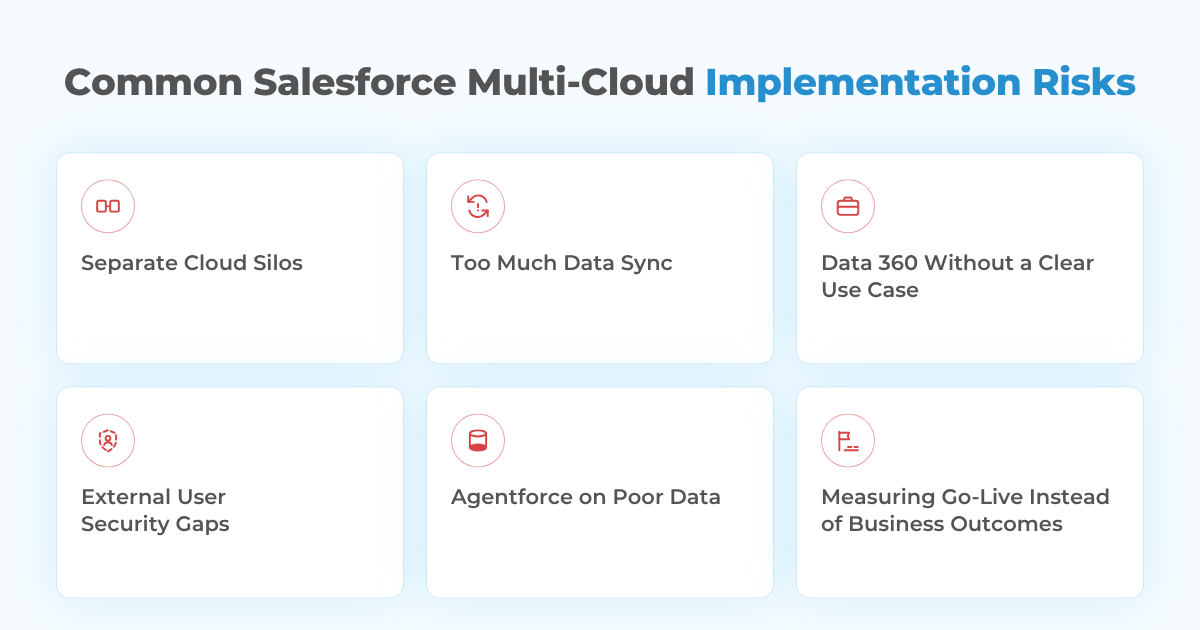
Treating Each Cloud as a Separate Project
Separate teams may configure fields, automation, security, and customer definitions differently. The result is Salesforce reproducing the same fragmentation the program was supposed to remove.
Shared data, integration, naming, and release standards reduce this risk.
Synchronizing Too Much Data
More synchronization is not automatically better.
Copying every field increases API use, storage, dependencies, and failure paths. Each integration should have a business reason and a defined consumer.
Introducing Data 360 Without a Clear Activation Use Case
Salesforce itself recommends reviewing data strategy, existing sources, unified-profile goals, users, permissions, and intended data usage before starting Data 360 implementation.
If a team cannot explain what it will do differently after profiles are unified, the extra data layer may not be justified.
Underestimating External User Security
Experience Cloud introduces customers and partners into the architecture. Sharing rules that are acceptable for employees may be inappropriate for external users.
Least-privilege access, guest-user exposure, authentication, sharing, and record ownership all need deliberate review.
Adding Agentforce Before the Data Is Ready
An AI agent with access to conflicting or poorly governed data can automate the wrong decision faster.
Agentforce use cases should therefore have explicit source data, permissions, action boundaries, fallback behavior, logging, and human escalation paths.
Measuring Go-Live Instead of Business Outcomes
A project can launch on time and still fail to improve operations.
Useful post-launch metrics include duplicate reduction, profile completeness, case resolution time, lead conversion, manual data-entry reduction, integration failure rates, and user adoption.
Salesforce Multi-Cloud Best Practices
A multi-cloud implementation can become expensive quickly. Salesforce is not the cheapest CRM, each additional cloud adds its own cost, and the real risk is paying for several products while the underlying processes are still designed poorly.
The good news is that most of these problems can be reduced with the right architecture and rollout discipline. A few practical best practices can make a multi-cloud implementation much easier to scale, govern, and maintain.
Keep one architecture across clouds. Maintain shared standards for objects, naming, integrations, security, and automation.
Design for failure. APIs time out, events arrive twice, records become locked, and external systems go offline. Retry logic, queues, monitoring, and reconciliation should be part of the design.
Use the simplest integration that meets the requirement. Native Salesforce functionality is often preferable when it genuinely fits. Custom APIs or MuleSoft should solve complexity, not create it.
Treat governance as part of AI readiness. Salesforce notes that Data 360 governance can control access, visibility, security, consent, and the safe use of customer data for AI.
Plan releases across the ecosystem. Multi-cloud environments have more dependencies, so regression testing, sandbox strategy, CI/CD, and coordinated production releases become increasingly important.
How Peeklogic Approaches Salesforce Multi-Cloud Implementation
Certifications matter, especially when a multi-cloud architecture touches sensitive customer data, integrations, and access across several systems. Peeklogic holds ISO 27001, GDPR, and HIPAA compliance assessments and has been an official Salesforce Consulting Partner since 2017.
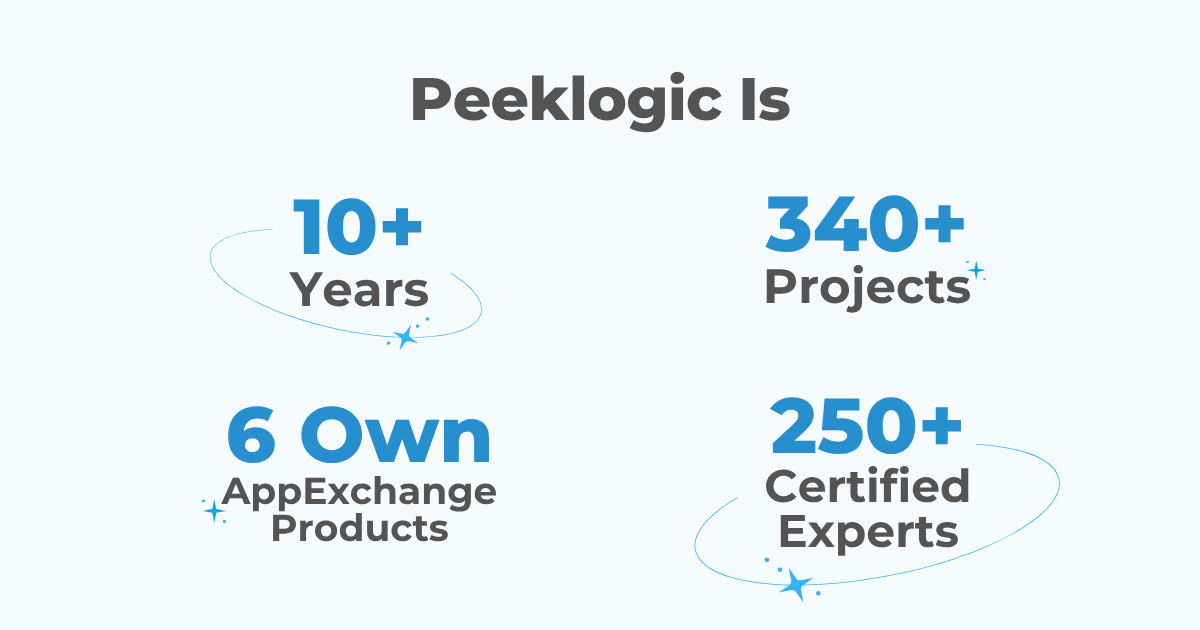
Still, certifications are only part of the picture. Multi-cloud projects depend heavily on practical experience, and Peeklogic brings 10+ years of Salesforce expertise, 340+ completed projects, and 250+ certified experts across CRM, integrations, data, automation, and complex Salesforce environments.
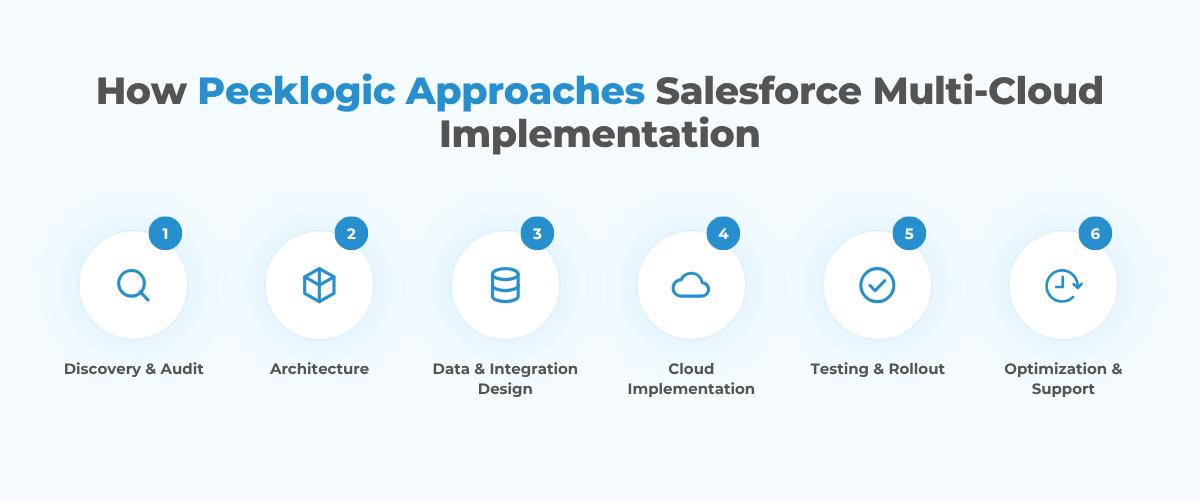
Through its Salesforce implementation services, Peeklogic supports discovery, data modeling, integrations, rollout planning, testing, production cutover, training, and post-launch support. Its implementation spans Sales Cloud, Service Cloud, Marketing Cloud Engagement and Account Engagement, Experience Cloud, Revenue Cloud, Data Cloud, Agentforce and Einstein AI, Industry Clouds, MuleSoft, Slack, Heroku, Tableau, and CRM Analytics.
Peeklogic also implements and integrates AppExchange applications and has built 6 AppExchange products of its own, adding first-hand product experience to its implementation work. The company has a 4.9 rating across 216 reviews and maintains a Salesforce partner and AppExchange presence alongside broader technology partnerships.
The work typically starts with an assessment of existing orgs, business processes, external applications, data quality, integrations, permissions, and reporting. From there, the implementation can define:
- Which Salesforce clouds are actually required
- Which system owns each major data domain
- How clouds and external systems should exchange information
- Where Data 360 adds enough value to justify the additional layer
- Which Agentforce use cases have sufficiently reliable data and controls
- How the rollout should be phased and tested
Need a Multi-Cloud Architecture That Fits Your Business?
Talk to PeeklogicKey Takeaways
Salesforce multi-cloud implementation in 2026 is primarily a data, integration, and operating-model challenge.
Sales Cloud, Service Cloud, Experience Cloud, Data 360, Agentforce, and external systems become more valuable when they share deliberate architecture. They also create more complexity when ownership, identity, security, and integration decisions are postponed.
Before implementation, map cross-functional processes, define systems of record, clean the data, choose integration patterns deliberately, phase the rollout, and measure outcomes that cross cloud boundaries. The best architecture is the one where users can act on reliable customer context without needing to know which system produced it.
Frequently Asked Questions
Salesforce multi-cloud implementation is the process of deploying and connecting multiple Salesforce products, such as Sales Cloud, Service Cloud, Experience Cloud, Data 360, and Agentforce, so they share data, workflows, automation, and customer context instead of operating as separate systems.
No. Data Cloud, now called Data 360, is most valuable when customer data is fragmented across multiple systems, identity resolution is required, high-volume data needs to be activated, or AI use cases need a broader customer context. Simpler environments may not require it immediately.
Not always. Native Salesforce tools and direct APIs can support many integrations. MuleSoft becomes more useful when several systems need reusable APIs, complex transformations, centralized monitoring, or cross-system orchestration.
There is no universal timeline. Duration depends on the number of clouds, integrations, data quality, migration volume, customization, security, testing, and rollout strategy. A phased implementation is usually safer than launching everything at once.
Unclear data ownership is one of the biggest risks. Without agreement on systems of record, identity rules, synchronization logic, permissions, and governance, connecting clouds can multiply inconsistencies instead of eliminating them.

Accomplished Salesforce professional with a decade of hands-on expertise in designing, implementing, and optimizing Salesforce Service Cloud solutions for organizations across diverse industries. Adept at translating complex business needs into scalable, high-performance configurations and customizations that enhance customer service, streamline case management, and improve operational efficiency.