September 08, 2026
 18 Views
Migrating from a Legacy CRM to Salesforce in 2026


Legacy CRM to Salesforce migration is rarely difficult because of the export itself. The real challenge is deciding what deserves to move, what needs to change, and what should finally be left behind.
Years of duplicate contacts, custom fields, old workflows, spreadsheets, reports, and integrations can make a CRM feel impossible to replace. Moving all of that into Salesforce without questioning it simply recreates the same problems on a newer platform.
A better migration treats data transfer as one part of a broader redesign. The goal is to preserve useful business history while giving teams a cleaner Salesforce environment for automation, reporting, integrations, and future AI use cases.
Planning a Move from Your Legacy CRM to Salesforce?
Talk to PeeklogicWhy Companies Move from a Legacy CRM to Salesforce
Most migrations begin when the existing CRM becomes harder to change than the business itself.
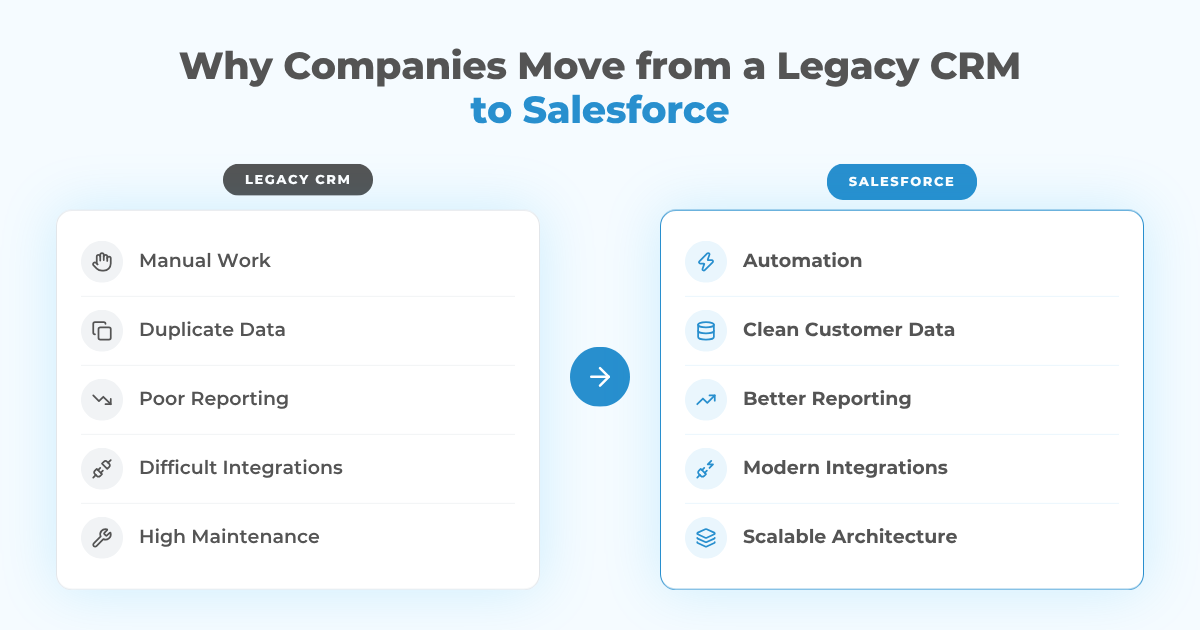
Sales teams may need better forecasting and pipeline visibility. Service teams want shared customer context. Management needs reliable reporting. Operations need integrations with ERP, billing, marketing, or data platforms. At the same time, old custom code, unsupported plugins, spreadsheets, and manual handoffs keep adding maintenance work.
Common reasons to move include:
- Limited workflow and automation flexibility
- Duplicate or inconsistent customer data
- Too much manual reporting and spreadsheet work
- Difficult integrations with modern applications
- High maintenance costs for custom or unsupported systems
- Poor visibility across sales, service, and operations
- A need to support new Salesforce capabilities without extending technical debt
Moving to Salesforce can solve many of these problems, but only if the target environment is designed around how the business should work next. Our Salesforce CRM implementation guide covers the broader decisions around Salesforce architecture, configuration, data migration, testing, and rollout.
What Should You Migrate to Salesforce?
The first migration question should not be “How do we export everything?” It should be “What does Salesforce actually need?”
A mature CRM can contain Accounts, Contacts, Leads, Opportunities, activities, cases, files, products, campaigns, custom objects, and years of history. Some of that information is essential. Some is duplicated. Some exists only because the old platform required a workaround.
A practical way to classify the source data is:
| Data Group | Recommended Action |
|---|---|
| Active business data | Migrate and validate |
| Valuable historical data | Migrate or archive based on access needs |
| Duplicate or obsolete records | Clean or exclude |
| Legacy-only configuration data | Redesign instead of copying |
| Old reports or temporary exports | Archive only if required |
Map Business Processes Before You Map Fields
Field mapping matters, but process mapping should come first.
A field such as Customer Status may look straightforward until different departments use it differently. Sales may mean an active opportunity, finance may mean a paying account, and support may mean a customer with current entitlement. Copying that field into Salesforce without agreeing on its meaning only transfers the ambiguity.
Before building a migration mapping file, document the real workflows around lead qualification, opportunity stages, approvals, onboarding, customer service, renewals, reporting, and handoffs between departments.
Then decide which legacy behaviors should be retained, redesigned, or retired.
An old workflow, script, custom field, or validation rule may exist because the previous CRM lacked functionality that Salesforce can now handle through standard objects, Flow, approvals, or a better integration pattern.
Clean and Prepare the Legacy CRM Data
A CRM migration exposes every data-quality issue accumulated over time.
Duplicate Accounts, inactive Contacts, inconsistent country values, free-text fields that should be picklists, invalid email addresses, missing ownership, and test records may all be technically importable. That does not mean they should be imported.
Before migration, review:
☑️ Duplicate detection and merge rules
☑️ Required-field completeness
☑️ Email, phone, address, date, and currency formats
☑️ Picklist values and naming standards
☑️ Account and Contact relationships
☑️ Record ownership and inactive users
☑️ Consent and communication preferences
☑️ Retention requirements for historical data
The exact cleanup process also depends on the source platform. For companies moving specifically from HubSpot, our HubSpot to Salesforce data migration guide goes deeper into field alignment, duplicate management, workflow recreation, testing, and validation.
The goal is not perfect data. It is data clean enough that Salesforce reports, automations, integrations, and future AI use cases do not inherit predictable errors on day one.
Design the Salesforce Data Model and Mapping Rules
Once the target processes are clear, map the source data into Salesforce.
A migration mapping document should identify the source object, source field, target Salesforce object, target field, data type, transformation rule, required status, default value, and relationship dependency.
For example:
| Legacy CRM | Salesforce | Transformation |
|---|---|---|
| Company | Account | Normalize company name |
| Person | Contact | Match to Account |
| Sales Deal | Opportunity | Map legacy stages |
| Owner ID | OwnerId | Translate legacy user IDs |
| Client Type | Account.Type | Standardize picklist values |
| Old Customer ID | External ID | Preserve for reconciliation |
Stable external identifiers are especially useful because they give the migration team a reliable reference between the old system and Salesforce during loading, validation, and troubleshooting.
Relationships also determine load order. Parent records need to exist before dependent records can be connected to them, and ownership cannot be assigned correctly until users and mappings are ready.
Choose the Right Migration Method
There is no single migration tool that is right for every legacy CRM to Salesforce project.
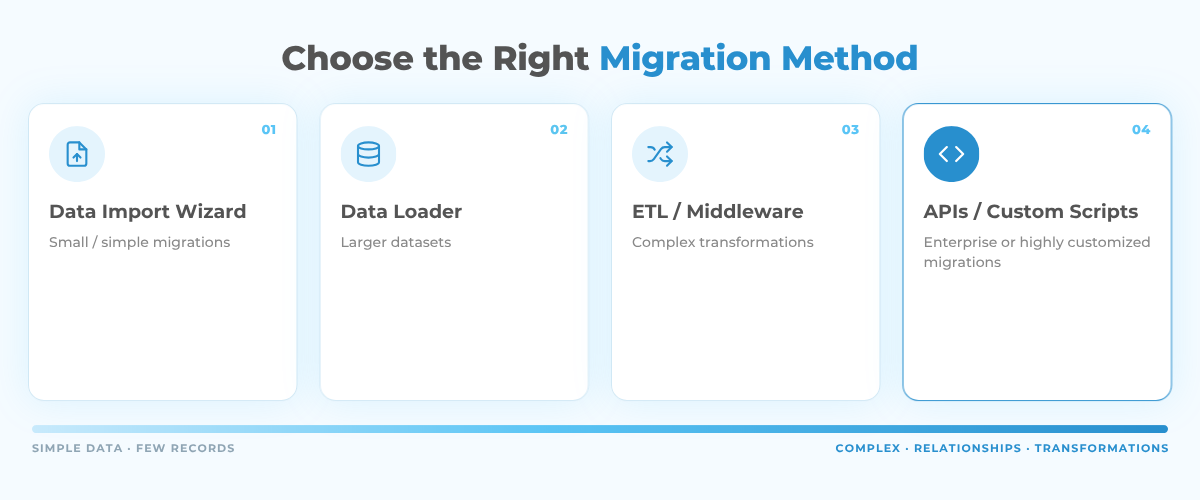
Smaller migrations with straightforward objects may use Salesforce-native import tools. Larger projects often require Data Loader, APIs, ETL platforms, middleware, or custom migration scripts.
The choice depends on:
- Number of records and objects
- Complexity of source and target schemas
- Relationship dependencies
- Transformation requirements
- Attachments and files
- Need for repeatable test loads
- Error logging and reconciliation requirements
- Whether several source systems are involved
For complex enterprise migrations, repeatability matters a lot. The team should be able to run the same extraction, transformation, and loading logic several times in testing before using it for the final production cutover.
What Happens to Legacy Automations and Integrations?
Data is only one part of an old CRM. Mature environments also contain workflow rules, scheduled jobs, emails, web forms, reports, integrations, custom code, and downstream processes.
Each one needs a migration decision. It may be:
- Retired
- Replaced with standard Salesforce functionality
- Rebuilt with Salesforce Flow
- Recreated with Apex or custom development
- Moved into middleware
- Redesigned as an API or event-driven integration
The wrong approach is to rebuild everything one-for-one simply because it existed before.
A legacy CRM may contain years of accumulated automation that nobody would design the same way today. Recreating all of it can produce a Salesforce org that is already difficult to maintain at launch.
A better approach is to identify the business outcome behind each automation and then choose the simplest modern Salesforce architecture that delivers that outcome.
Rehearse the Migration Before Production Cutover
A production migration should never be the first complete run.
A practical sequence is:
- Extract a representative sample from the legacy CRM.
- Transform and clean it using the agreed mapping rules.
- Load the sample into a Salesforce sandbox.
- Validate counts, relationships, ownership, and automation behavior.
- Run user acceptance testing with real business scenarios.
- Fix mapping and configuration issues.
- Rehearse the complete migration at production scale.
- Freeze or tightly control changes in the source CRM.
- Run the production migration.
- Reconcile results and begin hypercare.
This rehearsal catches the problems that rarely appear in a clean test file: missing users, unexpected values, child records loaded before parents, incorrect ownership, files that fail to migrate, or automations that fire during import and change data unexpectedly.
Big Bang vs. Phased Salesforce Migration
Not every company should switch every team and process on the same day.
A big-bang cutover can work when the CRM scope is relatively contained, integrations are limited, and dependencies are well understood. Everyone stops using the legacy CRM and begins working in Salesforce at the agreed cutover point.
A phased rollout is often safer when several business units, countries, integrations, or Salesforce clouds are involved.
Phasing reduces some operational risk, but it creates a temporary period when the legacy CRM and Salesforce coexist. That requires clear ownership of which system is authoritative, how changes are synchronized, and when each source is frozen.
Common Legacy CRM to Salesforce Migration Risks
Most migration failures come from several smaller assumptions rather than one dramatic technical mistake.
Migrating everything. Old data increases volume, testing effort, and clutter without always adding business value.
Rebuilding the legacy CRM inside Salesforce. This preserves outdated processes instead of using Salesforce capabilities to simplify them.
Broken record relationships. Accounts, Contacts, Opportunities, activities, and custom records can all load successfully while losing the links that make the data useful.
Automation firing during migration. Flows, validation rules, triggers, emails, and integrations can change imported records unless migration behavior is planned in advance.
Weak reconciliation. A successful import message does not prove that every owner, relationship, field, file, and record is correct.
Ignoring adoption. A technically correct Salesforce org can still fail if users do not understand or trust the new process.
The migration plan needs to cover all of these areas rather than treating success as “the import finished without errors.”
User Adoption and Change Management
Migration changes daily habits, not just software.
Users may lose familiar screens, reports, shortcuts, field names, and workarounds. Even when the Salesforce process is better, productivity can drop if those changes appear for the first time on launch day.
A practical adoption plan includes:
- Role-based training
- Sandbox access before launch
- Updated SOPs and process documentation
- Internal champions for different teams
- A clear support channel during go-live
- Hypercare after the production cutover
Training should use real workflows rather than generic Salesforce navigation. A sales rep should practice qualifying a lead and updating an Opportunity. A service user should work through a Case. A manager should validate the reports they will rely on after launch.
This also gives the migration team another opportunity to catch missing fields, confusing layouts, or process gaps before they become production problems.
How Long Does a Legacy CRM to Salesforce Migration Take?
There is no universal timeline.
A relatively small CRM with clean Accounts, Contacts, Opportunities, and only a few integrations may be migrated in several weeks. A complex enterprise environment with custom objects, years of history, documents, ERP integrations, regulatory requirements, and redesigned workflows can take several months.
Timeline is usually influenced by data quality, number of objects, integration complexity, custom logic, testing requirements, user groups, training scope, and cutover constraints.
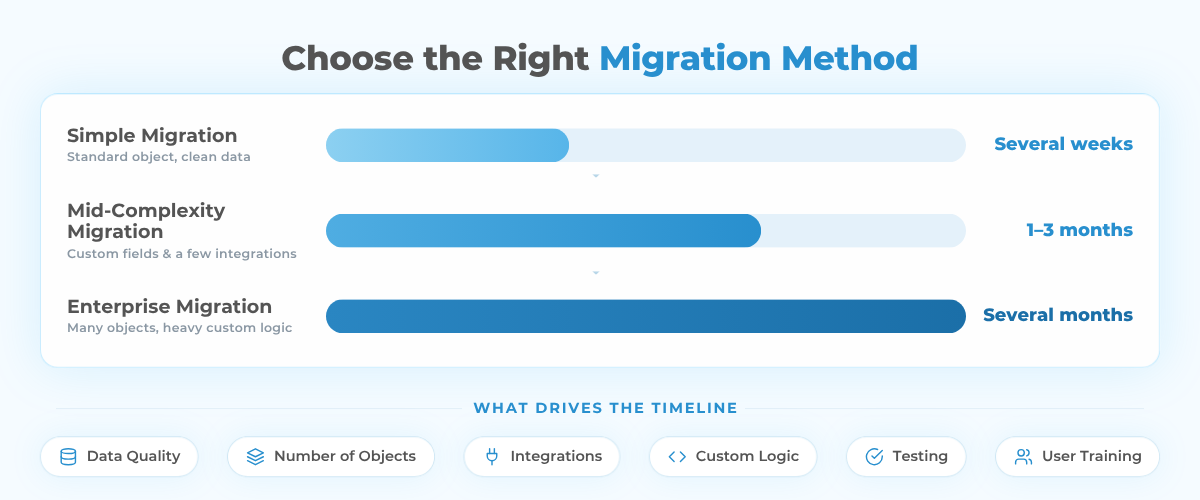
Record count alone is rarely the best predictor. A large clean dataset with stable mappings can be easier to migrate than a much smaller database with inconsistent relationships and undocumented business rules.
The most reliable estimates come after discovery and a test migration, when the team understands the real transformation and validation effort.
How Peeklogic Approaches Legacy CRM to Salesforce Migration
Peeklogic treats legacy CRM to Salesforce migration as a Salesforce implementation and data architecture project, not simply a file transfer.
The work begins with discovery of the legacy CRM, business processes, integrations, data model, reports, custom logic, and current pain points. From there, the target Salesforce architecture can define what should be migrated, redesigned, integrated, archived, or retired.
A migration project can include data assessment and cleansing, object and field mapping, Salesforce configuration, custom development, automation recreation, integration work, sandbox rehearsals, UAT, production cutover, reconciliation, training, and post-launch support.
Peeklogic works across migration, implementation, integration, and custom Salesforce development, which is particularly important when an old CRM contains business logic that cannot be solved through data import alone. You can also review Peeklogic on Salesforce AppExchange when evaluating a Salesforce partner for an integration-heavy or custom migration project.
The objective is not to make Salesforce look exactly like the old CRM. It is to preserve the information the business still needs while creating a cleaner platform for future growth.
Ready to Replace Your Legacy CRM with Salesforce?
Talk to PeeklogicKey Takeaways
A successful legacy CRM to Salesforce migration starts with business processes and data ownership, not export files.
Clean and classify source data before migration, design the Salesforce model around future processes, preserve relationships through stable identifiers, and rehearse the complete migration before production.
Review old automations and integrations instead of recreating them automatically. The real success metric is not how many records moved, but whether users can trust the new CRM and build on it without carrying old technical debt forward.
Frequently Asked Questions
A legacy CRM to Salesforce migration moves relevant customer data, relationships, processes, automation, and integrations from an older CRM or custom system into Salesforce while redesigning the target environment around Salesforce capabilities.
Most companies migrate active Accounts, Contacts, Leads, Opportunities, relevant activities, service records, files, and business-critical custom data. Duplicate, obsolete, test, or low-value historical records can often be cleaned, archived, or excluded.
Duplicates should be addressed before loading through normalization, matching rules, stable external identifiers, and defined merge criteria. Testing should also verify that repeated migration runs or retries do not create additional records.
Yes, depending on the source and complexity. Smaller migrations may use exported files and Salesforce-native import tools. Larger projects commonly use Data Loader, APIs, ETL platforms, middleware, or custom migration scripts.
Simple migrations can take several weeks, while complex enterprise migrations can take several months. Data quality, integrations, custom processes, testing, and adoption requirements usually influence the timeline more than record count alone.
Usually not. Historical data should be evaluated against business, reporting, compliance, and access requirements. Migrating unnecessary records adds cost and complexity to the new Salesforce environment.
Organizations commonly keep the legacy CRM read-only for a defined period, archive required historical information, validate Salesforce after cutover, and then retire the old platform according to operational and retention requirements.


Salesforce Architect, CEO & Founder of Peeklogic. AppExchange Applications development, CRM Implementation, Integration with enterprise level software, Salesforce Data Migration. Salesforce AppExchange Applications development, CRM Implementation, Integration with enterprise level software, Salesforce Data Migration