
 September 03, 2026
 50 Views
Boomi vs Workato for Salesforce: Integration-First or Automation-First?


Boomi vs Workato for Salesforce is not really a contest between two connector libraries. The real difference is architectural: Boomi usually fits better when the challenge is complex integration across systems, while Workato is often stronger when the priority is fast automation across business applications.
According to the current G2 comparison of Boomi and Workato, Workato scores 9.0 for Ease of Use versus 8.6 for Boomi, 8.8 versus 8.6 for Ease of Setup, and currently holds a 4.7/5 overall rating compared with 4.4/5 for Boomi. Those numbers support Workato’s reputation for accessibility, but they do not make it the automatic winner for every Salesforce environment.
Comparing Boomi and Workato for Salesforce?
Talk to PeeklogicBoomi vs Workato at a Glance
| Area | Boomi | Workato |
|---|---|---|
| Core approach | Integration-first | Automation-first |
| Salesforce integration | Strong | Strong |
| Data integration | Very strong | Strong |
| Workflow automation | Strong | Very strong |
| Hybrid connectivity | Strong runtime flexibility | Secure on-premises connectivity |
| B2B / EDI | Strong | Supported |
| Best fit | Complex enterprise integration | SaaS-heavy workflow automation |
Both platforms can connect Salesforce with ERP, finance, support, marketing, data, and productivity systems. The important difference is what happens after the connection becomes technically possible. Boomi tends to expose more of the integration architecture, while Workato makes the automated business process the main abstraction.
What Is Boomi iPaaS?
Boomi iPaaS is designed to connect applications, databases, APIs, files, and business processes across cloud and private environments.
In a Salesforce architecture, Boomi may sit between CRM and systems such as SAP, NetSuite, Oracle, warehouse applications, manufacturing platforms, finance software, or legacy databases. That makes it especially relevant when Salesforce is only one part of a wider enterprise landscape.
A typical integration may need to transform customer identifiers, map Salesforce fields to ERP structures, process orders, return invoice status, retry failed transactions, and reconcile records without creating duplicates. Boomi is built around this type of work, with visual mapping, process orchestration, APIs, monitoring, and runtime controls forming part of the same integration layer.
Its runtime model is also important. Organizations can process integrations through Boomi-hosted environments or use customer-controlled runtimes closer to private systems. That can be useful when Salesforce needs to exchange data with applications behind a firewall or inside a heavily customized environment.
For complex Salesforce-to-ERP or multi-system architectures, this integration-first model is one of the strongest arguments for Boomi iPaaS.
What Is Workato?
Workato covers many of the same integration requirements, but its product experience is more automation-first.
Its core building block is a recipe: a trigger followed by one or more actions across connected systems. For Salesforce teams, that might mean starting onboarding when an Opportunity becomes Closed Won, creating Jira tasks, updating billing, notifying Customer Success in Slack, and sending data to analytics.
That is technically an integration, but users experience it as a business workflow. This makes Workato attractive to organizations that want Salesforce admins, operations teams, integration specialists, and IT to collaborate on automation without treating every workflow as a custom development project.
Typical Salesforce workflows include:
- Customer onboarding after a deal closes
- Finance and billing handoffs
- Jira or ServiceNow task creation
- Slack notifications and approvals
- Synchronization across marketing, support, and analytics tools
Workato also supports APIs, databases, transformations, custom connectors, and secure access to on-premises systems. It is therefore broader than a simple SaaS automation tool.
Salesforce Integration: Where Boomi and Workato Feel Different
The difference becomes clearer when the Salesforce use case gets more complex.
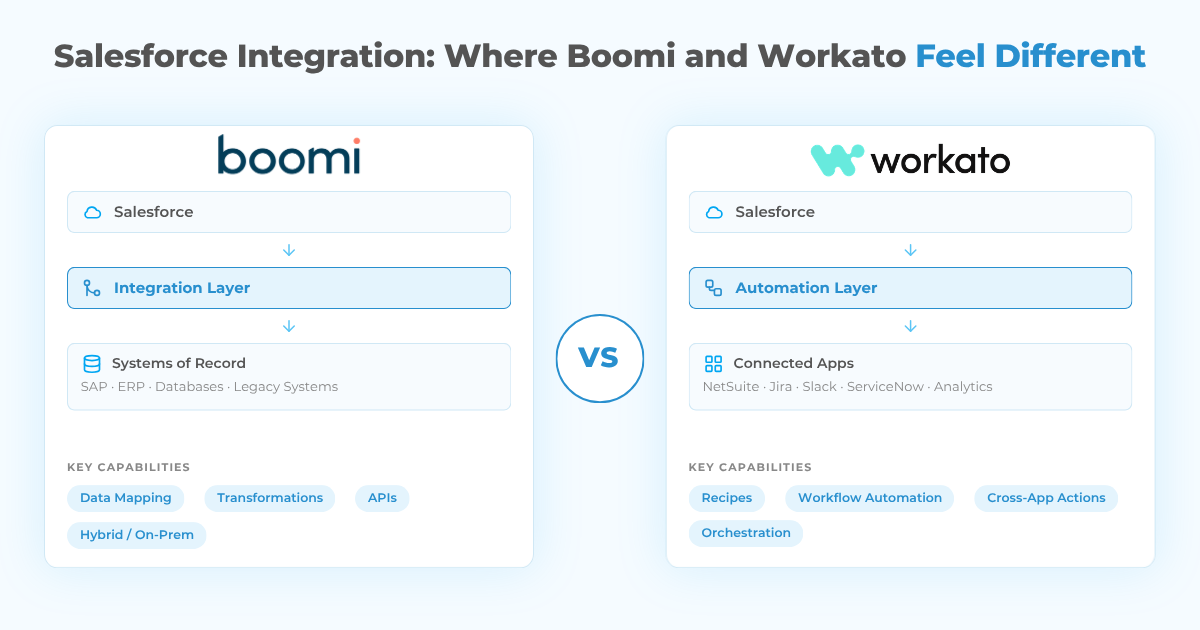
Consider a manufacturer using Salesforce together with SAP, a warehouse platform, logistics software, and internal databases. Once an order is approved in Salesforce, customer and product data must move into SAP, identifiers need transformation, fulfillment information has to return to CRM, and failed transactions must be logged and reconciled.
That is mainly an integration architecture problem. Boomi is a natural fit because data mapping, transaction handling, runtime location, APIs, and enterprise connectivity are central to the platform.
Now consider a SaaS company using Salesforce with NetSuite, Jira, Slack, ServiceNow, marketing automation, and analytics. When a deal closes, the company wants to create an implementation project, notify finance, assign onboarding tasks, update billing, and synchronize account information.
That environment still requires integration, but the dominant problem is orchestration. Workato’s recipe model makes these workflows easier to build, understand, and change.
Neither platform is limited to one scenario. The useful distinction in a Boomi vs Workato comparison is which type of work will dominate the Salesforce integration roadmap.
Data Integration and Transformation
Boomi has a strong position when Salesforce integration involves significant data transformation.
Enterprise systems rarely describe customers, products, invoices, and orders in exactly the same way. Different applications may use different identifiers, field structures, currencies, units, or validation rules. Integration therefore needs more than simple record copying.
Boomi’s visual mapping and transformation capabilities are well suited to these requirements. Combined with flexible runtime placement, they can support data-heavy integrations across cloud and private systems.
Workato can also transform and synchronize data, work with databases, process files, and support batch or real-time workflows. The distinction is not that Workato lacks data integration.
If complex data movement is the center of the architecture, Boomi often feels closer to the problem. If data movement mainly supports a larger automated business process, Workato often feels more natural.
Workflow Automation and Ease of Use
Workflow automation is where Workato usually differentiates itself most clearly.
Recipes mirror business logic in a simple structure: a trigger starts a process, conditions determine what should happen, and actions execute across connected applications. That model makes automation easier to discuss with teams outside traditional integration engineering.
Boomi is also low-code and provides visual development tools, so it should not be treated as a developer-only platform. However, its enterprise integration model often exposes more technical concepts around data mapping, runtimes, APIs, and process design.
For companies that want RevOps, finance, customer success, support, and IT to collaborate around Salesforce automation, Workato’s accessibility can reduce the gap between the business request and implementation.
Customer Support and Operational Ownership
Support matters more as an integration platform becomes part of revenue, billing, customer service, or ERP processes.
Workato generally receives strong feedback for usability and customer experience, while Boomi benefits from a mature enterprise ecosystem, extensive training, certifications, and implementation partners.
For Salesforce teams, vendor support is only one part of the operating model. Internal expertise still determines how quickly failed jobs can be investigated, mappings updated, API changes handled, and new workflows introduced safely.
A platform that is easier for the existing team to operate can create more value than one with stronger technical capabilities but a much steeper ownership model.
Hybrid Connectivity, APIs, and B2B
Hybrid architecture remains an important factor in the Boomi vs Workato decision.
Boomi offers strong flexibility around where integrations run, which can matter when Salesforce must connect to private databases, on-premises ERP platforms, factory systems, legacy applications, or network-restricted environments.
Workato remains a cloud platform, but it can securely connect to on-premises applications and data. That makes it suitable for many hybrid environments, although the operating model differs from placing an integration runtime directly inside customer-controlled infrastructure.
Boomi also has a particular strength in B2B and EDI scenarios. These capabilities become especially relevant when Salesforce must connect with:
- Private or legacy applications
- On-premises ERP systems and databases
- Manufacturing or operational platforms
- External trading partners using EDI
- Processes requiring tighter runtime control
What Changed for Boomi and Workato in 2026?
Both platforms are moving beyond traditional iPaaS.
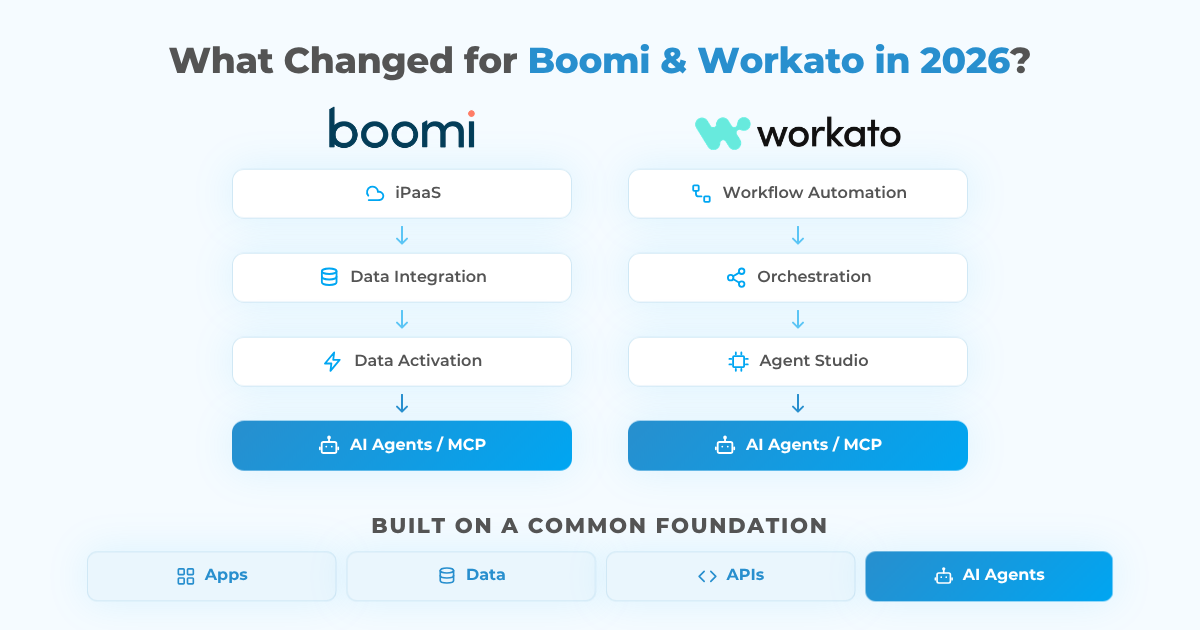
Boomi is increasingly positioning integration as part of a broader data activation and agentic AI layer, while Workato has expanded its automation model with Agent Studio, MCP capabilities, enterprise agent controls, and AI-oriented orchestration.
For Salesforce teams, this matters because future integration architecture may need to coordinate not only applications and data, but also AI agents and the tools those agents can use.
The underlying difference still holds. Boomi approaches this evolution from an enterprise integration and data foundation. Workato approaches it from automation and orchestration.
Boomi Pricing in 2026
Boomi pricing is not presented as one simple enterprise price on the company’s website. The official Boomi pricing page lets buyers compare available plans and request a demo or tailored quote based on their requirements.
Real cost depends heavily on connectors, usage, data volume, runtime requirements, environments, support, and implementation complexity.
Third-party market estimates commonly place larger deployments around:
- Professional / mid-market: approximately $20,000 to $50,000 per year
- Enterprise: approximately $50,000 to $190,000+ per year
These are not official Boomi prices and should only be used for early budgeting.
Workato Pricing in 2026
Workato pricing follows a similar enterprise pattern. The official Workato pricing page lets organizations review available plans, while larger deployments generally require customized pricing.
Unofficial market estimates vary widely. Depending on scale and contract structure, annual Workato costs are often discussed in a broad range of approximately $40,000 to $250,000, while smaller deployments may fall below that range.
These are not official Workato prices.
The better comparison is total architecture cost rather than subscription price alone. Implementation effort, workflow volume, governance, support, environments, maintenance, and the skills required to operate the platform all affect total cost of ownership.
Is Boomi a Workato Alternative?
Yes. Boomi is a strong Workato alternative when the organization needs deeper enterprise integration, complex transformations, hybrid architecture, B2B connectivity, or tighter control over where integration processing happens.
Workato is also a strong alternative to Boomi when the main requirement is rapid cross-application automation, especially in a SaaS-heavy environment where Salesforce sits alongside NetSuite, Slack, Jira, ServiceNow, marketing platforms, and analytics tools.
The overlap between the two products is substantial. The strongest fit is usually the platform whose operating model matches the systems, processes, internal skills, and people that will maintain the integration layer.
Boomi vs Workato for Salesforce: Which One Should You Choose?
Boomi is generally the stronger candidate when Salesforce is part of a complex enterprise integration landscape involving ERP connectivity, private infrastructure, B2B exchanges, legacy applications, or significant transformation requirements.
Workato is generally the stronger candidate when Salesforce sits inside a modern SaaS ecosystem and the main goal is to automate business processes quickly across applications.
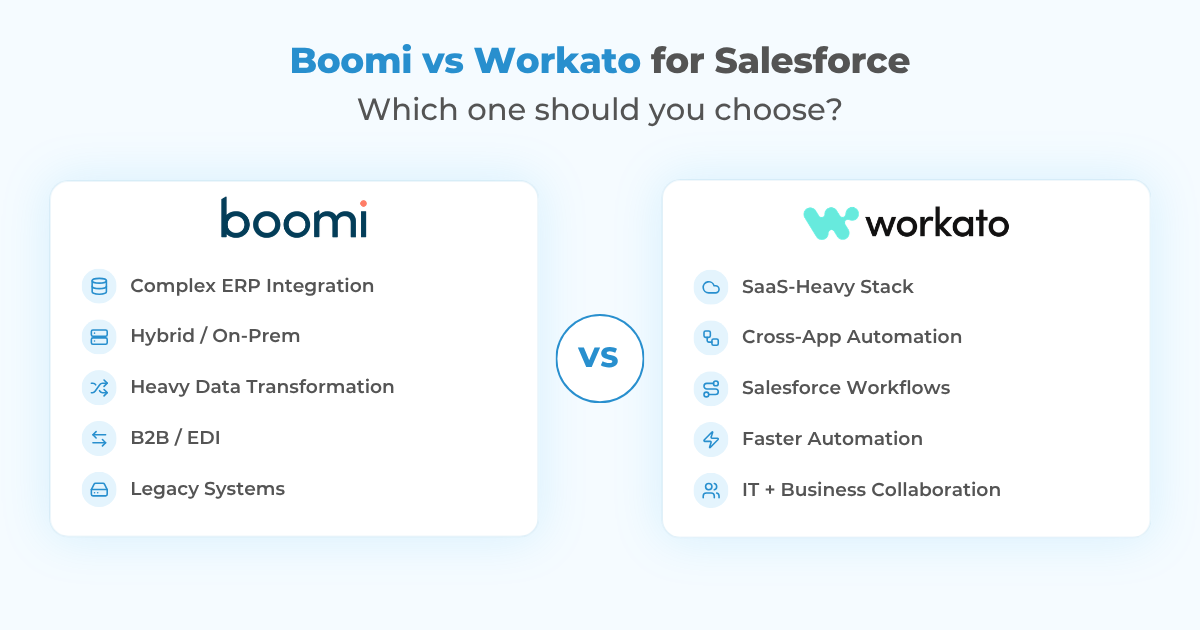
A practical way to frame the decision is:
☑️ Choose Boomi when complex integration, ERP connectivity, hybrid systems, transformation, B2B, and runtime control dominate the project.
☑️ Choose Workato when cross-application automation, SaaS orchestration, faster workflow delivery, and collaboration between IT and operations dominate the project.
☑️ Compare both when requirements overlap, then prioritize governance, internal expertise, deployment architecture, expected usage, and long-term maintenance.
How Peeklogic Approaches Boomi and Workato for Salesforce
Peeklogic starts with the Salesforce architecture rather than with a predetermined middleware platform.
The first step is identifying which systems own customers, products, orders, billing, service data, analytics, and other business processes. From there, the integration design can define data flows, sync direction, latency, APIs, transformations, security, monitoring, and error handling.
For organizations leaning toward an automation-first model, Peeklogic’s Workato integration services cover Salesforce connectivity, workflow orchestration, API integration, synchronization, automation, monitoring, and enterprise integration scenarios.
Boomi may be the stronger fit when Salesforce requires deeper connectivity with ERP systems, private databases, legacy applications, B2B networks, or transformation-heavy data flows.
The platform should follow the architecture, not the other way around. You can also review Peeklogic on Salesforce AppExchange when evaluating Salesforce partners for integration-heavy projects.
Need Help Choosing Your Salesforce Integration Platform?
Talk to PeeklogicKey Takeaways
Boomi vs Workato comes down to two different centers of gravity.
Boomi is more integration-first. It is particularly strong for enterprise data movement, hybrid environments, ERP connectivity, B2B integration, and architectures requiring deeper infrastructure control.
Workato is more automation-first. Its recipe model and workflow orientation make it particularly attractive for organizations automating processes across Salesforce and a broad SaaS ecosystem.
The right choice depends on architecture, operating model, internal skills, and total cost of ownership rather than connector count alone.
Frequently Asked Questions
Boomi is generally more integration-first, with strong data integration, hybrid architecture, API, B2B, and runtime capabilities. Workato is more automation-first, with a recipe-based model designed to make cross-application workflow orchestration easier.
Both integrate well with Salesforce. Boomi may be better when Salesforce needs complex ERP, database, B2B, hybrid, or transformation-heavy integration. Workato may be better when the primary requirement is automating workflows between Salesforce and multiple business applications.
Yes. Boomi is a strong Workato alternative, particularly for companies that need complex data integration, hybrid connectivity, B2B capabilities, or greater runtime control.
Boomi does not publish one simple enterprise price. Its official pricing page lets companies review available plans and request a tailored quote. Third-party estimates for larger implementations often range from tens of thousands of dollars annually to well above $100,000 depending on scope.
Workato enterprise pricing is customized according to usage and required capabilities. Unofficial market estimates commonly range from tens of thousands of dollars annually to $200,000+ for larger enterprise environments.
Both are low-code platforms, but Workato generally has the stronger reputation for accessibility and workflow-oriented automation. Boomi can require more integration-specific expertise as architecture and transformation complexity increase.
Yes. Both can connect Salesforce with ERP applications and other enterprise systems. The better fit depends on transformation complexity, system location, transaction volume, governance, and whether the project is primarily integration-driven or automation-driven.

Managing enterprise-grade integrations using MuleSoft Anypoint Platform to connect Salesforce with diverse business systems. Adept at delivering secure, scalable, and high-performance integration architectures that enhance data visibility, streamline operations, and drive digital transformation. Combines deep technical knowledge with strong business acumen to ensure integration solutions align with strategic objectives.
