
 August 27, 2026
 12 Views
Salesforce ERP Integration for Manufacturing Finance in 2026


Salesforce ERP integration sounds simple, but here is the real question: what happens when sales closes a deal in Salesforce while finance, inventory, and production are working from a different version of the same order in ERP? In manufacturing, that disconnect can quickly turn into duplicate entry, delayed invoices, wrong stock expectations, and awkward customer conversations.
Sales teams may work in Salesforce, while finance, production, inventory, purchasing, and fulfillment depend on SAP, Oracle, Microsoft Dynamics 365, NetSuite, or another ERP. Salesforce’s State of Data and Analytics says that only 29% of enterprise applications are connected and share information across the business. For manufacturers, that gap is especially expensive because one customer transaction can touch quoting, production planning, inventory, shipping, invoicing, credit, and payment collection before revenue is fully realized.
A well-designed Salesforce and ERP integration does not try to turn Salesforce into an accounting system or replace the ERP. It gives commercial teams the financial and operational context they need while keeping the ERP authoritative for the processes it already handles well.
Need to Connect Salesforce with Your ERP?
Talk to PeeklogicWhat Is Salesforce ERP Integration in Manufacturing?
Salesforce ERP integration is the connection between Salesforce CRM and an enterprise resource planning system so customer, order, product, inventory, invoice, payment, and financial data can move between them according to defined business rules.
In manufacturing, the division of responsibility is usually clear. Salesforce manages relationships, opportunities, quotes, service interactions, partner activity, and customer-facing workflows. The ERP manages areas such as the general ledger, accounts receivable, purchasing, inventory valuation, production, material planning, fulfillment, and invoicing.
The integration layer connects those worlds.
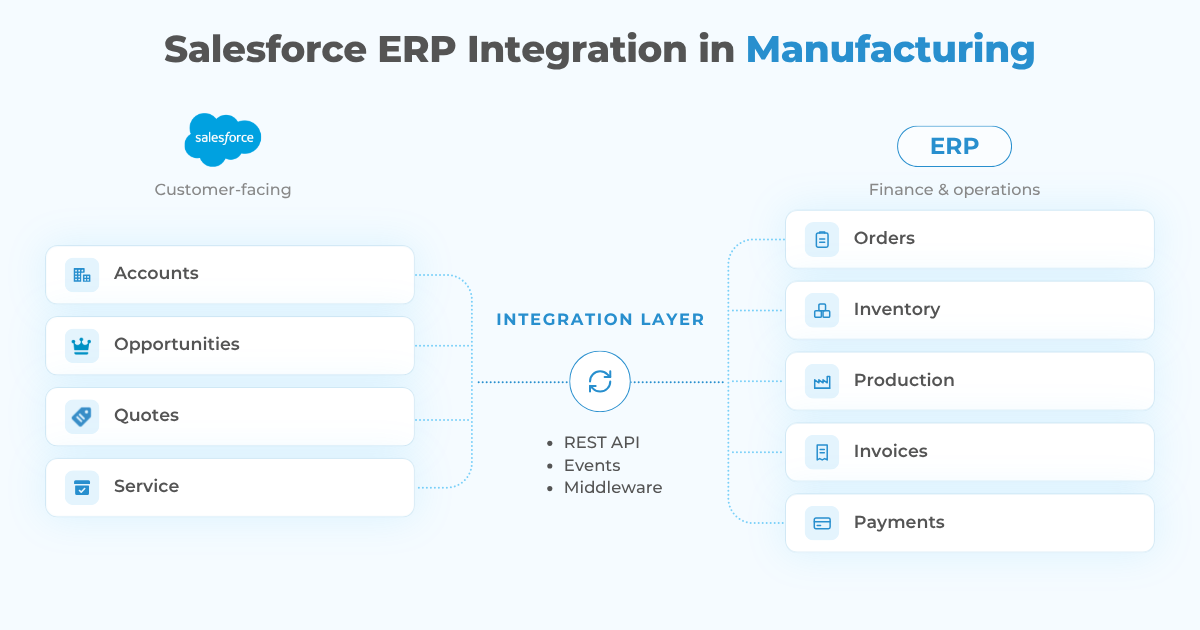
For example, when a rep closes a complex order in Salesforce, the approved order can move to the ERP for fulfillment and financial processing. Once the ERP creates an invoice, the invoice number, amount, due date, payment status, and other selected fields can return to Salesforce. The account team can then see whether the customer has overdue balances before negotiating another order without needing direct access to the finance system.
Salesforce also positions its manufacturing platform as an engagement layer that can work with existing ERP and order management systems through APIs, MuleSoft, or other middleware. This is an important architecture principle: the CRM and ERP should cooperate rather than duplicate each other.
Why ERP Integration with Salesforce Matters for Manufacturing Finance
Manufacturing finance is connected to far more than invoices. Revenue forecasting depends on orders actually being fulfilled. Margin depends on product costs, discounts, rebates, freight, and changes in material prices. Cash flow depends on invoicing and payment collection. Customer risk depends partly on credit exposure and overdue balances.
When CRM and ERP operate separately, each department sees only part of that chain.
An ERP integration with Salesforce can give sales teams access to relevant financial information without opening the full ERP to every user. Finance can receive cleaner commercial data because approved customers, orders, products, quantities, and pricing can move through controlled workflows rather than spreadsheets or manual re-entry.
The main benefits typically include:
- Faster order-to-cash workflows. Approved commercial data can move directly into ERP processes instead of being keyed in again.
- Better credit decisions. Salesforce users can see credit limits, open balances, overdue invoices, or account holds before committing to new terms.
- More accurate revenue visibility. Opportunity forecasts can be compared with actual orders, invoices, and payments.
- Fewer data-entry errors. Customer numbers, order IDs, invoice numbers, and product codes can be synchronized instead of recreated.
- Better customer communication. Sales and service teams can answer questions about orders, deliveries, and invoice status from Salesforce.
- Stronger reconciliation. Integration logs and shared identifiers make it easier to trace where a transaction originated and whether it was processed successfully.
For organizations already using Salesforce to manage financial-services-style workflows, similar data ownership questions appear in other industries too. Our guide to Salesforce Sales Cloud for FinTech explores how CRM architecture, financial data, integrations, and governance affect another highly data-sensitive environment.
What Data Should Salesforce and ERP Share?
The goal is not to synchronize every ERP table into Salesforce. A better approach is to identify which data another team needs to make a decision or trigger a process.
| Data | Typical System of Record | Common Integration Direction |
|---|---|---|
| Accounts / customers | Salesforce or ERP, depending on governance | Bi-directional |
| Products and SKUs | ERP | ERP → Salesforce |
| Pricing and cost data | ERP | ERP → Salesforce |
| Opportunities | Salesforce | Salesforce → ERP when approved |
| Sales orders | ERP | Bi-directional status updates |
| Inventory availability | ERP | ERP → Salesforce |
| Invoices | ERP | ERP → Salesforce |
| Credit limits / holds | ERP | ERP → Salesforce |
| Payments | ERP | ERP → Salesforce |
| Service context | Salesforce | Salesforce → ERP when required |
Every implementation needs an explicit ownership model. If Salesforce and the ERP can both independently overwrite the same customer, price, or order field, conflicts become inevitable.
Shared identifiers are equally important. The old Peeklogic manufacturing integration scenario used invoice numbers and account numbers to match ERP records with Salesforce records. That principle still holds: stable external IDs, idempotent processing, and clear parent-child relationships are basic requirements for reliable ERP Salesforce integration.
Salesforce and SAP ERP Integration, Dynamics, Oracle, and NetSuite
The integration pattern depends partly on the ERP.
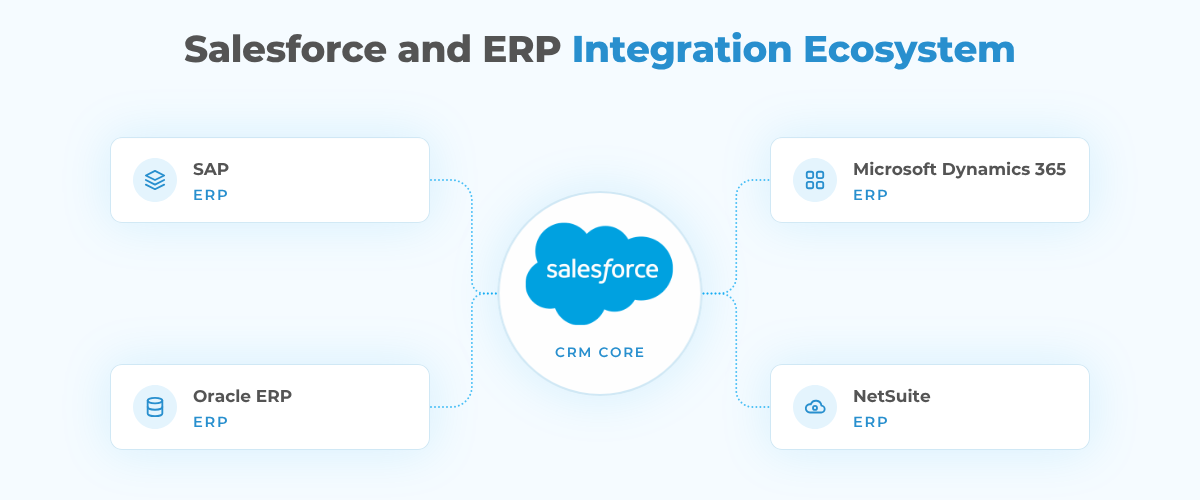
A Salesforce and SAP ERP integration may need to exchange customers, material or product data, sales orders, invoices, credit status, and fulfillment information. Salesforce provides MuleSoft integration templates for manufacturing scenarios including customer, product, and sales-order synchronization with SAP, which can reduce some of the repetitive integration work.
Microsoft Dynamics 365, Oracle ERP, NetSuite, and custom manufacturing ERP systems have different APIs, data models, event capabilities, and connector ecosystems. The business architecture should therefore be designed before selecting the integration technology.
There are three common approaches.
1. Direct APIs
A direct API integration works well when the scope is focused and the systems expose reliable APIs. Salesforce REST, Composite, Bulk, Platform Events, and Change Data Capture can support different data volumes and latency requirements.
Direct integration offers control but also creates ownership for authentication, transformations, retries, monitoring, API limits, and future changes.
2. Middleware or iPaaS
MuleSoft, Boomi, Workato, Jitterbit, and similar platforms become useful when several applications participate in the same process or when reusable integration services are required.
For example, one approved order may need to update the ERP, logistics platform, warehouse, tax service, and analytics environment. Middleware can centralize orchestration and monitoring instead of creating a web of point-to-point integrations.
3. Prebuilt Connectors
A connector can accelerate common Salesforce integration with ERP scenarios. The trade-off is flexibility. Manufacturers with custom order logic, unusual product hierarchies, legacy ERP extensions, or specialized finance controls may still need custom mappings and workflows.
The best method is the simplest architecture that meets the actual reliability, security, and scale requirements.
Real-Time vs. Batch Synchronization
Not every finance record needs real-time sync.
Real-time or event-driven integration makes sense when users must act immediately on a change. Examples include a new customer hold, inventory availability for an active quote, an important order-status change, or a newly created ERP order that Salesforce users need to see.
Batch synchronization is often appropriate for high-volume or less time-sensitive financial data, such as historical invoice loads, nightly reconciliation, cost updates, or reporting datasets.
A hybrid model is common. Customer-facing order status may update quickly, while detailed financial records move on a schedule.
This decision matters because “real time everywhere” adds cost and operational complexity without necessarily creating business value.
Example: Salesforce for Elevator Manufacturing
The original Peeklogic article used an elevator manufacturer to explain ERP integration, and the use case is still relevant even though the technical implementation should now be designed differently.
Salesforce for elevator manufacturing can manage contractors, property developers, opportunities, installation projects, service relationships, and account communication. The ERP may remain responsible for parts, production, purchasing, inventory, invoices, and payments.
Imagine a customer orders several elevators for a commercial property. Salesforce contains the opportunity, stakeholders, commercial terms, and project context. After approval, the order moves to SAP. SAP creates or updates the sales order, manages materials and fulfillment, and later generates invoices.
The ERP integration with Salesforce can return invoice number, amount, quantity, due date, payment status, and order status to the CRM. If the customer reduces the order quantity or an invoice is corrected, the integration updates the existing record using the ERP identifier instead of creating a duplicate.
The result is not “finance inside Salesforce.” It is financial visibility inside the customer workflow.
Common Salesforce ERP Integration Risks
The difficult part of Salesforce ERP integration is rarely sending JSON from one API to another. The harder part is deciding what should happen when business reality becomes messy.
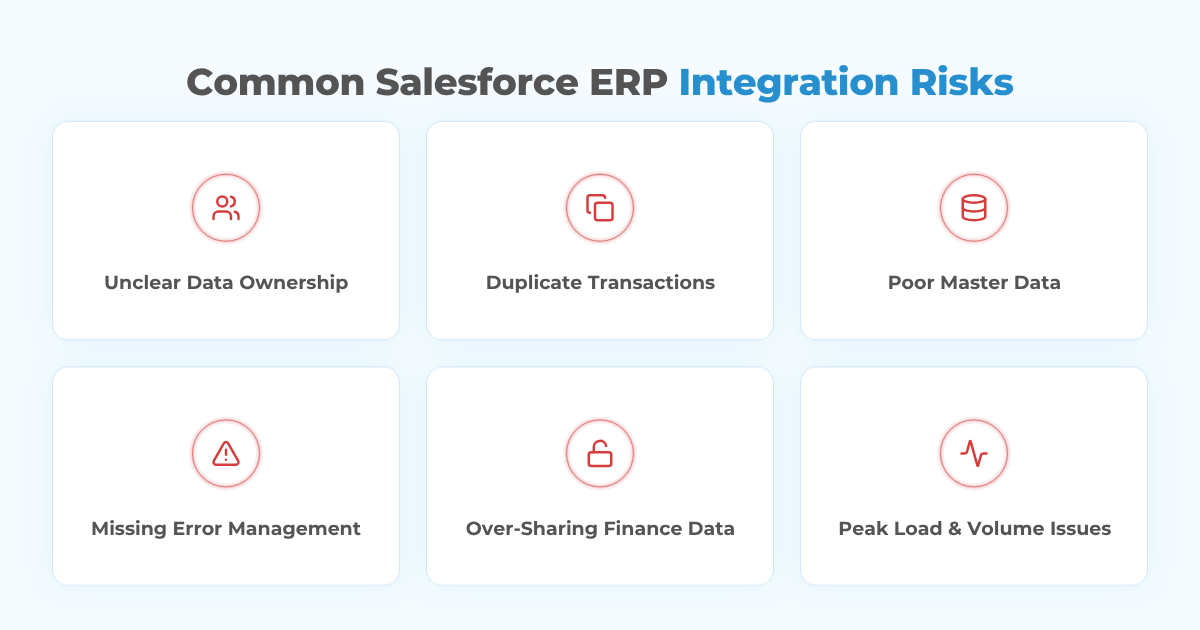
Unclear data ownership. If both systems can create and modify the same record without precedence rules, conflicts appear quickly.
Duplicate transactions. Retries must be idempotent. A temporary timeout cannot result in the same sales order or invoice being created twice.
Poor master data. Different customer names, product codes, currencies, units of measure, tax rules, and address formats can break otherwise correct integration logic.
Missing error management. Failed transactions need queues, logs, alerts, retry rules, and a reconciliation process. Silent integration failure is especially dangerous for financial data.
Over-sharing finance data. Salesforce users rarely need every accounting field. Role-based access and data minimization should determine what is exposed.
Ignoring volume and peak load. Month-end processing, seasonal demand, large order imports, or pricing updates can create loads very different from normal daily traffic.
Treating sync as the business process. Moving a field is not the same as defining what an approved order, disputed invoice, canceled line item, partial shipment, or credit hold should do across systems.
Best Practices for ERP Salesforce Integration
A reliable Salesforce ERP integration starts long before the first API call is written. The real work begins with agreeing on how sales, finance, operations, and manufacturing processes should behave across both systems. Which platform owns the customer record? Where should invoice changes be made? What happens when an order is partially fulfilled or a payment arrives late? If those rules are unclear, the integration will only automate the confusion.
That is why business and finance logic should be defined first, and the technical architecture should follow from it.
Define the Source of Truth
Document which platform owns customers, products, pricing, orders, invoices, payments, credit limits, and other shared entities. Ownership can differ by field, but it should never be ambiguous.
Use Stable External IDs
Customer numbers, sales-order IDs, invoice numbers, and product codes should be mapped consistently across systems. These identifiers allow Salesforce to upsert the correct record and make reconciliation possible.
Design for Financial Corrections
Manufacturing transactions change. Orders are partially fulfilled, quantities change, invoices are credited, payments are split, and pricing corrections occur.
The integration should update the existing business transaction correctly rather than assuming every incoming message represents a new record.
Build Error Handling and Reconciliation
Every production integration needs to answer: What failed? Why? Was it retried? Did the ERP accept it? Does Salesforce now match the ERP?
Monitoring dashboards, dead-letter queues, structured error logs, and reconciliation reports are not optional extras for finance-related workflows.
Test Real Business Scenarios
Testing should include duplicates, canceled orders, credit notes, partial shipments, invalid account mappings, ERP downtime, Salesforce API limits, high-volume loads, and out-of-order messages.
A happy-path order is only the beginning.
Secure the Integration
Use least-privilege access, modern OAuth patterns, encrypted transport, controlled credentials, auditability, and field-level access. Financial visibility in Salesforce should be designed around what each role needs rather than exposing the ERP broadly.
How Peeklogic Approaches Salesforce ERP Integration for Manufacturers
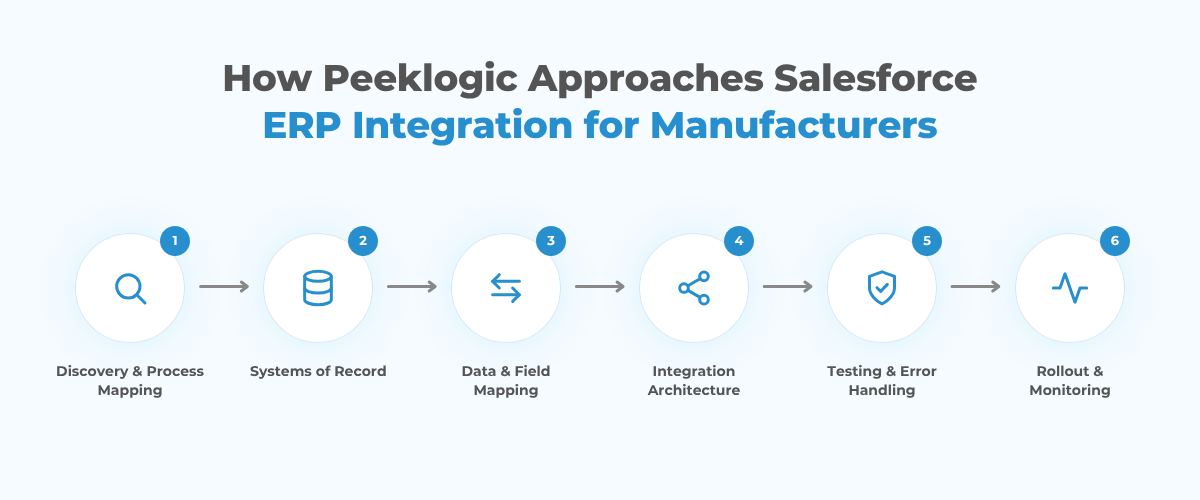
Peeklogic treats Salesforce ERP integration as a business architecture project, not just a connector installation. The first step is understanding how sales, operations, manufacturing, and finance currently move a transaction from customer request to order, fulfillment, invoice, and payment.
Through Salesforce custom integration services, the team can work with direct APIs, middleware, Salesforce automation, custom objects, Apex, and integration-specific monitoring depending on the ERP and process requirements. Peeklogic also works with manufacturers on broader Salesforce architecture and implementation through its manufacturing industry practice.
A typical discovery process defines the systems of record, shared identifiers, required sync directions, latency requirements, financial fields exposed to Salesforce users, error-handling rules, and rollout plan before development begins.
That matters because the objective is not to move the maximum amount of ERP data into Salesforce. It is to give sales, service, finance, and operations the right information at the right point in the process while keeping each platform responsible for what it does best.
Planning a Salesforce and ERP Integration?
Talk to PeeklogicKey Takeaways
Salesforce ERP integration can connect the customer context in Salesforce with the financial and operational truth held in ERP.
For manufacturers, the most valuable integrations usually focus on customers, products, pricing, orders, inventory, invoices, credit, and payments. Success depends on clear data ownership, reliable identifiers, appropriate real-time or batch patterns, strong error handling, and finance-aware testing.
The best Salesforce and ERP integration is not the one that synchronizes the most fields. It is the one that removes manual work and gives each team trustworthy information without creating a second ERP inside Salesforce.
Frequently Asked Questions
Salesforce ERP integration connects Salesforce with an ERP platform so selected customer, product, order, inventory, invoice, payment, and finance data can move between the systems automatically. Salesforce typically remains focused on CRM and customer-facing workflows, while the ERP remains authoritative for finance and operational processes.
Salesforce can integrate with SAP, Oracle ERP, Microsoft Dynamics 365, NetSuite, and many custom or industry-specific ERP systems. The appropriate method depends on available APIs, transaction volume, required latency, middleware strategy, and how heavily the ERP has been customized.
There is no single answer for every data type. Salesforce may own opportunities and customer-facing activity, while the ERP owns invoices, payments, inventory, costs, and accounting records. The integration design should explicitly assign ownership for each shared entity and important field.
No. MuleSoft can be useful for complex, reusable, multi-system integration architecture, but direct APIs or another middleware platform may be more appropriate for narrower requirements. The choice should be based on complexity, maintainability, monitoring, scale, and existing technology standards.
Only when users need immediate visibility or the invoice event triggers another time-sensitive process. Many manufacturers use a hybrid approach where critical order and credit events sync quickly while high-volume financial records or reconciliation data move in scheduled batches.
Salesforce can support customer, sales, service, automation, and selected financial workflows, but a manufacturing ERP typically remains responsible for accounting, inventory valuation, production, purchasing, and other back-office processes. Integration is usually more practical than trying to reproduce the entire ERP inside Salesforce.

Accomplished Salesforce professional with a decade of experience in designing, developing, and managing robust integrations between Salesforce and enterprise systems, ensuring seamless data flow, operational efficiency, and enhanced business capabilities. Skilled in bridging complex technical requirements with practical business solutions to deliver secure, scalable, and high-performing integration architectures.
